OpenAI Token Usage: Complete Cost Optimization Guide
Learn how to reduce OpenAI token usage and avoid hidden charges. Practical tips for optimizing your API costs in 2026.
Your team ships an AI feature, watches usage climb, and feels good about adoption. Then the OpenAI invoice lands, and nobody can explain why the total moved faster than request volume. You look at token counts, maybe even a few logs, and still can't answer the only question finance cares about: what drove the bill?
That's the trap with OpenAI token usage. Token volume is necessary to measure, but it isn't enough to manage cost. Bills grow for reasons that don't show up clearly in a simple prompt-length review. Cached tokens are priced differently from uncached ones. Reasoning models can burn internal output tokens the user never sees. Agentic workflows often waste more than the prompt itself through retries, rework, and repeated context.
If you've been treating token counts as the whole story, you're not alone. Many start there. Practical cost control starts when you separate three questions: what text the model processed, what category those tokens fell into, and which workflow kept generating them.
Table of Contents
- Why Your OpenAI Bill Feels Like a Mystery
- How Tokenization Works Across OpenAI Models
- Understanding OpenAI Token Pricing and Billing Categories
- Real Tokenization Examples That Reveal Hidden Costs
- Where Token Waste Really Comes From
- Practical Techniques to Reduce OpenAI Token Usage
- Measuring Token Usage and Savings with SpendLens
Why Your OpenAI Bill Feels Like a Mystery
The familiar version of this problem looks like this. A product team adds chat, summarization, or an agent workflow. Early testing seems cheap. The first production bill doesn't.
The dashboard shows “tokens used,” but engineering still has to guess. Was the spike caused by longer prompts, a new model rollout, an endpoint that started returning longer answers, or a repeated prefix that should have been cached but wasn't? Those are different problems, and they need different fixes.

Token counts are not the same as spend
OpenAI's own help docs show that you can track usage in the Usage Dashboard across current and past billing periods, and even inspect token counts on individual requests through fields for input, output, and total tokens. The same dashboard also supports 1 minute interval views for tokens per minute. That's useful operational visibility, but it still measures volume more directly than economics, as described in OpenAI's token usage documentation.
A practical example helps. Say two endpoints each process a similar number of total tokens over a day. One endpoint mostly reuses a stable long prefix and gets discounted cached input. The other generates long answers on every call. Their total token counts can look similar while their costs diverge sharply.
The three hidden layers teams miss
Most surprise bills come from one or more of these layers:
- Cached billing nuance: Some input is discounted, some isn't, and cache write behavior can complicate what looked like a simple “saved money” story.
- Reasoning output inflation: The user sees a concise answer, but the model may have spent many more billed output tokens getting there.
- Workflow waste: Retries, stale history, over-retrieved context, and agent loops multiply requests.
Practical rule: Don't ask only “how many tokens did we use?” Ask “which workflow produced them, how were they billed, and what output behavior created them?”
That shift saves time in debugging and money in production. Teams that instrument usage by feature instead of reading invoices after the fact usually find the culprit much faster, often in one review cycle instead of several rounds of log scraping.
How Tokenization Works Across OpenAI Models
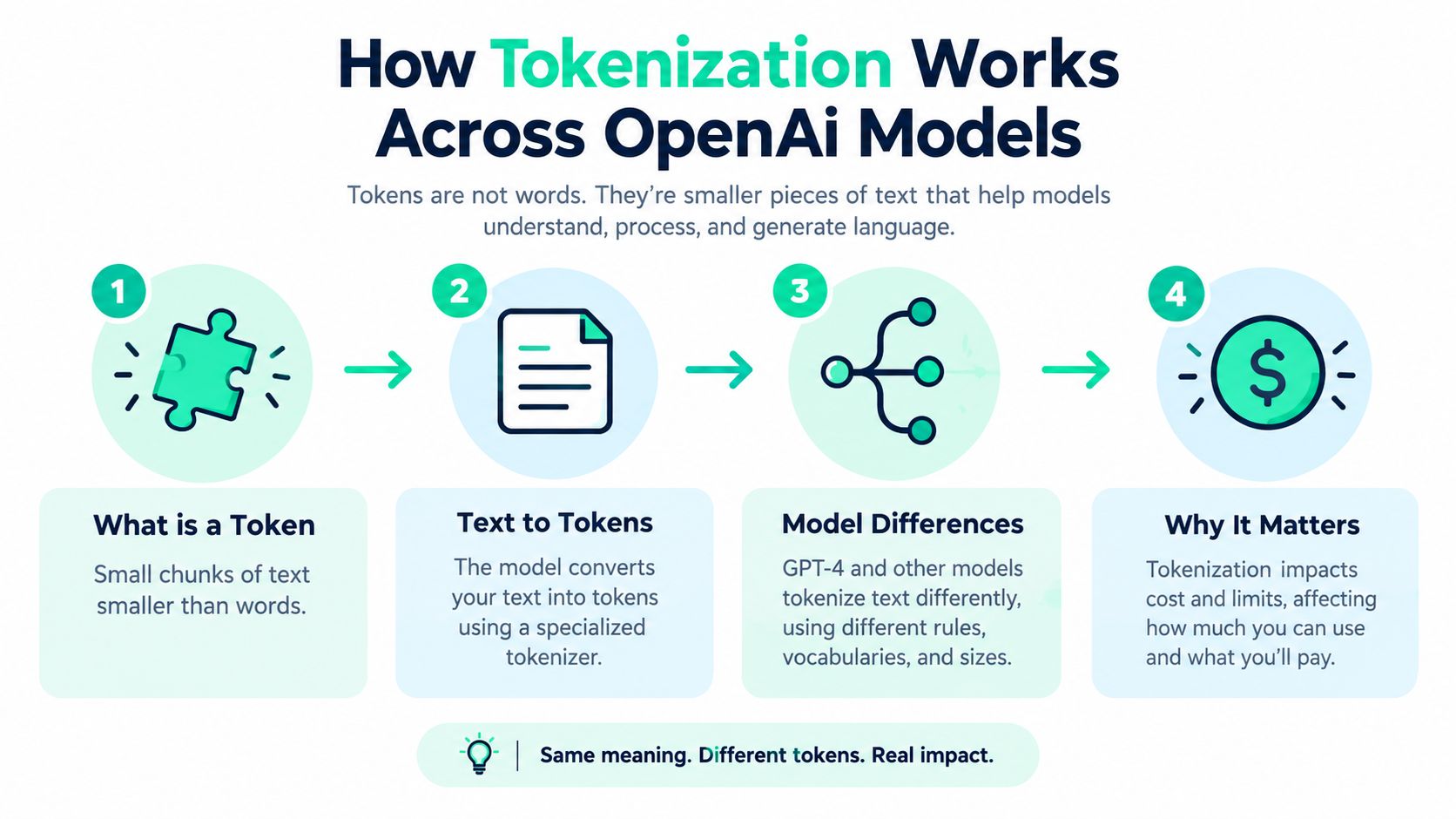
Before you can optimize OpenAI token usage, you need a good mental model of a token. A token is not the same as a word. It's a chunk of text from the model's vocabulary. Sometimes it's a whole word. Sometimes it's part of one. Sometimes it's punctuation or whitespace.
That's why a prompt that “looks short” to a human can still be expensive. Models don't bill by sentence. They bill by tokenized representation.
A plain language example
Take a short sentence:
Summarize the customer complaint in one sentence.
A human sees a small instruction. A tokenizer may split that into chunks like “Summ”, “arize”, “ the”, “ customer”, “ complaint”, “ in”, “ one”, “ sentence”, and punctuation. I'm not listing exact counts because they vary by model family and tokenizer. The point is structural. Billing follows token chunks, not your intuition about word count.
That matters in a few common cases:
- Long compound words: They may split into several tokens.
- Structured text: JSON, code, and tool definitions often tokenize less efficiently than plain prose.
- Repeated whitespace and formatting: They still occupy tokens.
- Conversation history: Every turn re-sent to the model gets re-tokenized in context.
If you want a clean way to inspect how text structure affects downstream analysis, tools that analyze data with PlotStudio AI can help teams turn prompt logs into something easier to reason about, especially when comparing templates and response patterns across features.
Why model changes alter cost
Different OpenAI models can tokenize the same text differently because they may use different vocabularies and internal handling. That means switching models can change token counts even when your application text stays identical.
A lot of engineers miss this during model migrations. They benchmark latency and quality, but they don't check whether the same workload tokenizes differently. That's one reason per-request cost can move in ways your application code didn't obviously cause.
For a useful companion on the broader inference side of this problem, this overview of what LLM inference is gives the right systems context.
A short explainer is worth watching before you tune prompts.
What engineers should estimate by eye
You don't need perfect token prediction during development. You need good instincts.
Use this rough review habit:
- Scan stable boilerplate first. Long system prompts and tool instructions often dominate input.
- Check response shape second. Verbose outputs frequently cost more than the prompt that produced them.
- Review context growth over turns. Chat history expands.
- Compare templates by task class. Classification, extraction, and multi-step reasoning behave very differently.
That habit saves review time because you stop debating prose quality and start inspecting the actual cost surface.
Understanding OpenAI Token Pricing and Billing Categories
A billing review often goes sideways in the same way. Engineering sees one big token total, finance sees a larger-than-expected invoice, and nobody can explain why two requests with similar prompts cost very different amounts. The missing piece is category-level billing.
OpenAI separates token charges into input tokens, cached input tokens, and output tokens, as shown on the OpenAI API pricing page. If you only track total tokens, you miss the cost layers that drive real spend.
The billing categories to watch
Treat these categories like line items on a cloud bill. Two requests can consume a similar number of tokens while landing in very different price buckets.
| Model and Billing Category | Price per 1M Tokens | What to verify |
|---|---|---|
| GPT-4o Input | $10.00 | Full-price prompt tokens |
| GPT-4o Cached Input | $1.00 | Discounted repeated prefix tokens |
| GPT-4o Output | $50.00 | Generated response tokens |
| GPT-4o mini Input | $4.00 | Full-price prompt tokens |
| GPT-4o mini Cached Input | $0.40 | Discounted repeated prefix tokens |
| GPT-4o mini Output | $20.00 | Generated response tokens |
The exact rates vary by model family and can change over time. The pattern is what matters for cost engineering. Cached input is much cheaper than fresh input, and output is often the expensive side of the request.
That changes how you read a request log. A long system prompt is not always the first problem if most of it is cacheable. A short answer is not always cheap if your workflow forces the model to generate lots of hidden intermediate work upstream.
Why cached tokens are a separate cost layer
Cached billing trips people up because the request still contains those tokens. They did not disappear. They just moved into a cheaper bucket when OpenAI can reuse a stable prefix.
A practical analogy helps here. Fresh input is like reading every page of a manual from scratch. Cached input is like bookmarking the first hundred pages and paying much less to reference them again. You still used the manual. You just did not pay full price for rereading the same part.
This is why prompt trimming by itself can disappoint. If your team cuts 200 tokens from a highly stable prefix that was already landing in cached billing, the savings may be small. Cutting 200 output tokens or reducing uncached context can matter more.
The practical optimization order
Start where marginal cost is highest and where measurement is clean:
- Reduce output length first. Many teams overspend on verbose answers, broad JSON payloads, and unnecessary explanations.
- Raise cache hit rate second. Keep system prompts, tool instructions, and reusable context stable enough to qualify for cached pricing.
- Inspect reasoning-heavy paths third. Total visible output can look small while internal work still pushes cost up in reasoning workflows.
- Only then tighten prompt wording. Prompt edits help, but they are often a smaller win than output control or cache-aware design.
For the broader framework behind category-level optimization, this guide on AI token cost analysis for engineering teams fills in the larger budgeting model.
Where teams misread the bill
The common failure mode is aggregation. A dashboard shows one token total per endpoint, so engineers assume caching is not helping or that prompts are the main problem. The invoice can tell a different story.
Three hidden layers usually create the confusion:
- Cached-token billing. Reused prefixes lower unit cost, but only if your prompts stay stable enough.
- Reasoning tokens. Some workflows incur internal token usage that is easy to underestimate if you only look at visible response length.
- Agentic workflow waste. Multi-step chains, retries, tool loops, and over-broad context loading can multiply token usage before the user sees a final answer.
SpendLens is useful here because it lets you measure spend by billing category and workload shape instead of staring at one blended total. That is the level where waste becomes visible. You can separate uncached prompt growth from output inflation, and separate both from agentic loops that looked harmless in code review.
If your team wants fewer billing surprises, review requests the same way you would review cloud infrastructure cost. Break the total into priced components, identify which components are growing, and optimize the expensive bucket first.
Real Tokenization Examples That Reveal Hidden Costs
The easiest way to understand hidden cost is to compare two requests that look similar from the user's perspective but bill differently.
Start with a normal non-reasoning workflow. A user sends a prompt, the model returns an answer, and the API response exposes usage fields for input tokens, output tokens, and total tokens. That's the straightforward part of OpenAI token usage. The request has visible input, visible completion, and a visible total.

Example one with visible prompt and visible answer
Say your application sends a support ticket plus a short instruction:
- Input side: ticket text, system instructions, formatting rules
- Output side: one summary paragraph plus a label
- What you inspect: request usage object and endpoint-level aggregation
In this case, optimization is intuitive. If the prompt is bloated, cut context. If the answer is too long, cap response length or tighten formatting. The token trail maps cleanly to what the user sees.
That's why many teams stop here. They assume all cost behaves this way.
Example two with reasoning overhead
Reasoning models are different. OpenAI's reasoning docs state that these models use internal thinking tokens before generating the answer, and those tokens count toward usage and are billed as output tokens. The docs also note that these tokens occupy context window space and that their count is surfaced in the response usage object under output token details, as described in the OpenAI reasoning guide.
So you can have a short user prompt and a short visible answer, yet still see a much larger billed output footprint than expected.
A concise answer does not guarantee a cheap answer when the model reasons internally before it responds.
Teams lose money and time. They trim prompts aggressively, don't see meaningful savings, and assume the model pricing changed. In reality, the task class may be invoking deeper reasoning.
What to inspect in the response object
When you review reasoning workloads, check for these patterns:
- Output inflation: visible response is short, but billed output is unexpectedly large.
- Task-specific spread: extraction and classification may stay tight, while planning or code reasoning expands.
- Context pressure: internal reasoning still uses context window space.
If your team is also comparing semantic retrieval and context assembly behavior, this background on the OpenAI embeddings API helps separate retrieval cost from generation cost.
The practical payoff is clear. When you classify workloads by reasoning intensity, you avoid wasting days “optimizing prompts” for a problem that lives on the output side.
Where Token Waste Really Comes From
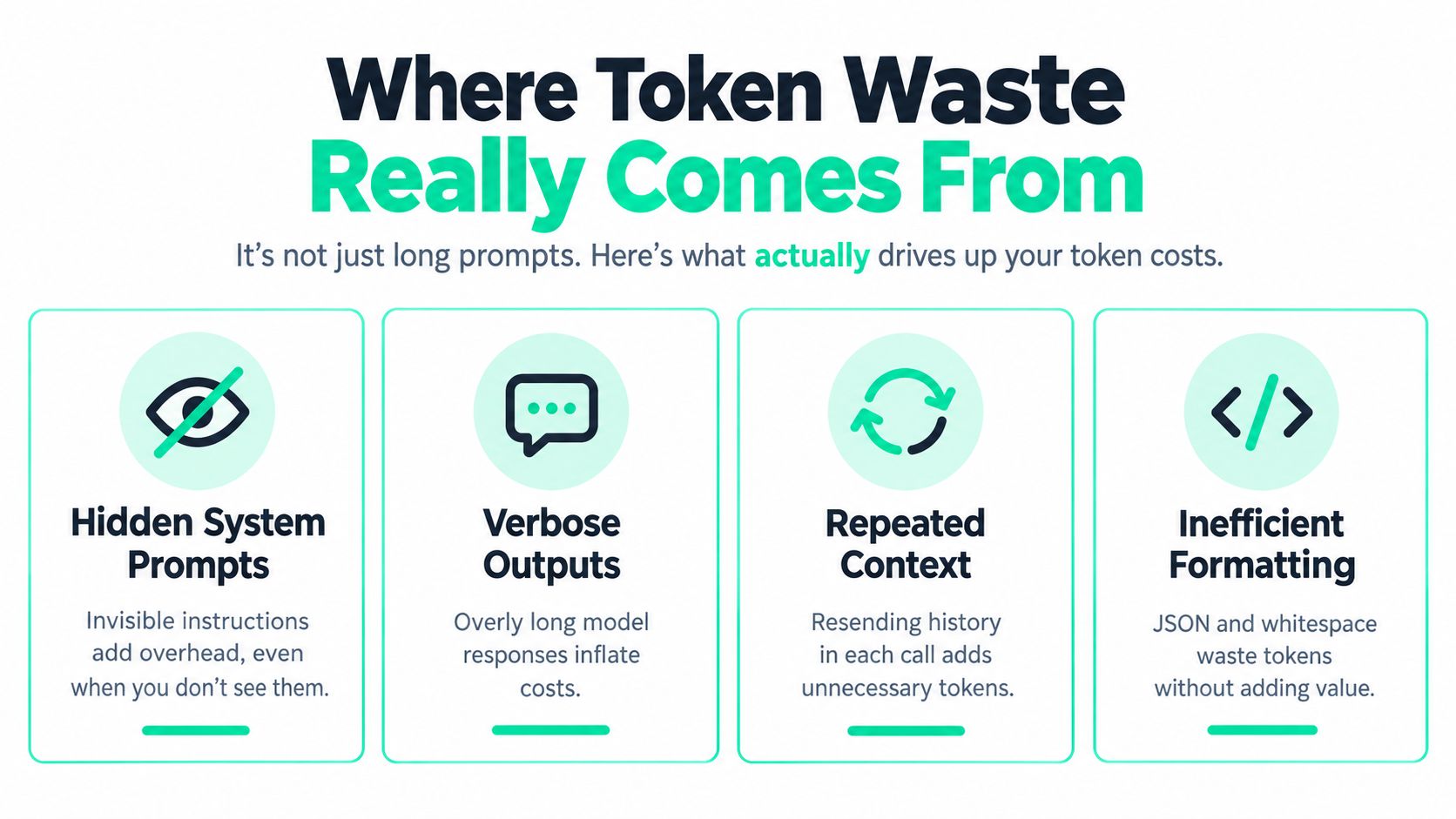
A lot of advice about OpenAI token usage treats long prompts as the villain. Long prompts can hurt, but they're often not the biggest source of waste in production systems.
The cost leaks usually sit in workflow behavior. Agents retry. Tools resend instructions. Chat systems replay stale history. Retrieval pipelines stuff in more context than the model needs. Structured output fails, then runs again.
Hidden waste is often the majority
One industry analysis estimated that hidden cost categories accounted for 52.5% of billed tokens and increased effective spend by 70.4% versus list-price expectations, with invisible reasoning tokens alone representing 22.4% of billed tokens in some workloads. The same analysis also highlights agent rework and retry behavior as a major source of cost, covered in this industry writeup on AI token usage cost by model.
Even if you treat those figures as directional rather than universal, the operating lesson is solid: waste often comes from orchestration, not just text length.
The waste categories worth checking first
These show up repeatedly in real systems:
- Repeated context: every turn resends old history, policy text, or retrieval chunks.
- Verbose outputs: the model answers correctly, then keeps talking.
- Failed structured responses: one schema miss becomes multiple billable retries.
- Agent rework loops: a planner, tool caller, and reviewer keep re-processing the same task.
If your team needs a useful framing for separating symptoms from root causes, this writeup on what a cost driver is fits well here.
Caching saves money, not context space
Prompt caching adds another nuance that gets oversimplified. OpenAI documents that prompt caching is automatic for supported models, applies only when prompts exceed 1,024 tokens, stores the longest previously computed prefix, and expands in 128 token increments. OpenAI also notes that cached tokens are billed at discounted rates for supported models, as described in the OpenAI pricing documentation for prompt caching.
That helps cost. It doesn't solve prompt sprawl. OpenAI also documents that cached tokens still occupy context window space, even though they're discounted. So a large repeated prefix can become cheaper without becoming smaller, as explained in the OpenAI prompt caching guide.
Teams often celebrate cache hit rate while ignoring that the prompt is still too large for healthy context management.
That distinction saves money and debugging time. You can improve billing through caching and still need to shorten prompts for latency, context fit, or agent stability.
Practical Techniques to Reduce OpenAI Token Usage
The fastest wins usually come from changing request shape, not rewriting your entire stack. You want a sequence that cuts waste with low implementation risk and gives you measurable money saved or engineering time saved quickly.
Start with output control
If output tokens are expensive, start there.
A few low-drama fixes work well:
- Set tighter response instructions. Ask for “three bullets” instead of “explain fully.”
- Use schemas carefully. Structured output can save cleanup time, but retry behavior can erase that gain if the schema is too strict.
- Separate verbose and compact modes. Humans may want detail in one feature and a short answer in another.
This often saves prompt-tuning time because you stop bikeshedding wording and put guardrails on the larger cost driver.
Standardize repeated prefixes
Stable templates are where caching earns its keep. If your system prompt, safety policy, and tool definitions stay mostly fixed, standardize them instead of rebuilding them dynamically every call.
That helps in two ways:
- More cacheable prefixes
- Less accidental prompt drift across services
OpenAI's current prompt caching behavior matters operationally. It's automatic for supported models, kicks in only above 1,024 tokens, and expands in 128 token steps. Repeated long prefixes can therefore become materially cheaper when you keep them stable enough to reuse.
Cut context with a scalpel, not a chainsaw
Blind prompt trimming can break quality. Target the parts with low value density:
- Old chat turns that no longer affect the answer
- Over-retrieved RAG chunks where only one or two passages matter
- Duplicate instructions copied into system, developer, and user messages
- Verbose tool descriptions the model doesn't need every time
A practical review pattern is to diff prompts between a cheap successful request and an expensive successful request. The overlap usually reveals what can become a template and what can be removed.
Use a short implementation checklist
Run this in order:
- Cap outputs for every endpoint that doesn't need long prose.
- Normalize templates so repeated prefixes stay identical across calls.
- Audit retries on structured output and tool calling paths.
- Trim stale history rather than only shortening the newest user message.
- Compare model choices by task class instead of using one model for everything.
- Measure cache efficiency instead of assuming caching is helping.
Operational note: The cheapest token is the one your workflow never generates. The second cheapest is a cached one. The most expensive is often unnecessary output.
That sequence saves engineering time because each step narrows the search space for the next one.
Measuring Token Usage and Savings with SpendLens
Token optimization gets real when you can attribute cost to a workflow instead of staring at an org-wide total. That's the gap many teams hit. They know usage is up, but they can't tell whether the culprit is a support assistant, an eval job, a single experiment, or a background agent loop.
One instrumentation layer matters more than another round of prompt edits. SpendLens AI adds lightweight tracking around existing provider calls so teams can attribute usage to workflows, features, tasks, endpoints, or experiments through tools like @spendlensai.observe, track(), and client.tag().
What measurement should answer
A useful measurement system should let you answer questions like these without manual log archaeology:
- Which feature caused yesterday's spike
- Which model is expensive for a simple workload
- Where cached input is helping, and where it isn't
- Which prompts keep carrying repeated instructions
- Which task classes produce long outputs or retry churn
The value is time saved in incident review. Instead of a cross-team thread and ad hoc query work, you can usually isolate the driver by workload label and request shape.
The views that matter in practice
SpendLens AI's dashboard breaks down spend by project, provider, model, and workload, along with token usage, cache efficiency, and per-call metrics where available. It also groups similar operations through automated workload classification, which is what makes fair model comparisons possible across environments and releases.
That matters when a “cheaper” model requires more retries, or when a “more capable” one finishes a task in fewer steps. Cost per outcome beats cost per token in those reviews.
For prompt inspection outside your app boundary, a tool like the page token inspector for brand visibility can also be useful when teams want to understand how published page content may be represented in AI-facing contexts.
How savings reviews become concrete
The most useful cost tooling doesn't stop at reporting. It highlights action paths:
| Capability | What it helps you do | Likely value |
|---|---|---|
| Workload attribution | Map cost to features, endpoints, and experiments | Saves debugging time during bill reviews |
| Cache efficiency visibility | See whether repeated prefixes are actually earning discounts | Saves money on stable prompt templates |
| Automated workload classification | Compare similar tasks across models | Saves model evaluation time |
| Savings recommendations | Review lower-cost alternatives with confidence and migration risk | Saves testing effort and reduces overpaying |
| Prompt waste signals | Flag large templates, repeated instructions, excessive context, and long outputs | Saves tokens before they scale |
| Daily summaries | Give leadership a usable spend snapshot and next action | Saves reporting time |
The executive-ready summary angle matters more than people admit. A short daily view with yesterday's spend, top cost driver, and highest-impact recommendation reduces reporting effort and makes budget conversations calmer.
What you should expect from this kind of system is straightforward: less token waste, more predictable monthly spend, and better evidence when deciding whether to switch models, shorten outputs, or refactor a workflow.
If your OpenAI bill keeps surprising the team, the fix usually isn't another spreadsheet. SpendLens AI gives you workload-level attribution, cache visibility, prompt waste signals, and model-switch recommendations so you can connect OpenAI token usage to real spend. If you want fewer billing surprises and faster cost reviews, it's a practical place to start.