
OpenAI Embeddings API: Complete Reference Guide
Master the OpenAI Embeddings API with this comprehensive reference. Learn parameters, best practices, cost optimization, and Python integration examples.

You've probably already used embeddings in a prototype. A short script sends text to OpenAI, stores vectors in a database, and semantic search works well enough to demo. The operational trouble starts later, when the same pipeline serves search, recommendations, ticket routing, and retrieval-augmented generation. Embedding calls happen in background jobs, cache misses, re-indexing runs, and query paths, so the feature can become expensive and fragile without anyone seeing the cause.
The OpenAI embeddings API is simple at the request level. Production usage isn't. Token limits, vector dimensions, batching, model migrations, retries, and missing attribution all shape the cost of the system. The practical objective isn't merely to generate vectors. It's to generate the right vectors, at the right time, with enough instrumentation to explain every request.
Table of Contents
- Why Embeddings Drive Hidden AI Costs
- Understanding the Embeddings API Structure
- Choosing the Right Embedding Model
- Making Your First API Request
- Batching Strategies for Production Scale
- Optimizing Token Usage and Cost
- Avoiding the Model Migration Trap
- Instrumenting Embeddings for Cost Visibility
- Integrating Embeddings into RAG Systems
- Quick Reference for Common Decisions
Why Embeddings Drive Hidden AI Costs
A support team adds semantic search to its portal. The first release embeds a manageable document set and handles occasional queries, so the bill appears insignificant. The team then adds recommendations, ticket routing, and a RAG assistant that embeds user questions continuously. Months later, nobody can explain the growing embeddings charge because the original search service still looks inexpensive on its own.
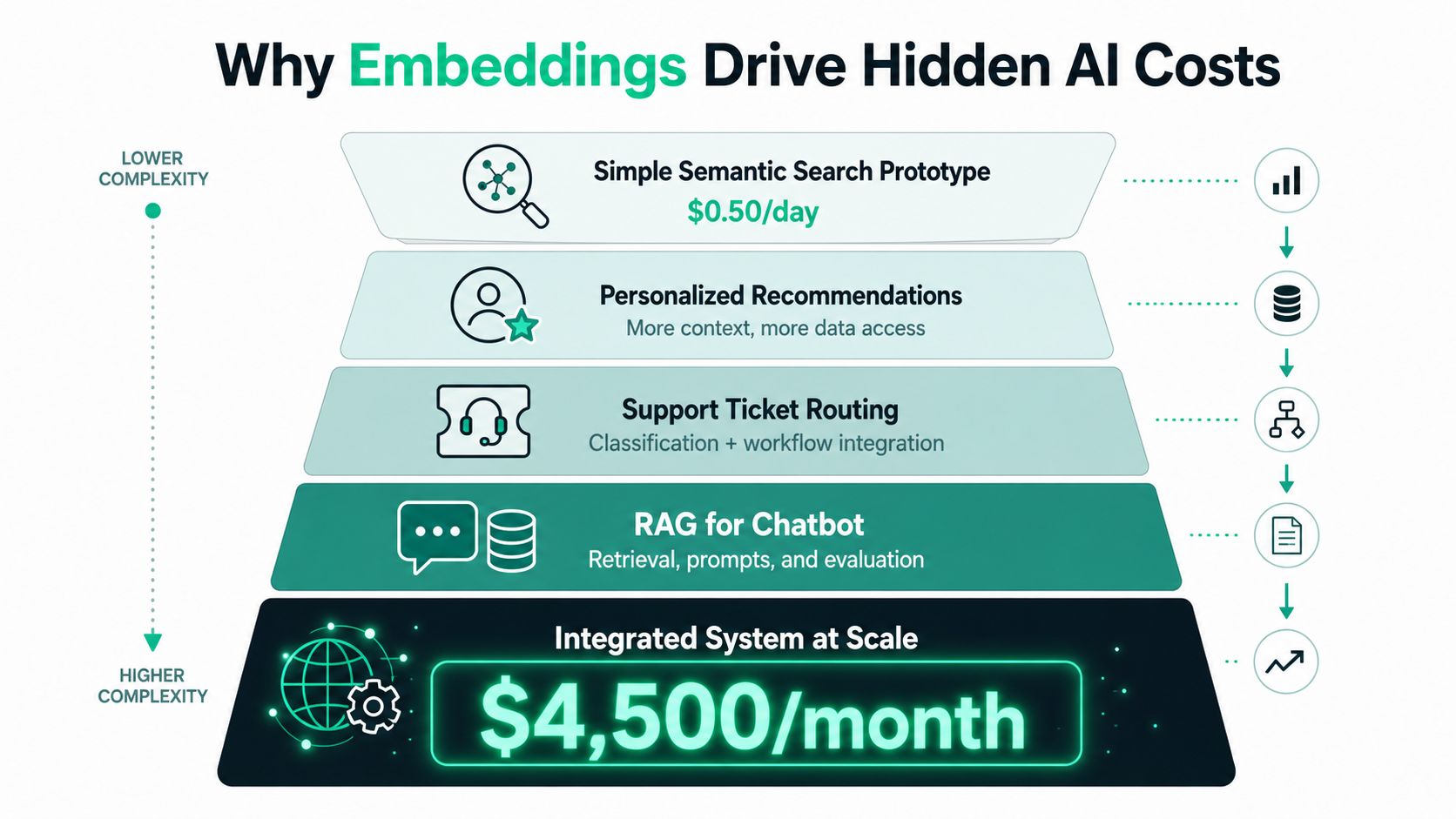
The main issue is call multiplication. A document can be embedded during ingestion, after a metadata update, and again when a failed job restarts without a checkpoint. One user action may trigger a query embedding, recommendation lookup, classification pass, and fallback search. Each request looks cheap in isolation. Together, they create a workload that storage, queues, and billing dashboards may not clearly attribute.
Where the invoice hides
Chat completions usually map to a visible product action. Engineers can connect a response to a conversation, endpoint, or customer request. Embeddings frequently run in background systems and shared services:
- Indexing jobs: Content imports embed every chunk when the pipeline does not track unchanged text.
- Cache misses: A query path generates a new vector after an unexpected cache-key change.
- Feature overlap: Search and recommendations embed the same descriptions independently.
- Reprocessing: A deployment replays a queue without separating completed vectors from pending work.
- Evaluation traffic: Offline ranking tests consume embeddings without appearing in production dashboards.
The provider charge is only one part of the bill. Vector storage, database indexing, network transfer, queue execution, retries, and investigation time also matter. Lower dimensions can reduce storage and search pressure. Caching can remove requests entirely. Both decisions need retrieval-quality checks, because a cheaper vector or stale cache can degrade results.
A useful operating rule is simple: treat every embedding request as a production event, including work outside the request path.
The case for measuring invisible AI usage is particularly relevant when several feature teams share one model but no team owns the full spend. Log the feature, workload, model, input-token count, cache status, retry state, and outcome at the call boundary. Add a request or job identifier so ingestion, search, and evaluation traffic can be separated later. Without those fields, teams are forced to guess which pipeline caused the invoice increase.
Understanding the Embeddings API Structure
A production integration starts with a POST request to /v1/embeddings. The required fields are a model identifier and input text. Newer text-embedding-3 models also accept dimensions, which can reduce the returned vector size. The OpenAI embeddings guide documents the request shape and supported options.
A representative request looks like this:
{
  "model": "text-embedding-3-small",
  "input": [
    "Resetting a workspace password",
    "Changing account recovery settings"
  ],
  "encoding_format": "float"
}
The response returns one record for each input. Every record includes an index and an embedding array. The usage object reports prompt-token consumption. Persist that value at the request or job boundary, because discarding it makes later cost attribution difficult.
{
  "object": "list",
  "data": [
    {
      "object": "embedding",
      "index": 0,
      "embedding": [0.0123, -0.0456]
    },
    {
      "object": "embedding",
      "index": 1,
      "embedding": [0.0211, -0.0322]
    }
  ],
  "model": "text-embedding-3-small",
  "usage": {
    "prompt_tokens": 12,
    "total_tokens": 12
  }
}
The vectors are shortened here for readability. In production, text-embedding-3-small defaults to 1,536 dimensions, while text-embedding-3-large defaults to 3,072 dimensions. Lowering dimensions can reduce storage and index pressure, but validate retrieval quality before changing an established pipeline.
Parameters that affect operations
| Parameter | Type | Required | Constraints | Production Note |
|---|---|---|---|---|
model |
String | Yes | Must identify an embedding model | Pin the intended model and record the returned model name |
input |
String or array | Yes | Each input can contain at most 8,192 tokens; the request total can contain at most 300,000 tokens (OpenAI documentation) | Pre-count tokens before batching |
encoding_format |
String | No | Use a supported response encoding | Choose based on client and storage requirements |
dimensions |
Integer | No | Supported by text-embedding-3 and later models |
Reduce vector size only after retrieval validation |
The API accepts multiple inputs as an array of strings or token arrays. An empty request is invalid. The documented array limit is 2,048 inputs, not vector dimensions. Validate input shape, per-input tokens, aggregate tokens, and batch size before sending work to the provider.
The returned model field deserves operational logging. A configuration error, model alias change, or deployment mismatch can produce vectors that look valid but belong to a different embedding space. Record the model alongside the vector's index version so migrations do not mix incompatible data.
Choosing the Right Embedding Model
Model selection is a system decision, not a leaderboard exercise. The two current text-embedding-3 models offer different quality, storage, and cost profiles, while text-embedding-ada-002 still matters when evaluating legacy indexes. OpenAI introduced the newer models on January 25, 2024. Its launch announcement listed text-embedding-3-small at $0.00002 per 1,000 tokens, down from $0.0001, and text-embedding-3-large at $0.00013 per 1,000 tokens (OpenAI's model announcement).
| Model | Dimensions | Price per 1M Tokens | Best For |
|---|---|---|---|
text-embedding-3-small |
1,536 default | $0.02 based on the launch price | General semantic search, classification, cost-sensitive RAG |
text-embedding-3-large |
3,072 default | $0.13 based on the launch price | Higher-capacity retrieval where quality justifies cost |
text-embedding-ada-002 |
1,536 | $0.10 based on the launch comparison | Existing systems that have not completed migration |
Do not choose from a benchmark score alone. Build a labeled query set from real traffic, include terminology and abbreviations specific to your corpus, and record which passages should be retrieved. Evaluate recall, ranking quality, and downstream answer quality. Access controls and document structure also affect results, especially in RAG systems where the right passage can still be unusable if filtering is applied too late.
Match the model to the failure cost
Start with text-embedding-3-small for ordinary search and classification workloads. It usually fits systems where corpus size, query volume, index storage, and embedding throughput matter more than gaining the final increment of retrieval quality.
Use text-embedding-3-large when a missed retrieval has a meaningful operational cost, such as technical knowledge discovery or complex RAG workflows. Its larger vectors increase storage and index pressure, so test end-to-end answer quality rather than assuming higher dimensionality will improve the product.
Dimension reduction can ease memory and vector database limits. The dimensions parameter gives text-embedding-3 models flexibility that the older generation lacks, but changing dimensions creates a different vector representation and can alter ranking behavior. Treat each dimension setting as its own index version. Run offline recall and precision checks, then shadow or canary the new configuration before replacing an established index.
Migration also has a compatibility cost. Do not mix vectors from different models or dimension settings in one similarity index unless the database and retrieval design explicitly support that arrangement. Store the model and dimension configuration with each index, and plan re-embedding capacity before switching production traffic.
A cheaper vector that retrieves the wrong context is a quality regression with a smaller invoice.
Making Your First API Request
A production client needs more than a successful curl response. It needs explicit timeouts, bounded retries, structured logs, and clear handling for errors that retries can't fix. The following Python function keeps those concerns in one place and returns both the vector and usage metadata.
from __future__ import annotations

import logging
import random
import time
from typing import Any

import requests

logger = logging.getLogger(__name__)

EMBEDDINGS_URL = "https://api.openai.com/v1/embeddings"

class EmbeddingError(RuntimeError):
    pass

def embed_text(
    text: str,
    *,
    api_key: str,
    model: str = "text-embedding-3-small",
    timeout_seconds: float = 15.0,
    max_attempts: int = 4,
) -> dict[str, Any]:
    if not text.strip():
        raise ValueError("Embedding input cannot be empty")

    payload = {
        "model": model,
        "input": text,
        "encoding_format": "float",
    }
    headers = {
        "Authorization": f"Bearer {api_key}",
        "Content-Type": "application/json",
    }

    for attempt in range(max_attempts):
        try:
            response = requests.post(
                EMBEDDINGS_URL,
                json=payload,
                headers=headers,
                timeout=timeout_seconds,
            )
        except requests.RequestException as exc:
            if attempt == max_attempts - 1:
                raise EmbeddingError("Network failure after retries") from exc
            delay = min(8.0, 0.5 * (2**attempt)) + random.random() * 0.25
            time.sleep(delay)
            continue

        if response.status_code == 200:
            body = response.json()
            return {
                "embedding": body["data"][0]["embedding"],
                "usage": body.get("usage", {}),
                "model": body.get("model", model),
            }

        if response.status_code == 401:
            raise EmbeddingError("Invalid API key")

        if response.status_code == 429 or response.status_code >= 500:
            if attempt == max_attempts - 1:
                raise EmbeddingError(
                    f"Retryable API error: {response.status_code}"
                )
            delay = min(8.0, 0.5 * (2**attempt)) + random.random() * 0.25
            logger.warning(
                "Embedding retry status=%s attempt=%s delay=%.2f",
                response.status_code,
                attempt + 1,
                delay,
            )
            time.sleep(delay)
            continue

        raise EmbeddingError(
            f"Embedding request failed: {response.status_code} {response.text}"
        )

    raise EmbeddingError("Embedding request exhausted retry policy")
A 429 usually calls for slower or better-coordinated work, not immediate repetition. Jitter prevents many workers from waking simultaneously and creating another burst. A 401 should fail fast, while context-length errors require input correction, not retries.
For a broader implementation checklist, the OpenAI embeddings API quickstart documentation can sit beside your service runbook. Add request IDs, feature tags, and prompt-token counts to logs before the first production batch. That small amount of metadata can save hours of invoice investigation later.
Batching Strategies for Production Scale
The API accepts multiple inputs in one array, so batching is the practical default for corpus ingestion. The hard boundaries affect queue design: each input can contain at most 8,192 tokens, the aggregate request can contain at most 300,000 tokens, and the API reference documents an array limit of 2,048 inputs (OpenAI's embeddings API reference).
One input per request simplifies failure handling, but it adds request overhead and makes rate-limit coordination harder. Multi-input requests usually use the connection more efficiently and reduce client-side work. Maximum-size batches create their own costs: the first result arrives later, and replaying a failed request repeats more work.
Build batches around tokens
Count tokens before adding each item. Keep a conservative budget below the documented aggregate ceiling, and route unusually long inputs through a controlled path. Preserve document IDs and input order so each returned index maps reliably to its source record.
| Strategy | Batch Size | Throughput (emb/sec) | P95 Latency (ms) | Token Efficiency |
|---|---|---|---|---|
| Single input per request | 1 | Not provided in verified data | Not provided in verified data | Lower request efficiency |
| Multi-input request | Variable | Not provided in verified data | Not provided in verified data | Higher request efficiency when token-packed |
| Adaptive token batch | Token-budgeted | Depends on workload | Depends on workload | Best control under mixed input lengths |
The listed throughput and latency fields are not universal performance expectations. Measure your own region, concurrency, SDK, network, and corpus. The trade-off is consistent: requests carrying useful work can improve throughput, while tail latency rises when queries wait behind large batches.
Batch by token budget, not document count. One hundred short titles and one hundred long manuals are different workloads.
Large ingestion jobs need a queue with checkpoints. Persist the last successful batch, retry only failed batches, and generate deterministic vector IDs. Adaptive workers can reduce batch size or concurrency when 429 responses become frequent, then increase them cautiously after the queue stabilizes. Isolate failed chunks so one malformed document does not force a complete restart.
Instrumentation should sit beside the queue. Endpoint-level monitoring can separate provider throttling from token growth, client timeouts, and internal backlog. Use this endpoint monitoring guidance alongside queue metrics, and record batch size, token totals, response status, retry count, and processing age for each job. Those fields make replay decisions and cost investigation far easier.
Optimizing Token Usage and Cost
The arithmetic is straightforward, but only if you use the current model price and actual token counts. At the launch price, text-embedding-3-small costs $0.00002 per 1,000 tokens, and text-embedding-3-large costs $0.00013 per 1,000 tokens (OpenAI's pricing announcement). A workload of one million documents averaging 500 tokens would therefore contain 500 million tokens before retries, duplicate content, or cache effects. The resulting base embedding cost is approximately $10 with text-embedding-3-small and $65 with text-embedding-3-large, calculated from those published rates.
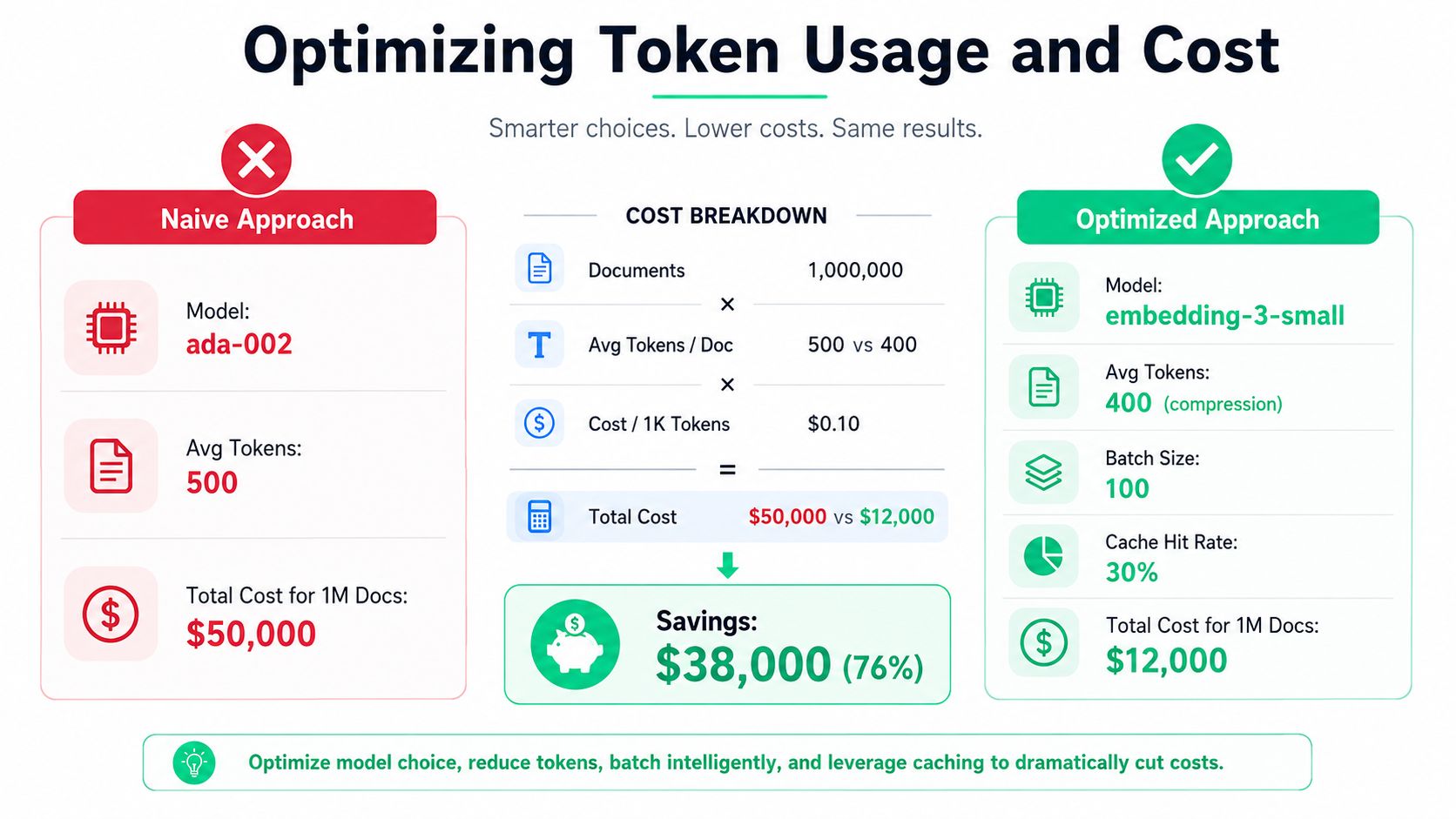
Those figures exclude storage, database operations, retries, and re-indexing. They also show why embedding volume matters more than the price of an individual call. Remove repeated navigation, boilerplate footers, duplicated legal text, and irrelevant markup before tokenization. Split at semantic boundaries so the system doesn't embed large regions that will never be retrieved.
Reduce work before reducing quality
Content hashing is the safest first optimization. Hash the normalized text and reuse the existing vector when the hash, model, dimension setting, and preprocessing version all match.
import hashlib
from typing import Callable

def content_key(
    text: str,
    *,
    model: str,
    dimensions: int | None,
    preprocessing_version: str,
) -> str:
    normalized = " ".join(text.split())
    material = "|".join(
        [
            model,
            str(dimensions),
            preprocessing_version,
            normalized,
        ]
    )
    return hashlib.sha256(material.encode("utf-8")).hexdigest()

def get_or_create_embedding(
    text: str,
    *,
    model: str,
    dimensions: int | None,
    cache_get: Callable[[str], list[float] | None],
    cache_put: Callable[[str, list[float]], None],
    create: Callable[[str], list[float]],
) -> tuple[list[float], bool]:
    key = content_key(
        text,
        model=model,
        dimensions=dimensions,
        preprocessing_version="v1",
    )
    cached = cache_get(key)
    if cached is not None:
        return cached, True

    vector = create(text)
    cache_put(key, vector)
    return vector, False
Never key the cache by text alone. A model migration or dimension change should produce a different key, because vectors from different spaces aren't interchangeable. The dimensions parameter can reduce vector size for text-embedding-3 models, which may lower storage and search costs, but validate retrieval quality before adopting the smaller representation.
Track cost by feature, not just by model. A rising total may come from a new indexing job, a cache regression, or user-generated content becoming longer. Alert on token volume, uncached requests, and re-embedding rates so the team can act before a batch compounds the problem.
Avoiding the Model Migration Trap
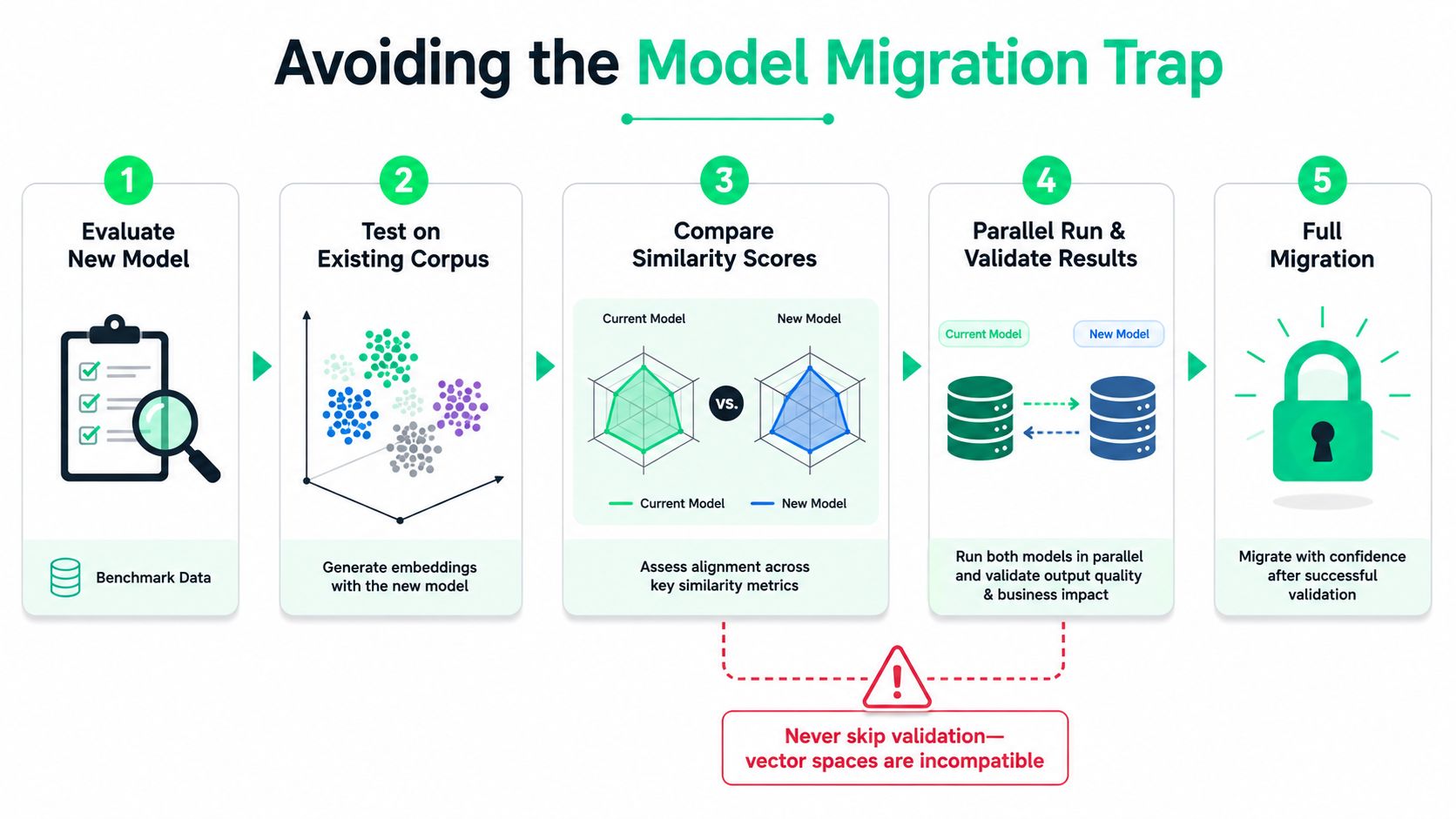
An embedding model is not a drop-in replacement for another. Embeddings from different models belong to different vector spaces, and a migration can change cosine-similarity distributions, ranking behavior, thresholds, and retrieval logic. Consult the OpenAI embeddings model documentation before selecting the replacement and defining its parameters.
A query generated with text-embedding-3-small should not be compared with documents generated using text-embedding-ada-002. The vectors can have compatible shapes, and the database can accept them, while their ranking semantics remain incompatible. Mixing them in one index can reduce search quality and distort deduplication or classification results.
Migrate as an evaluation project
Build a fixed evaluation set with representative queries, relevant documents, difficult negatives, abbreviations, and applicable multilingual or domain-specific terminology. Embed the corpus and queries separately with the candidate model. Compare rankings within each model's own vector space, rather than comparing raw vectors across models.
Run parallel indexes during the transition. Send a controlled portion of search traffic to the new index, log both result sets, and review disagreements. Re-tune similarity thresholds, top-k values, filters, and re-ranking rules against the new distribution. Copying production settings can hide a quality regression.
Keep the old index until the replacement passes quality and operational checks. A migration plan should include:
- Versioned vector metadata: Store the model, dimensions, preprocessing version, and corpus revision with every record.
- Rebuild checkpoints: Persist completed batches so an interrupted re-index does not repeat successful work.
- Dual query evaluation: Compare rankings without using vectors from different models in one similarity calculation.
- Rollback routing: Keep a configuration switch that returns traffic to the previous index.
- Cache invalidation: Include the model and preprocessing version in query-vector cache keys.
Re-embedding consumes time, compute, and storage. Mixed-model vectors can create failures that are harder to diagnose. Choose based on measured quality, migration effort, operational support, and the cost of keeping the older model. A newer model name is not a migration plan. Move only when evaluation shows a benefit that justifies rebuilding the index.
Instrumenting Embeddings for Cost Visibility
The minimum useful event is one record per embedding request. Include the feature that initiated the call, model, input count, prompt tokens, dimensions, latency, retry count, cache status, and success state. That lets a team separate search indexing from recommendation refreshes and query-time RAG traffic.
A lightweight wrapper can collect the fields without changing the provider client:
import logging
import time
from collections.abc import Callable
from typing import Any

logger = logging.getLogger("embeddings")

def observed_embedding(
    create: Callable[[list[str]], dict[str, Any]],
    inputs: list[str],
    *,
    feature: str,
    model: str,
    cache_hits: int = 0,
    dimensions: int | None = None,
) -> dict[str, Any]:
    started = time.perf_counter()
    result: dict[str, Any] = {}
    status = "success"

    try:
        result = create(inputs)
        return result
    except Exception:
        status = "error"
        raise
    finally:
        usage = result.get("usage", {})
        logger.info(
            "embedding_request feature=%s model=%s inputs=%s "
            "prompt_tokens=%s cache_hits=%s dimensions=%s "
            "latency_ms=%.1f status=%s",
            feature,
            model,
            len(inputs),
            usage.get("prompt_tokens"),
            cache_hits,
            dimensions,
            (time.perf_counter() - started) * 1000,
            status,
        )
The wrapper doesn't calculate spend by itself because pricing can change and deployments may use different price configurations. Store usage as the source event, then apply a versioned pricing table in your metrics pipeline. That also makes historical analysis reproducible.
| Metric | Purpose | Alert Threshold |
|---|---|---|
| Prompt tokens by feature | Finds the workloads consuming input volume | Define a baseline and alert on sustained deviation |
| Cache-hit count and rate | Tests whether caching prevents duplicate work | Alert when cache effectiveness falls below the service baseline |
| Requests by model | Detects unexpected model routing or migration drift | Alert on unapproved model usage |
Retry and 429 count |
Separates throttling from ordinary traffic | Alert on a sustained increase |
| Vector dimensions | Tracks storage and index configuration | Alert when dimensions differ from the approved schema |
| Cost by feature | Enables ownership and budget decisions | Alert when a feature exceeds its budget |
Instrumentation should feed dashboards and deployment comparisons, not just application logs. A platform such as an AI observability platform can centralize provider events, but the underlying principle remains the same. If you can't attribute tokens to a workload, you can't defend the budget or prioritize an optimization.
Integrating Embeddings into RAG Systems
Embeddings determine which context reaches the language model, so retrieval errors become generation errors. A polished prompt can't compensate for a missing policy, an irrelevant chunk, or a result from the wrong tenant namespace.
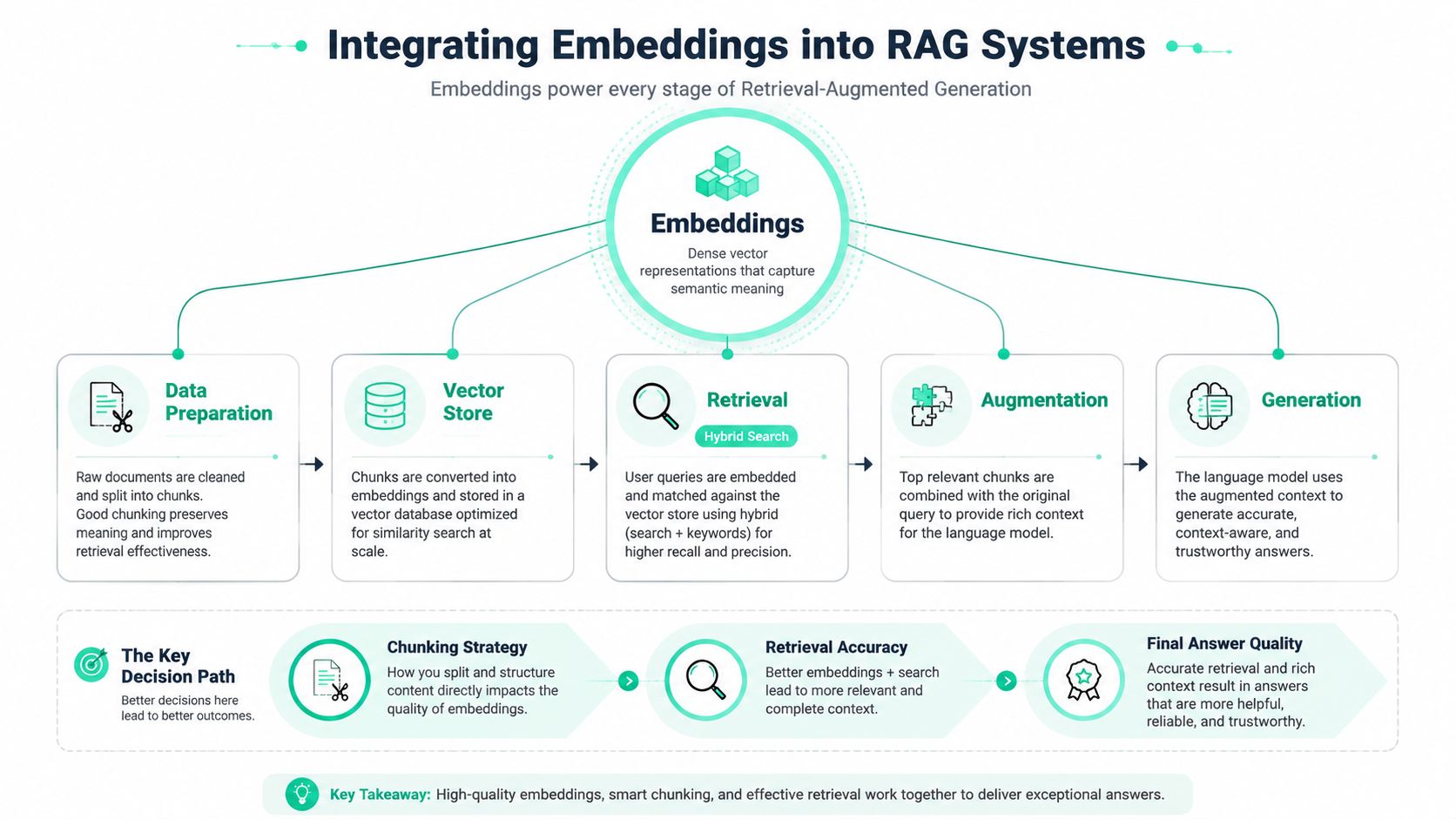
Chunking deserves more attention than the embedding call itself. Split documents around headings, paragraphs, table boundaries, and other semantic units. Preserve source identifiers and offsets so the answer can cite the right passage, and avoid splitting a definition from the conditions that qualify it.
Design the retrieval path as a pipeline
A effective RAG path often combines:
- Metadata filtering: Restrict by tenant, document status, permissions, language, or product area before similarity search where possible.
- Hybrid retrieval: Combine semantic vectors with keyword matching for product names, error codes, identifiers, and exact phrases.
- Re-ranking: Apply a more expensive relevance step to a smaller candidate set instead of embedding or generating more context indiscriminately.
- Context assembly: Remove duplicate passages and preserve document order when neighboring chunks improve comprehension.
- Feedback capture: Log retrieved IDs, scores, final citations, and user corrections so retrieval quality can be evaluated separately from generation quality.
Incremental indexing should process changed documents only. Store a content hash, model version, preprocessing version, and source revision with each chunk. When a document changes, replace its own records rather than rebuilding unrelated collections.
Dimension choices affect vector-store memory and index behavior, especially as the corpus grows. Don't choose a dimension setting only because the database schema accepts it. Compare retrieval quality, query cost, memory pressure, and operational simplicity on the corpus that matters.
This video gives a visual overview of the system boundary between retrieval and generation:
The most useful RAG metric is not “the answer sounded good.” Check whether the retrieved context contains the evidence needed for the answer, then measure generation against that evidence. That separation tells you whether to improve chunking, filters, ranking, or the language-model prompt.
Quick Reference for Common Decisions
Use this checklist during implementation and code review, then test the decisions against production traffic rather than relying on defaults.
- Start semantic search with
text-embedding-3-small: Its lower launch price and 1,536-dimension default make it a practical baseline for many workloads. Confirm current pricing before budgeting. - Use
text-embedding-3-largeselectively: Choose it when measured retrieval gains justify the higher price and larger default vector. Evaluate representative queries, storage requirements, and search latency together. - Never mix model spaces: Re-embed the corpus when changing models, or isolate each space behind its own index and query path.
- Batch by token total: Enforce the 8,192-token per-input and 300,000-token per-request limits before submission. A batcher should split oversized work before the API rejects it. Check the embeddings API reference when configuring request handling.
- Cache by full configuration: Include normalized content, model, dimensions, and preprocessing version in the cache key. Set a TTL based on how often source content changes, and invalidate immediately when preprocessing or model settings change.
- Reduce dimensions only after testing: Smaller vectors can reduce storage and search costs, but ranking quality must pass the evaluation set.
- Retry selectively: Retry
429and transient server failures with exponential backoff and jitter. Fail fast on invalid credentials and malformed input. - Checkpoint ingestion: Persist completed batches and use deterministic vector IDs so retries do not duplicate work.
- Tag every request: Record feature, model, token count, cache status, latency, and outcome. Without these fields, cost spikes are difficult to assign.
- Watch token drift: User-generated text changes over time, so stable request volume can still produce rising spend.
- Validate upgrades with cosine similarity and ranking tests: Do not copy thresholds from the old model into the new vector space.
- Set spend alerts before production ingestion: Alert on cumulative spend and cost per million tokens, with an owner and an escalation path.
The most common post-deployment mistakes are ignoring token drift in user-generated content, skipping cosine-similarity validation after model upgrades, and failing to set spend alerts before the first production batch job runs. Fix those before tuning minor latency details.
SpendLens AI gives engineering teams visibility into LLM and embedding-related usage through lightweight instrumentation, workload-level attribution, cache-efficiency tracking, and model-switch recommendations. Visit SpendLens AI to connect embedding spend to the features, teams, and optimization decisions driving it.