Prompt Optimization: Cut Token Costs Without Losing Quality
Practical prompt optimization techniques to reduce LLM token waste, cut OpenAI and Anthropic costs, and trade spend for quality without breaking production.
Most prompt optimization advice chases accuracy while a key budget leak sits in token spend. A prompt can look tidy in a notebook and still become a monthly bill multiplier once it's shipped to production and called at scale. A practical shift is simple, treat prompt work like a spend-control problem, then measure quality as the constraint, not the headline.
Table of Contents
- Why Token Costs Should Drive Your Prompt Optimization Strategy
- Diagnosing Token Waste Before You Touch the Prompt
- Refactoring Prompts to Shrink Token Footprint
- Templating, Truncation, and Output Control
- Caching for Cost Reduction
- Choosing the Right Model for the Right Workload
- Instrumenting and Verifying Savings with SpendLens
Why Token Costs Should Drive Your Prompt Optimization Strategy
Prompt work gets framed as a wording problem, but the evidence says prompt choice changes outcomes materially. A 2023 benchmark-style comparison found that for GPT-4-1106, GSM8K accuracy ranged from 85.89% with chain-of-thought prompting to 92.19% for the baseline in the published table, and GPT-3.5-Turbo swung from 18.5% to 57.24% depending on prompt strategy, with similar variation on other tasks (benchmark comparison). That's enough to show why prompt optimization matters, but it's not enough to tell you what survives production.
The production mistake is spending a week shaving one percentage point off quality while shipping a bloated context block that gets replayed millions of times. Token-heavy prompts turn every extra sentence into recurring cost, and the bill arrives whether the answer was good or merely acceptable. If you want a practical lens, the core question is whether a prompt change improves cost per successful task, not just raw output quality.
Practical rule: optimize the prompt that dominates spend, not the prompt that feels most elegant in review.
A solid workflow starts with cost-aware technique selection, and a useful companion reference is prompt engineering tips from RewriteBar when you want a quick refresher on tightening language without losing intent. For cost tracking, I'd pair that mindset with the budgeting view in AI token cost analysis, because the prompt that looks harmless in docs can still be the one eating margin in production.
The rest of this guide uses five levers that move the needle when they're instrumented properly, refactoring, templating, output control, caching, and model switching. Each one can lower spend, but each one can also hurt quality if you treat it like a style exercise instead of an engineering change.
Diagnosing Token Waste Before You Touch the Prompt
Before rewriting anything, measure where the tokens are going. A prompt that feels reasonable in isolation can still dwarf the answer, especially when the output is short and the instruction block is long. The first thing I inspect is the input-to-output ratio per request, because that tells you whether the system is paying for guidance that the model barely needs.
Start With the Prompts That Move Spend
Then pull cache hit rates from your provider dashboard. A low hit rate on a mostly static prefix is free money left on the table, and it usually means the prompt has been assembled in a way that prevents reuse. I also diff the rendered string against the template, because duplicate system messages, repeated few-shot examples, and pasted schema text are common sources of invisible bloat.
One of the fastest ways to identify opportunities is to rank prompts two different ways, by total spend and by per-call token count. The most expensive prompt overall is not always the one that needs attention first, but a rare expensive call usually beats a common cheap one when you're looking for savings. That's why prompt audits should include both frequency and footprint, not just a vague sense that “this prompt seems long.”
A practical review flow is below.
| Diagnostic Signal to Capture Before Optimizing | Where to Get It | What It Tells You |
|---|---|---|
| Input tokens per request | Provider usage logs or tracing | Whether the instruction block is oversized relative to the task |
| Output tokens per request | Provider usage logs or tracing | Whether the model is over-verbose or the response format is too loose |
| Cache hit rate | Provider dashboard | Whether static prefixes are being reused efficiently |
| Rendered prompt diff | Template renderer plus source control | Whether examples, rules, or schema fragments are duplicated |
| Top spend by prompt | Cost dashboard or internal analytics | Which prompt is driving actual monthly cost |
| Top spend by per-call footprint | Cost dashboard or tracing | Which prompt is bloated even if traffic is low |
For a deeper operational view of these signals, the LLM monitoring guide is worth reading alongside your own traces. The point isn't to collect more metrics for show, it's to identify the exact prompt segment that's expensive enough to justify a change.
Don't rewrite the whole stack because one prompt looks ugly. Fix the one that dominates spend, then verify the rest is still stable.
Refactoring Prompts to Shrink Token Footprint
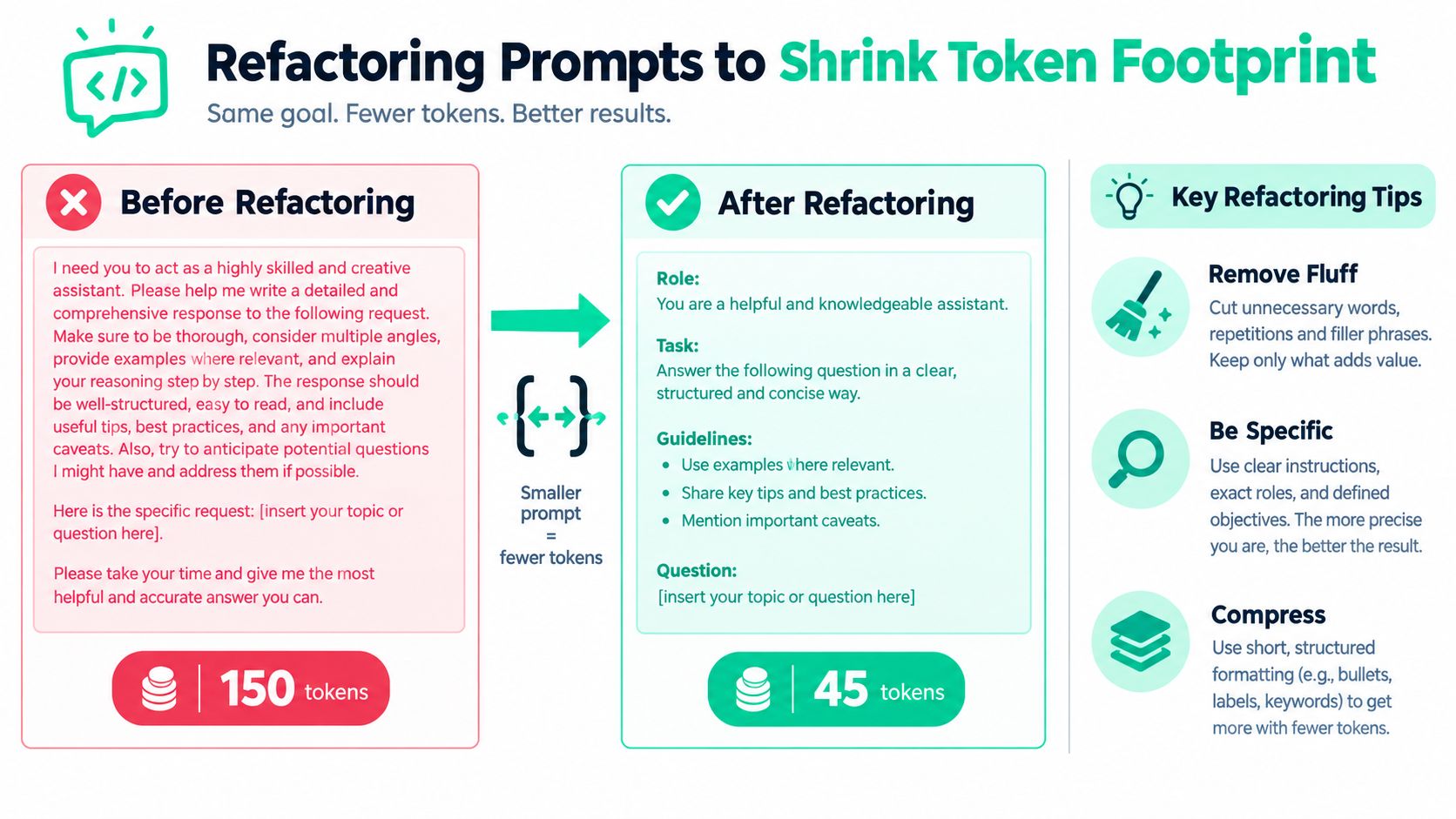
Refactoring works best when you treat prompt text like code, not prose. Long instructions usually contain repeated intent, hedging language, and examples that were useful during early experimentation but became dead weight after the flow stabilized. The goal is to preserve task clarity while removing everything the model doesn't need to solve the request.
Make the instruction block tighter
A typical before-and-after looks like this:
Before: “Please carefully analyze the following document and provide a thorough summary of the key points in a clear and professional manner.”
After: “Summarize the document in three bullets.”
The second version is not just shorter, it's less ambiguous. It drops polite filler, narrows the output shape, and reduces the chance that the model spends tokens restating the ask instead of solving it. In practice, that kind of rewrite often trims the prompt enough that the tokenizer visibly shows a smaller footprint.
Collapse rules and examples into a cleaner structure
Nested system messages are another common source of waste. Merge high-priority rules into one ordered block, then separate task instructions from output constraints with delimiters or structured fields. If you need few-shot examples, keep the set short and representative, or move them into a cached prefix so they don't get resent with every call.
A few useful refactors:
- Remove duplicate politeness: “please” and “carefully” rarely change behavior, but they do spend tokens.
- Replace paragraphs with commands: short imperatives are easier for the model to parse and cheaper to send.
- Use fields instead of prose:
goal,constraints, andoutputbeats a wandering paragraph when the task is repetitive. - Compress examples: one strong example often works better than three near-duplicates.
Rule of thumb: if a sentence doesn't change the model's decision, it probably shouldn't be in the production prompt.
The same discipline applies to code-facing prompts. For a practical checklist, the tips to improve prompt engineering article from MyMentions is a useful companion when you're cleaning up wording without losing control over task boundaries.
Templating, Truncation, and Output Control
Output cost is where many teams get surprised, because they optimize the input and forget that completion tokens are part of the bill too. If the model can answer in a narrow structured payload, letting it generate a long free-form response is just a way to pay for language you won't use. Treat output length as a budget, not a byproduct.
Constrain the response shape
A strong pattern is to replace free-form summaries with fielded extraction. If the business needs summary, risks, and next_step, ask for those fields explicitly and reject anything else. When the API supports structured responses, use JSON Schema or an equivalent response format so the model stays inside the envelope instead of meandering into extra explanation.
Before:
- A 1,200-token narrative answer that repeats the prompt's wording
- Several paragraphs of context restatement
- A conclusion the downstream system ignores anyway
After:
- A 220-token structured payload
- Only the fields the application stores
- A completion that's easier to validate and cheaper to log
Truncate the context before it reaches the model
Retrieval-heavy flows need their own guardrails. Don't dump every matched chunk into the prompt and hope the model self-edits. Re-rank the chunks, cap top-k, and summarize long context on the prompt side when the source text is too large to justify raw ingestion.
Over-constraining can hurt classification confidence and code generation, so structure the output where the task supports it and leave room where it doesn't.
Max token settings should reflect real production behavior, not theoretical worst cases. Set limits from observed completions, then tighten them after you've verified that the model still finishes the task cleanly. If you're trying to avoid long answers, the fix is usually clearer instructions plus a tighter schema, not just an arbitrary cap.
| Output Control Techniques Compared | Mechanism | Typical Token Savings | Quality Risk |
|---|---|---|---|
| Structured response format | Constrains fields and order | Reduces verbose completions by design | Low for extraction, higher for open-ended generation |
| Max token cap | Hard ceiling on output length | Prevents runaway completions | Can cut off useful detail |
| Prompt-side summarization | Compresses retrieved context before generation | Lowers input size and downstream output length | Possible loss of nuance |
| Top-k truncation | Sends fewer retrieved chunks | Cuts context bloat | May miss relevant evidence |
| Fielded extraction | Replaces prose with fixed fields | Shrinks both output and post-processing | Poor fit for nuanced synthesis |
Caching for Cost Reduction
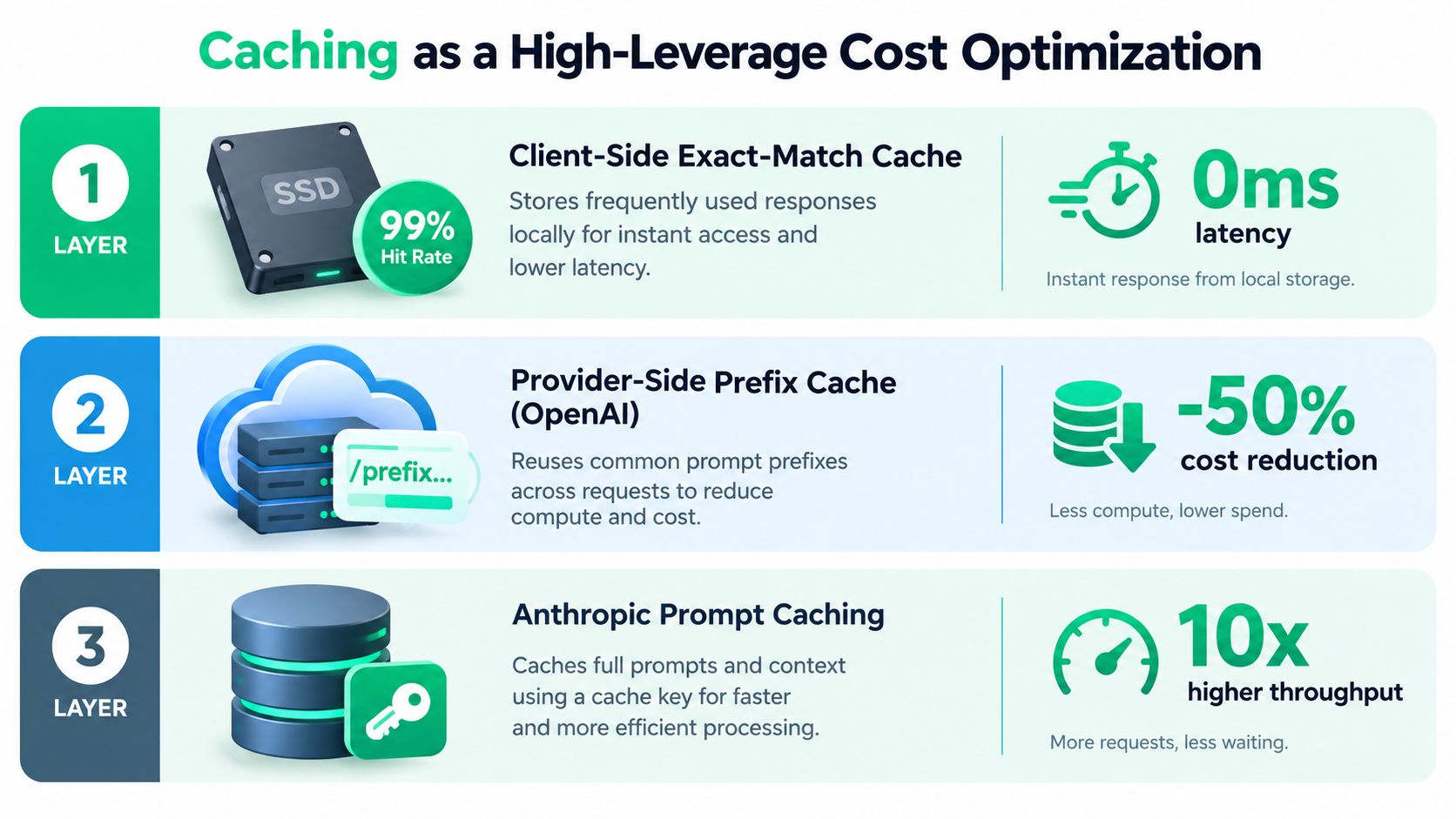
Caching can cut both spend and latency without forcing a major prompt rewrite. The trick is to match the cache to the repetition pattern, because each layer solves a different problem. Client-side exact-match caching helps with repeated requests, provider-side prefix caching reuses static prompt sections, and semantic caches try to reuse earlier answers when the meaning is close enough.
Match the cache to the repetition pattern
Client-side exact-match caches are simple and predictable, but they only help when the full request repeats. Provider-side prefix caches fit long static system prompts, especially when the reusable block comes first and the variable part comes later. Semantic caches are the loosest option, and they are also the easiest to misuse when a near-match produces an answer that sounds right but is not correct.
Caching only pays when the workload is stable enough to reuse. High request volume, long prompts, and a rarely changing static section make it more likely to pay off. Noisy traffic and highly unique requests can leave you with extra operational work for little return.
The main failure modes are easy to name:
- Cold-start stampedes when many requests miss cache at once.
- Stale semantic matches that return the wrong answer because the similarity threshold was too loose.
- Operational drag from maintaining a vector cache that saves less than it costs to run.
For a practical look at hit-rate thinking, the cache hit ratio guide is a useful companion. In production, caching usually works best when it protects a known hot prefix, not when it is asked to rescue a messy prompt design.
Choosing the Right Model for the Right Workload
Model switching is often the biggest savings lever because it changes the economics of the whole request, not just the prompt shape. The gap between a larger general model and a smaller one is usually much bigger than the savings from a dozen prompt edits, so routing matters. For routine classification, extraction, and lightweight rewriting, a cheaper tier can do the job. For brittle reasoning or complex generation, keep the stronger model in reserve.
Route by workload, not by habit
The cleanest way to make model choice less subjective is to classify each request before it hits the model. I use workload buckets like classification, extraction, reasoning, generation, and agentic tasks, then assign a tier and an escalation rule. Cheap models handle the first pass, and only low-confidence outputs go to a stronger model.
That routing pattern works across OpenAI, Anthropic, and open-weight deployments, but the operational shape differs. Smaller models are attractive for fast, repetitive tasks, while stronger models are still the safer bet when the output must be precise and failure is expensive. Compare them on cost, latency, and task fit, not on brand loyalty.
A practical decision matrix looks like this.
| Workload | Recommended Tier | Example Models | Routing Rationale |
|---|---|---|---|
| Classification | Low-cost fast path | GPT-4o-mini, Claude Haiku, small open-weight models | The task is narrow and benefits from low latency |
| Extraction | Low-cost fast path | GPT-4o-mini, Claude Haiku, Llama or Qwen variants | Structured output is easier to validate than free-form reasoning |
| Reasoning | Escalation tier | GPT-4o, Claude Sonnet | Higher accuracy matters when the task needs multi-step inference |
| Generation | Mixed tier | Fast model first, stronger model on rejection | Draft cheaply, escalate only when quality checks fail |
| Agentic workflows | Conservative tier | GPT-4o, Claude Sonnet, selected open-weight setups | Tool use and state make failures more expensive |
Practical rule: let the cheap model try first when the task is easy to validate, then escalate only when your checks fail.
For comparative cost planning, the AI model cost comparison resource is a useful companion when you are choosing between tiers. OpenAI, Anthropic, and open-weight hosts all have different trade-offs, and a routing table is usually more honest than a single-model default. If you are looking at the broader cost picture, route-and-spend decisions help show which tasks deserve stronger models at all.
The one caveat is that model switching changes output distribution, so every cost-driven move needs regression tests on a held-out eval set. A cheaper model that saves tokens but breaks edge cases is not a win. It is deferred trouble.
Instrumenting and Verifying Savings with SpendLens
Prompt optimization only becomes trustworthy when every change is measured against a baseline. I treat each refactor, cache rule, template update, and model swap as a closed-loop experiment. If the dashboard can't tell me which prompt version caused the spend change, then the change wasn't really shipped, it was guessed.
Capture the right telemetry on every request
The minimum useful telemetry is simple: prompt token count, completion token count, cache hit flag, and a hash of the active prompt template version. Those four fields are enough to tie spend back to a specific prompt revision and separate prompt bloat from output bloat. Tag each request with a feature label and a prompt_version label, then review cost by task, not just by raw token volume.
A weekly review should rank templates by cost per successful task. That metric catches a trap a lot of teams miss, because a cheap model with a bloated prompt can still dominate spend if it runs at high volume. The goal is not to admire low token counts, it's to make the unit economics obvious enough that bad prompts can't hide.
Verify before you merge
The rollout pattern I trust is straightforward:
- Capture a 1,000-request baseline before the change.
- Deploy behind a feature flag.
- Watch cost per task and cache hit rate in the dashboard.
- Hold the merge until the data says the change is stable.
That discipline matters because prompt changes often improve one metric while harming another. A refactor that trims tokens but degrades answer quality is just a delayed incident, and a model swap that lowers cost but increases retries can erase the savings fast. I'd rather reject a promising optimization than ship one that looks good in a notebook and bad in production.
For teams that want this to be operational instead of manual, SpendLens AI adds instrumentation for LLM cost tracking, cache efficiency, and model-switch opportunities across OpenAI and Anthropic workloads. It fits this topic because it makes prompt spend visible at the request level, so refactors and routing changes can be verified instead of assumed.
| SpendLens Verification Metrics by Optimization Lever | Primary Metric | Secondary Signal | Rollback Trigger |
|---|---|---|---|
| Prompt refactoring | Cost per successful task | Prompt token count | Higher failure rate or lower task success |
| Output control | Completion token count | Response validation pass rate | Truncated or malformed outputs |
| Caching | Cache hit rate | Time to first token | Hit-rate drop or stale responses |
| Model switching | Spend by workload | Latency and success rate | Accuracy regression on held-out evals |
| Context truncation | Input token count | Downstream quality checks | Missed evidence or weaker answers |
If you're trying to turn prompt work into a repeatable cost-control process, SpendLens AI gives you the instrumentation to do it with real request-level data instead of guesswork. Visit SpendLens AI to see how prompt spend, cache efficiency, and model routing can be tracked in one place, then use that data to decide which prompt changes are worth keeping.