IT Budget Plan Guide with AI and FinOps Cost Control
Build an IT budget plan that handles AI, cloud, and FinOps spend. Includes forecasting templates, KPIs, and real examples for engineering leaders.
You're probably staring at last year's spreadsheet right now, trying to make it fit this year's reality. The software line looks fine. Cloud looks messy but manageable. Then AI feature usage starts climbing, the model mix changes, and the budget that felt disciplined in January is already off the rails by spring.
That's the trap with a modern it budget plan. Most templates still treat AI as a footnote under software or cloud, which is the wrong place for it. AI and LLM spend behaves like its own category, with its own forecasting model, its own chargeback path, and its own failure modes.
The hard truth is that 2026 budget planning sits inside a volatile spending environment. Gartner's July 2026 outlook put global IT spending at $6.37 trillion in 2026, up 14.2% from 2025, and it also showed software spending rising to $1.47 trillion in the same forecast, which is a strong signal that software and AI-adjacent costs are still absorbing more budget than anticipated (Gartner July 2026 update). Gartner's 2026 revisions also moved fast, from $6.15 trillion in February to $6.31 trillion in April and then $6.37 trillion in July, which is exactly why static annual planning breaks down in AI-heavy stacks (CIO coverage of Gartner's April 2026 forecast).
The fix isn't prettier spreadsheets. It's a budget built for usage volatility, model swaps, prompt growth, and real ownership.
Table of Contents
- Why Your 2025 IT Budget Plan Already Failed
- The Six Cost Categories Every IT Budget Plan Must Cover
- Three Forecasting Approaches and How to Stack Them
- Attributing AI and LLM Spend to Features, Teams, and Customers
- The Five Cost Drivers That Move Your AI Line the Fastest
- Governance, KPIs, and the Control Loop That Keeps the Plan Honest
- Your 30-Day IT Budget Quickstart With Real Savings Targets
Why Your 2025 IT Budget Plan Already Failed
In February, a platform lead walks into leadership with a clean annual plan. Software is mapped, cloud is bucketed, headcount is approved, and the AI feature line sits inside “miscellaneous usage.” The deck gets nods. No one pushes back. By the end of Q2, the newest feature has tripled AI calls, the team has tested a more expensive model for quality, and the invoice shows up with no clear owner.
The issue runs deeper than a forecasting miss. It is a template failure.
The old plan assumed AI behaved like another SaaS renewal or another cloud workload. It does not. LLM costs shift with model choice, prompt length, output length, retry loops, and usage spikes from one release. A single product change can move spend faster than a normal infrastructure line ever would. If you bury that cost inside cloud or software, you lose the only thing finance needs from the plan, which is accountability.
Practical rule: if your AI spend can't be tied to a feature, team, and customer cohort, it's not budgeted. It's hidden.
The reason this matters now is simple. The market is already forcing repeated resets. Gartner's 2026 forecast moved from $6.15 trillion to $6.31 trillion and then to $6.37 trillion in the same year, a blunt reminder that IT leaders are budgeting against a moving target, not a stable environment. The point is not just that budgets changed. AI-related demand kept forcing the reset.
If you want a clean diagnosis of why invisible AI usage keeps wrecking budgets, this analysis from AI isn't expensive, invisible AI usage is is worth reading.
A real 2026 IT budget plan has to admit the stack changed. The template that worked when SaaS was predictable and cloud was the dominant variable is now too blunt for a product org shipping AI features weekly. The plan is wrong because it was built for a stack that no longer exists.
The Six Cost Categories Every IT Budget Plan Must Cover
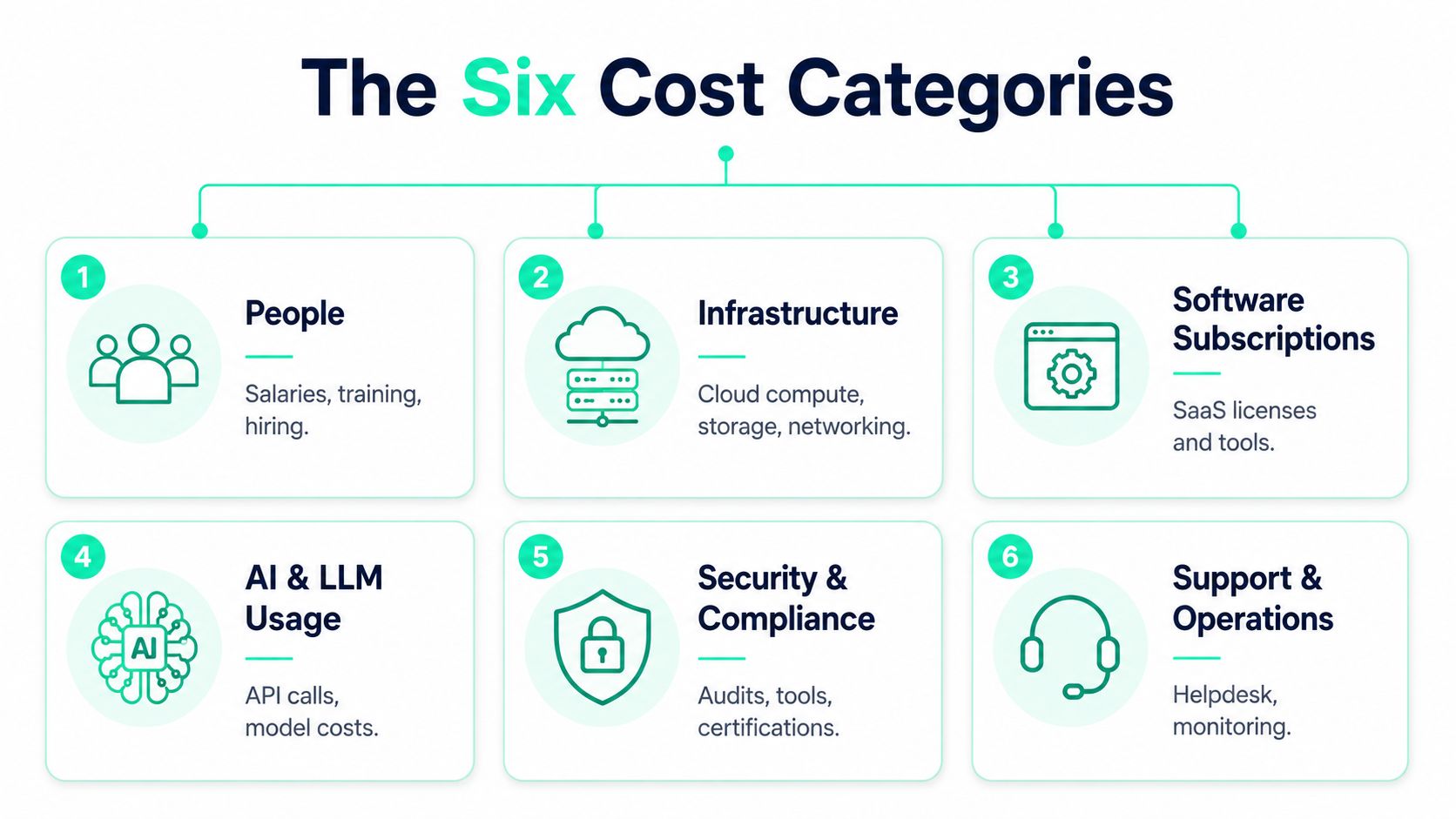
A budget that tries to cover everything usually covers nothing well. Start with six buckets, keep them separate, and force each one to behave the way it spends. That is how an IT budget plan stays readable, defendable, and useful when finance asks where the money went.
1. People
This bucket covers salaries, training, hiring, and the internal time pulled into support and delivery. In a 50-person SaaS engineering org, people often take the largest share of the plan because the work sits inside the team, not in vendor spend. Watch out for “free” internal time. It is not free once it crowds out roadmap work.
2. Infrastructure
Cloud compute, storage, networking, and anything that scales with usage belong here. The mistake is folding AI inference into this bucket just because both run in the cloud. Watch out for blended reporting that makes LLM usage look like generic compute. That obscures the true driver.
3. Software Subscriptions
SaaS licenses, developer tools, monitoring tools, and annual renewals belong in one line, cleanly separated. Keep this bucket boring. Watch out for tools with variable usage pricing, because they stop behaving like subscriptions the moment product teams start pushing them hard.
4. AI and LLM Usage
This is the line most templates still miss. API calls, model inference, token growth, prompt churn, and provider variability deserve their own column and their own forecast. Watch out for burying this under cloud or software. That decision weakens forecasting and makes chargeback nearly impossible. If your team still treats this like a side item inside a cloud line, use cloud cost management discipline as a reset and fix the structure before the bill gets more volatile.
5. Security and Compliance
Audit work, security tools, certifications, and governance overhead belong here. For teams in regulated environments, this bucket grows quickly once you add evidence collection and control maintenance. A disciplined plan should also reflect structured planning and explicit scope management, the same way government cost-estimating guidance emphasizes point estimates, independent validation, and updating with actuals as execution begins (GAO cost-estimating guide).
6. Contingency Reserve
This is the buffer for model changes, surprise usage spikes, and unplanned remediation. Do not treat it as leftover money. Treat it as the cost of admitting reality.
A practical starting split for a 50-person SaaS engineering org might look like 38% people, 22% infrastructure, 18% SaaS subscriptions, 12% AI and LLM usage, 6% security, and 4% reserve. A startup still validating LLM economics should push more caution into the reserve and keep the AI bucket visible, because usage can change fast before product-market fit settles.
If you are still mixing cloud and AI spend together, reset the model with cloud cost management discipline. The structure is the point. Once the structure is right, the budget starts telling the truth.
Three Forecasting Approaches and How to Stack Them
Most budgeting advice forces you to pick one forecasting method. That's lazy. For AI-heavy planning, you need to stack three methods because each one catches a different kind of error. Historical actuals tell you what already happened, bottom-up estimates tell you what you're about to ship, and three-point estimates tell you where volatility can explode.
| Forecasting Methods Compared for 2026 IT Budgets | |||
|---|---|---|---|
| Method | Best For | Strength | Weakness |
| Historical actuals | Recurring spend patterns | Anchors the plan in real behavior | Misses new AI workloads |
| Bottom-up estimates | Known features and roadmap items | Ties spend to engineering intent | Breaks when usage assumptions are wrong |
| Three-point estimates | AI workloads and uncertain launches | Forces you to price uncertainty | Requires discipline and honest ranges |
Historical actuals are your floor. If last quarter's OpenAI spend was $18K, that number should stay in the model unless you have a clear reason to change it. Bottom-up estimates are your product layer. If the new “chat with PDF” feature is expected to add $9K, put it in explicitly so product and finance are looking at the same launch cost. Then use a three-point range for volatility, because prompt bloat, experimentation, and model changes can swing the bill in ways a single-point forecast can't capture.
A blended plan beats a clever single number. If the base is $18K, the feature adds $9K, and the volatility band spans $4K to $22K, the honest answer is not a neat average. It's a range with ownership, triggers, and a decision rule for when the number becomes a problem.
Use the method that matches the risk. Historical actuals are fine for stable SaaS renewals. Bottom-up is right for committed roadmap work. Three-point is mandatory for AI spend that changes with prompts, models, and adoption.
This is why “budget once, monitor quarterly” is too slow for AI-heavy stacks. Quarterly review might work for office software. It does not work when a release changes token consumption in a day. If you're serious about planning, build a forecast that can absorb a model swap, a feature launch, or a prompt rewrite without pretending the number was stable all along.
Attributing AI and LLM Spend to Features, Teams, and Customers
A single invoice is a receipt, not a budget answer.
One Anthropic or OpenAI bill cannot tell you which feature drove the spike, which team owns the spend, or which customer cohort is using it. That is why chargeback breaks down in so many organizations. Finance sees the cost. Engineering sees the code. Product sees the feature. Nobody sees the link between them.
The fix is lightweight instrumentation. Wrap calls with decorators such as @observe, then tag the call with the data that matters, feature='support_copilot', team='support', customer_tier='enterprise'. You do not need to rewrite client SDKs or add proxy latency to do this well. You need metadata at the call site so usage can be rolled up by the unit that owns the decision.
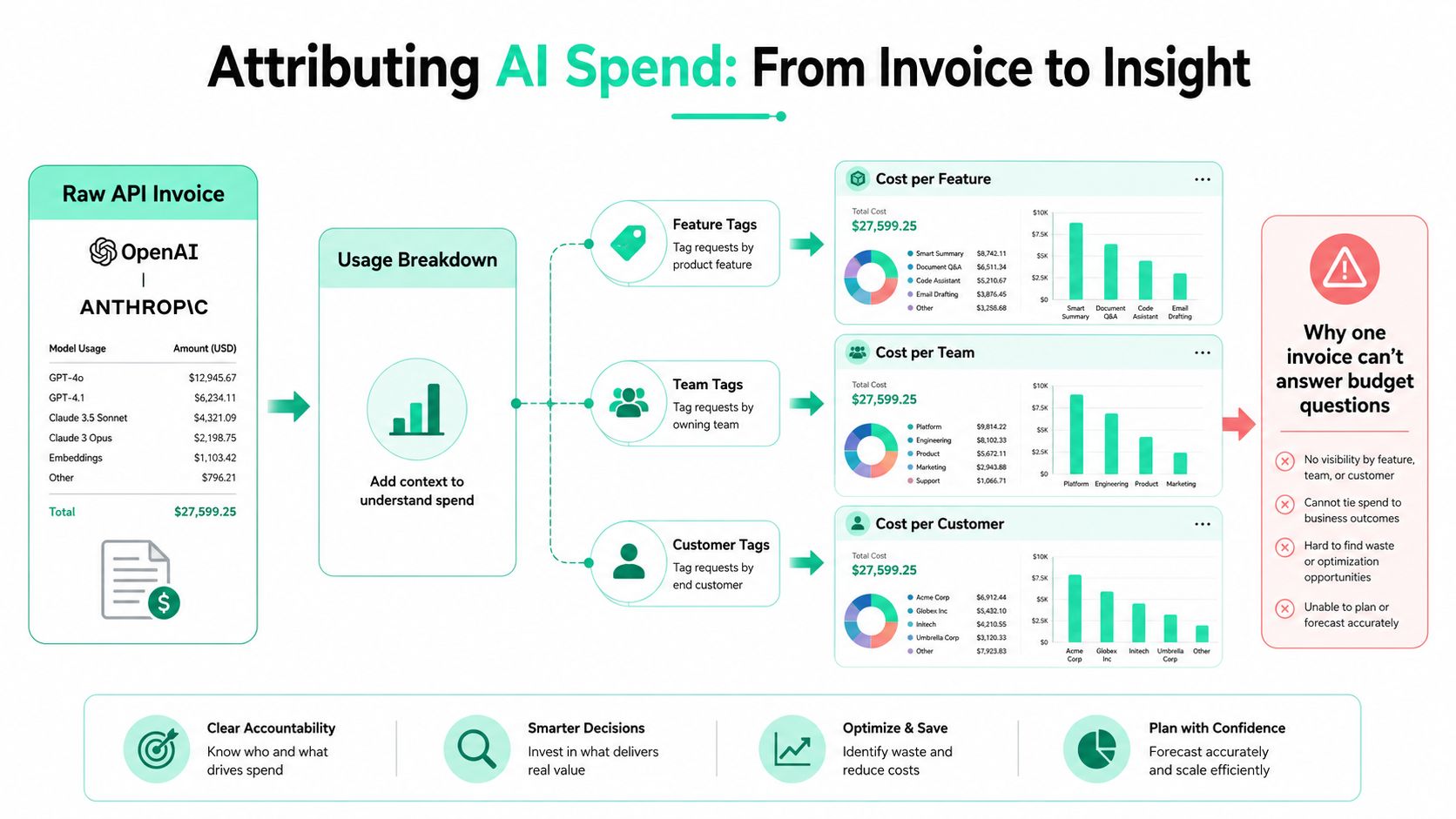
Here is the chargeback logic in plain terms. Suppose $42K of Anthropic spend lands in the month. If 61% belongs to customer support, 22% to internal RAG, and 17% to an AI playground, finance can assign ownership and stop arguing about whose invoice it was. The same breakdown should also exist by model, because model choice drives future behavior.
| Attribution view | What it answers | Why finance cares |
|---|---|---|
| Feature | Which product path consumed the spend | Ties cost to roadmap decisions |
| Team | Who owns the budget | Makes chargeback real |
| Customer | Which cohort drove usage | Supports pricing and margin decisions |
| Model | Which provider or model family was used | Exposes expensive swaps fast |
Use the same discipline you would apply to any cost allocation system. The mechanics matter more than the label, and the wrong tagging strategy will make every dashboard useless. For a tighter explanation of the allocation logic, see cost allocation methods.
A good AI budget process should make this attribution visible without friction. If the tooling cannot ingest tagged calls and break down spend by project, provider, model, and workload, it is not ready for a serious IT budget plan. SpendLens AI is one example of a developer-first platform that does this with lightweight instrumentation and spend breakdowns across OpenAI and Anthropic workloads. The category matters more than the brand, but the capability is essential.
The Five Cost Drivers That Move Your AI Line the Fastest
AI bills rarely spike for one mysterious reason. They spike because a small operational mistake shows up in five places at once. If you want control, start with the levers that move the line the fastest, then set guardrails before the next release ships.
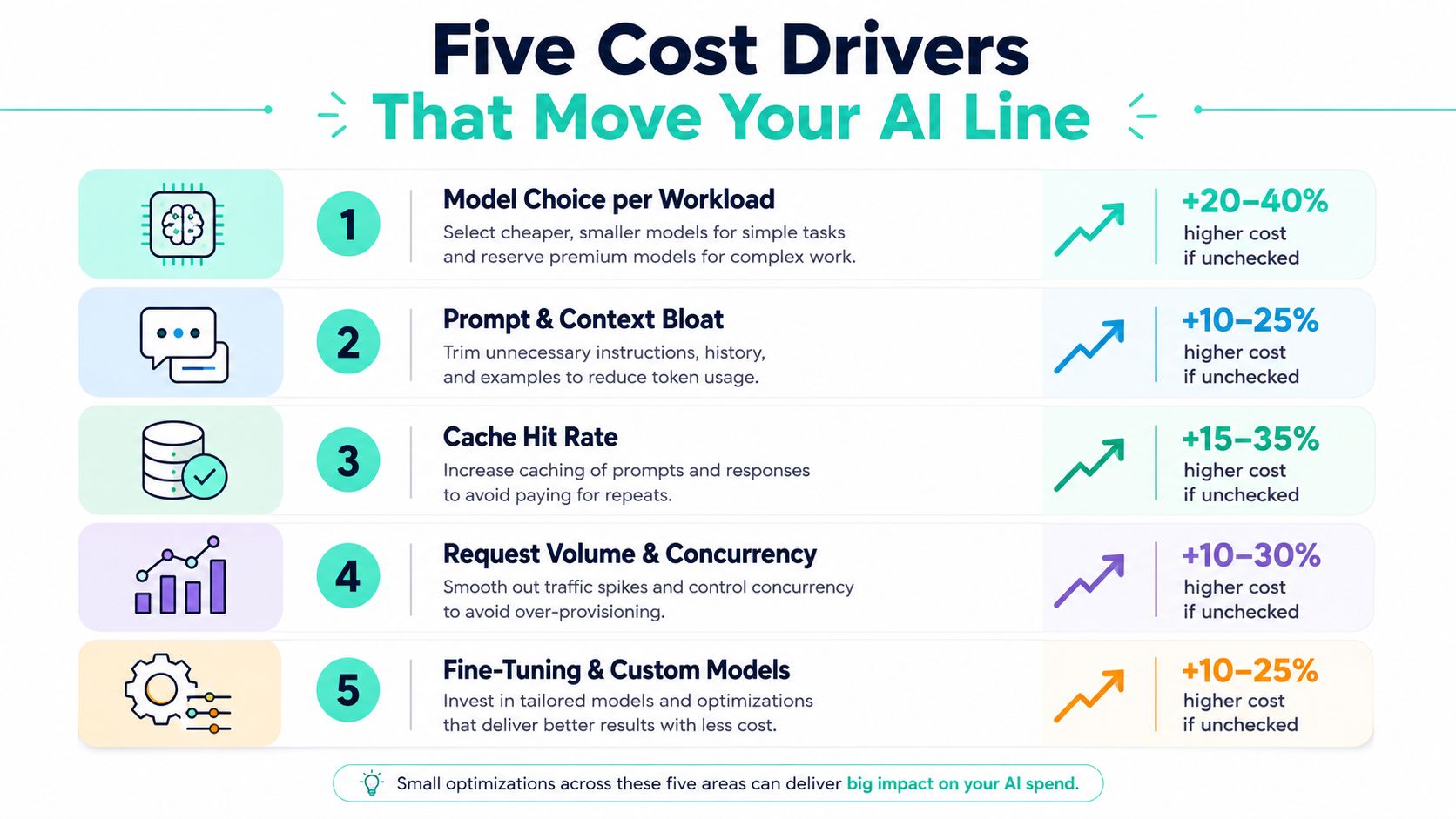
Model choice per workload
Use cheaper models for simpler tasks. A classification workload doesn't need the most expensive model in the stack, and forcing one anyway burns budget for no real gain. Watch for an unplanned model swap in a new release. Guardrail: require approval for model changes that move a workload into a higher-cost class.
Prompt and context bloat
Repeated instructions, duplicated context, and long system prompts inflate token usage. Even modest bloat compounds fast when it sits in every request. Watch for prompt templates growing release over release. Guardrail: enforce prompt reviews the same way you review code changes that affect performance.
Cache hit rate
When caching works, you stop paying for the same answer over and over. When it doesn't, you finance repeated inference with no business value. Watch for cache hit rate dropping after a feature launch. Guardrail: set a minimum cache threshold before rollout.
Retry and error loops
A failing integration can turn one request into several. Retries look harmless in logs until they hit the invoice. Watch for retry rate climbing above normal during deployments. Guardrail: cap retries for AI calls and alert on abnormal loops quickly.
Output length
Long outputs cost more, especially when users don't need them. A verbose assistant feels helpful until it starts exhausting the budget. Watch for average output tokens trending up after a UI change. Guardrail: set output length targets for each feature and review exceptions.
The fastest place to look when a bill spikes by 30% in a week is usually prompt bloat or an accidental model swap, not some exotic provider issue. That's why the fix belongs in product and engineering reviews, not just in finance dashboards. If the cost driver isn't visible at the feature level, it'll keep surprising you.
Cost control is design work. The cheapest way to cut AI spend is to stop expensive behavior from being shipped in the first place.
Governance, KPIs, and the Control Loop That Keeps the Plan Honest
A budget without governance is just a document. The plan only works when someone checks it often enough to stop bad spend before it compounds. That means a small control loop, not a giant committee.
The KPIs should be blunt. Track cost per active user, cost per LLM feature, forecast variance, cache hit rate, and percentage of AI spend with an owner. If a line item has no owner, it's already drifting. If forecast variance keeps widening, your assumptions are stale.
| KPI | Review cadence | Owner |
|---|---|---|
| Cost per active user | Weekly | Finance with product input |
| Cost per LLM feature | Weekly | Product and engineering |
| Forecast variance | Weekly | FinOps or finance |
| Cache hit rate | Daily | Platform engineering |
| Percentage of AI spend with an owner | Monthly | Engineering leadership |
The operating rhythm should be simple. Daily spend alerts catch surprises, weekly variance review catches process drift, and monthly plan review forces the forecast back into reality. A small council with engineering, finance, and product should approve material model or prompt changes before they hit production spend.
That discipline pays back fast when the team takes it seriously. In one planning cycle, a model upgrade that would have added $11K/month got replaced with a smaller model that kept quality acceptable and saved roughly $7K/month. That kind of saving is the reason governance exists. Without it, the cost change would have arrived as a surprise invoice instead of a deliberate choice.
For the monitoring layer that sits underneath the control loop, use endpoint-level visibility rather than waiting for monthly summaries. This endpoint monitoring guide fits that mindset: endpoint monitoring.
The best it budget plan isn't static. It's a living control system that asks one question every week, did the last decision make spend more predictable or less. If the answer is less, the plan is already slipping.
Your 30-Day IT Budget Quickstart With Real Savings Targets
Stop trying to perfect the annual spreadsheet first. Start by making the current month legible. Four weeks is enough to uncover waste, assign owners, and set the first real guardrails.
Week 1 Instrument spend
Spend 30 minutes tagging the highest-volume AI calls by feature and team. The deliverable is a visible breakdown of where the money is going. The savings target is simple, find the blind spots. In most orgs, that first pass exposes cost you couldn't defend.
Week 2 Build a per-feature forecast
Take the top AI features and estimate cost from actual usage plus expected changes. The deliverable is a forecast tied to product behavior, not a generic provider invoice. The savings target is precision, not optimism. If the feature is going to grow, say so.
Week 3 Set owner-backed budgets and cache targets
Assign each AI line to a real owner and set a cache or reuse target for the highest-cost workflows. The deliverable is a budget with names next to it. The savings target is lower waste, not theoretical efficiency. If nobody owns a line, it won't hold.
Week 4 Ship the first reforecast
Publish the updated plan and compare actual spend against the new assumptions. The deliverable is a reforecast you can show leadership without excuses. In one example org, the first 30 days uncovered roughly $4K/month in cache misses, $2.8K/month in over-modeled classification traffic, and $1.6K/month in repeated prompt context, for $8.4K/month recovered against a $42K baseline, roughly a 20% drop without changing a product feature.
Do this now, not next quarter: tag AI calls, split AI spend into its own budget line, and review the first variance before the month closes.
If you want the plan to survive the next launch, keep it simple. Instrument, attribute, forecast, and reforecast. That's the whole job.
If you're rebuilding your it budget plan for AI-heavy workloads, SpendLens AI gives engineering and finance teams a way to tag LLM calls, break spend down by feature and owner, and spot model-switch opportunities before the invoice turns into a problem. Visit SpendLens AI and use it to turn AI spend from a hidden line item into a managed budget.