Gemini API Pricing Explained with Real Cost Examples
Gemini API pricing explained for developers. See model tiers, token billing, real cost examples and tips to estimate and optimize your monthly spend.

Gemini 2.5 Flash-Lite costs $0.10 per 1 million input tokens and $0.40 per 1 million output tokens, while Gemini 2.5 Pro costs $1.25 and $10.00, and Gemini 3.1 Pro costs $2.00 and $12.00, with higher rates beyond 200K tokens. The right answer for your bill depends less on the model name than on your workload's input volume, output volume, context length, and reuse pattern.
You may be looking at a Gemini invoice after launching a chat feature, document workflow, or background classifier and wondering why the token total doesn't translate neatly into a predictable amount. A small request can be inexpensive on a lightweight model, while a long prompt with a generous response can make a capable model disproportionately costly.
The useful question isn't, “What does Gemini cost?” It's, “What does this workload cost on this model, at this volume, with this context?” The following guide builds that forecast from billing units to model tiers, worked examples, monthly planning, and practical cost controls. You'll see where money and engineering time are saved by choosing a suitable model instead of defaulting to the most powerful option.
Table of Contents
- Why Gemini API Pricing Feels Confusing at First
- How Gemini API Billing Actually Works
- Gemini Model Tiers and What You Pay Per Million Tokens
- Real Cost Examples for Common Developer Workloads
- How to Estimate Your Monthly Gemini Spend With Confidence
- Proven Ways to Lower Your Gemini Bill Without Hurting Quality
- Choosing the Right Gemini Model for Your Next Feature
Why Gemini API Pricing Feels Confusing at First
A common production scenario looks harmless. A team adds a classification endpoint, measures the average prompt, and assumes the bill will grow in proportion to request count. Later, a chat assistant begins returning longer answers, conversation history expands, and document uploads push prompts toward a context threshold. The original estimate no longer describes the actual workload.
The confusion starts because requests aren't the billing unit by themselves. Gemini API pricing separates what you send from what the model generates. Input and output tokens have different rates, and the model tier determines both. Context length can introduce another price step, so a prompt that crosses a threshold may cost more even when the feature appears unchanged to the user.
The forecast needs more than token totals
Suppose two features each process the same broad amount of token volume. One might send detailed instructions and receive short labels. The other might send a modest prompt but generate long code or conversational replies. Their bills can differ sharply because output pricing is higher on the more capable Gemini tiers.
A useful forecast records four properties for every workflow:
- Model choice: Which Gemini model handles the call?
- Input volume: How much text or multimodal content enters the request?
- Output volume: How much text or code does the model produce?
- Context shape: Does the prompt approach or cross a context-based pricing threshold?
This approach saves estimation time because you can calculate each workload independently instead of averaging every feature into one misleading rate. It also saves money by exposing over-provisioned calls, such as a simple labeler using a Pro model when a Flash-family model would satisfy the quality requirement.
Practical rule: Treat every AI feature as its own cost center until its input, output, model, and context behavior are understood.
The rest of the exercise is operational rather than theoretical. Read the pricing row, multiply the input and output portions separately, then test how the result changes when you switch model tiers, shorten prompts, cap responses, or reuse cached context. For teams tracking several providers, the same discipline also applies to chat completions API cost patterns, even though each provider uses its own rate card.
How Gemini API Billing Actually Works
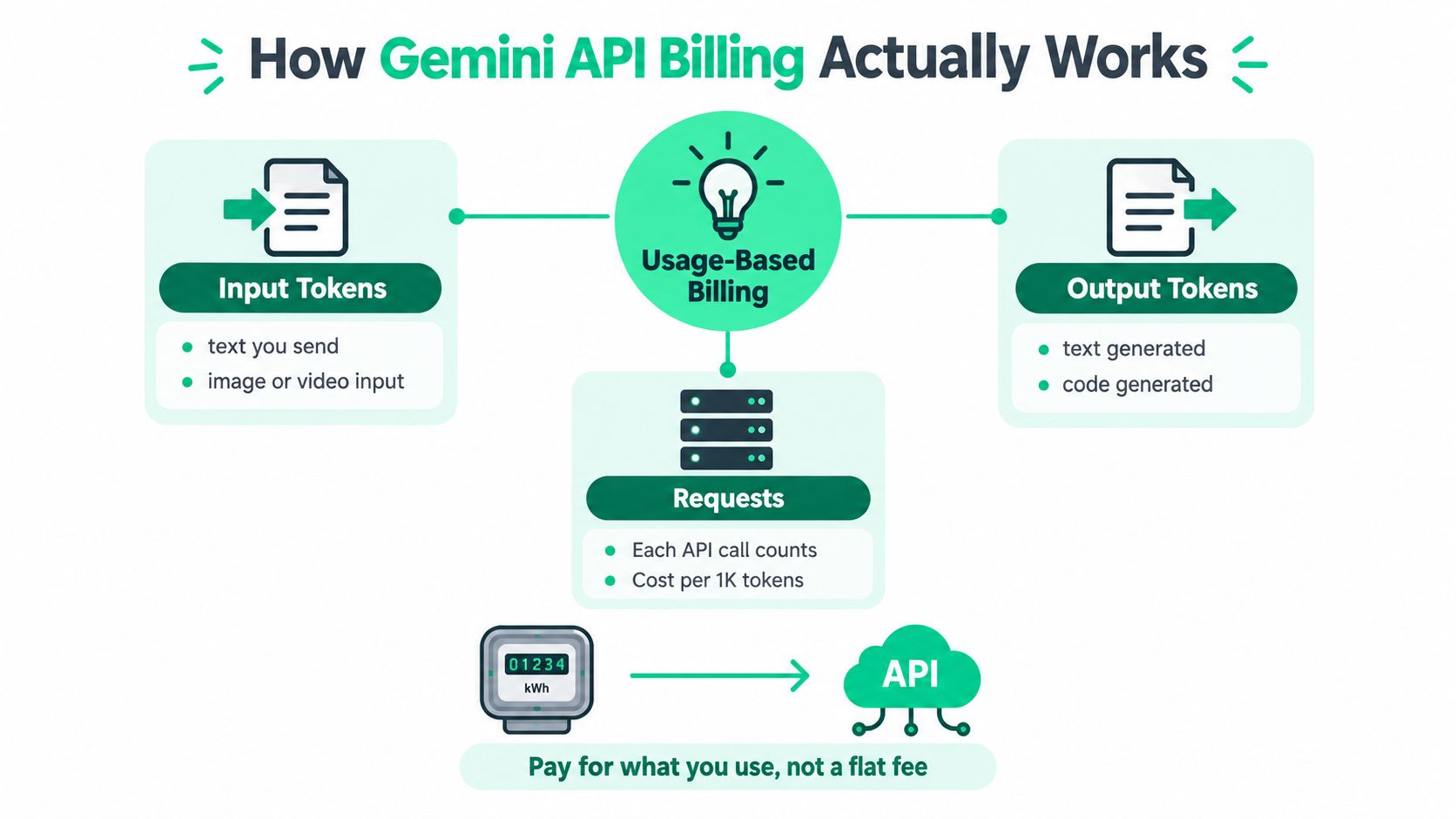
Think of the Gemini API like an electricity meter rather than a monthly software seat. A flat subscription charges for access. Usage-based billing charges for the amount consumed, and the meter separates different kinds of consumption.
Four levers shape the bill
Input tokens represent what your application sends. That can include a user message, system instructions, conversation history, retrieved passages, code, or supported media content. A large recurring template increases input consumption on every uncached call.
Output tokens represent what Gemini generates. A short JSON classification has a small output footprint. A code explanation, long answer, or multi-step agent response can use much more. Output rates are often higher than input rates, especially on Pro models, so response verbosity deserves its own budget.
Requests matter operationally because each API call consumes capacity and can trigger retries or workflow fan-out. The token rates determine the main usage charge, while request volume determines how quickly that charge accumulates and whether your service can operate within rate limits.
Context length describes how much information the model receives in one prompt. Some Gemini pricing rows change at a context threshold. That makes prompt size a price condition, not merely a quality or latency consideration.
Tokens measure volume, not value. A token-heavy call isn't automatically useful, and a short call isn't automatically cheap if it runs on a high-priced model at large volume.
To calculate a call, use two separate multiplications:
- Divide input tokens by 1 million and multiply by the model's input rate.
- Divide output tokens by 1 million and multiply by the model's output rate.
- Add the two results across the expected request volume.
- Apply the relevant context pricing row if the prompt crosses its threshold.
Rate limits belong in the same production plan, but they aren't the same as token prices. Google's billing documentation, summarized in the Gemini 1.5 Pro pricing reference, describes a paid tier supporting 1,000 requests per minute, while the free tier is limited to 2 requests per minute and 50 requests per day. Those limits can make a free experiment unsuitable for a production rollout even before spend becomes the concern.
If you're comparing planning tools, you can also choose a plan that fits how your team manages prompt work and experiments. Keep that decision separate from the Gemini rate calculation itself. The API bill still comes from the usage dimensions above.
Gemini Model Tiers and What You Pay Per Million Tokens
The current Gemini family offers a clear trade-off between lower-cost throughput and higher-cost reasoning capacity. Google's Gemini API pricing page lists the following rates.
Gemini Model Tier Pricing at a Glance
| Model | Input per 1M | Output per 1M | Best Fit |
|---|---|---|---|
| Gemini 2.5 Flash-Lite | $0.10 | $0.40 | High-volume, simpler classification and extraction |
| Gemini 2.5 Flash | $0.30 | $2.50 | General-purpose generation and assistants |
| Gemini 2.5 Pro, up to 200K tokens | $1.25 | $10.00 | Complex reasoning and demanding workflows |
| Gemini 3.1 Pro, up to 200K tokens | $2.00 | $12.00 | Advanced reasoning and agentic workloads |
The input spread from Flash-Lite to Gemini 2.5 Pro is 4x, but output changes the economics more dramatically. A feature that generates much more than it reads will feel the difference between $0.40 output per 1 million tokens and $10.00 output per 1 million tokens more than a short classification endpoint will.
Gemini 3.1 Pro has a higher listed rate than Gemini 2.5 Pro for prompts up to 200K tokens. Above that context size, the pricing page lists higher charges, so a long-context workflow needs a separate calculation rather than a simple average rate. Vertex AI's Gemini 3.1 Pro pricing details show $4 input and $18 output per 1 million tokens above 200K, compared with $2 and $12 up to that threshold.
Match capability to the job
Flash-Lite is the natural starting point for routing, tagging, extraction, and other tasks where the output format is constrained. Flash can suit a conversational feature that needs broader language ability but doesn't require the highest reasoning tier. Pro becomes easier to justify when errors create substantial review work, the task requires complex reasoning, or the workflow depends on code and document analysis.
One entry point also has a scheduled price change. The pricing information lists $0.75 input and $3.75 output through December 31, 2026, then $1.50 input and $7.50 output starting January 1, 2027. Treat that as a projection for future budgeting, not as today's universal Gemini rate.
A model comparison across providers can help you test whether a capability premium is earning its place in production. The LLM pricing comparison guide is useful as a starting point, but your own evaluation should measure quality, retries, latency, and human review alongside token spend. A cheaper first call isn't a saving if it causes repeated retries or manual correction.
Real Cost Examples for Common Developer Workloads
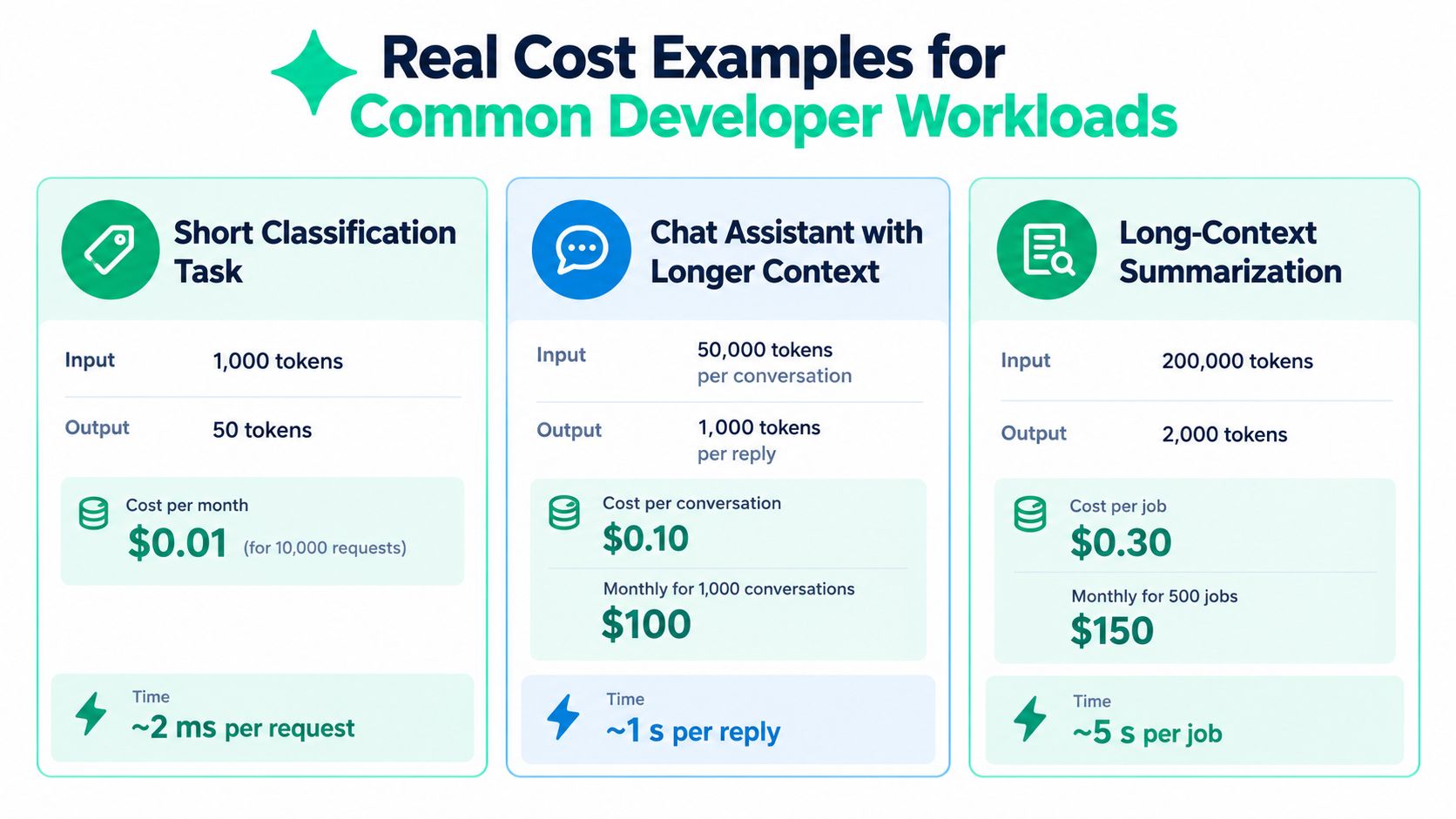
Worked examples make the rate card easier to use. The calculations below use the rates shown for Gemini 2.5 Flash-Lite, and they illustrate how workload shape changes the result.
Short classification task
Assume each request sends 1,000 input tokens and receives 50 output tokens. On Flash-Lite, the input portion costs $0.0001 per request, calculated from $0.10 per 1 million input tokens. The output portion costs $0.00002 per request, calculated from $0.40 per 1 million output tokens.
That makes the combined cost $0.00012 per request, before any other charges. For 10,000 requests, the total is $1.20, not $0.01. The image supplied for this article displays a $0.01 monthly figure for that card, but that visual conflicts with the verified rate calculation, so the rate-based result is the defensible planning value.
At this size, switching from a more expensive model can save money directly, while a short output also saves time for downstream parsing and review. The important lesson is that classification is dominated by volume, not by elaborate response generation.
Chat assistant with longer replies
Now assume 50,000 input tokens per conversation and 1,000 output tokens per reply. Flash-Lite input costs $0.005 per conversation, and output costs $0.0004. The combined cost is $0.0054 per conversation, so 1,000 conversations cost $5.40 at these rates.
The infographic supplied for this section shows $0.10 per conversation and $100 monthly, but those figures don't follow from the verified Flash-Lite rates and assumptions. Use the formula with your selected model, then compare the result with your actual logs. A chat product can still become costly on Pro because its output rate is much higher and conversation history keeps expanding.
Long-context summarization
For a job with 200,000 input tokens and 2,000 output tokens, Flash-Lite input costs $0.02 and output costs $0.0008. The total is $0.0208 per job, or $10.40 for 500 jobs.
The provided visual labels this scenario $0.30 per job and $150 monthly, but that does not match the verified Flash-Lite rates. On a Pro model, context thresholds and higher output rates can change the result substantially, especially once the prompt moves beyond the applicable context band.
For repeatable planning, record the assumptions beside every calculation. The AI cost estimation guide can complement that worksheet, but the essential method is simple: input cost plus output cost, multiplied by request volume, with the correct model and context row applied.
A short walkthrough can help teams understand the same arithmetic in practice:
How to Estimate Your Monthly Gemini Spend With Confidence
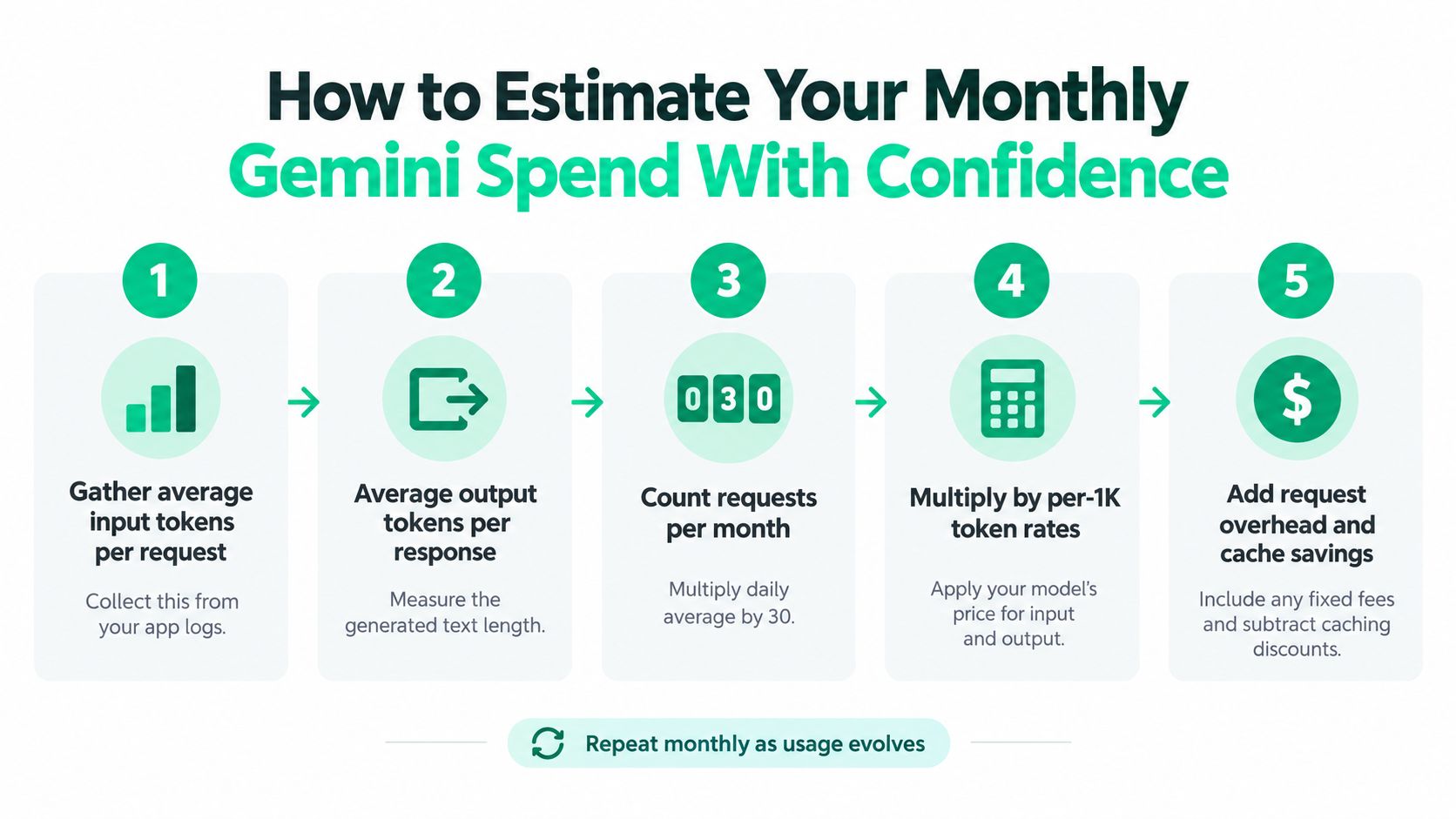
A reliable monthly forecast starts with observed workload behavior, not a guessed average across your product. Give every feature its own line in the estimate, then aggregate the results after each line has a model, input volume, output volume, and request count.
Build the estimate from logs
Start by collecting average input and output tokens for each workflow. Use production logs where possible, because a test prompt usually omits conversation history, retrieved context, retries, and user-generated variation.
Then count expected requests for the forecast period. Apply the selected model's input and output rates separately, and flag calls whose context could cross a higher pricing band.
A compact worksheet can use these columns:
- Workflow: Classifier, assistant, summarizer, or agent step.
- Model: The exact Gemini model and pricing row.
- Average input: Tokens sent per request.
- Average output: Tokens generated per response.
- Request volume: Expected calls in the month.
- Base cost: Input charge plus output charge.
- Risk adjustment: Retries, traffic variation, and long-context exposure.
The risk adjustment shouldn't be an arbitrary percentage. Use observed retry behavior, known traffic scenarios, or a clearly labeled planning assumption. If the application recently changed its prompt, retrieval strategy, or output format, re-estimate immediately because those changes can alter token volume without changing the endpoint name.
Attribute spend to decisions
Tag calls by feature, customer-facing workflow, experiment, or background job. This lets finance and engineering see whether spend comes from a useful product path, a noisy retry loop, or a prompt that includes redundant context.
Forecasting becomes credible when every dollar has an owner, a workload, and a measurable usage driver.
Review the estimate after deployment and compare forecast against actual usage. Look for changes in output length, model mix, context size, and retry frequency. That comparison saves engineering time during invoice reviews because the team can investigate a specific workload rather than search through every service.
Proven Ways to Lower Your Gemini Bill Without Hurting Quality
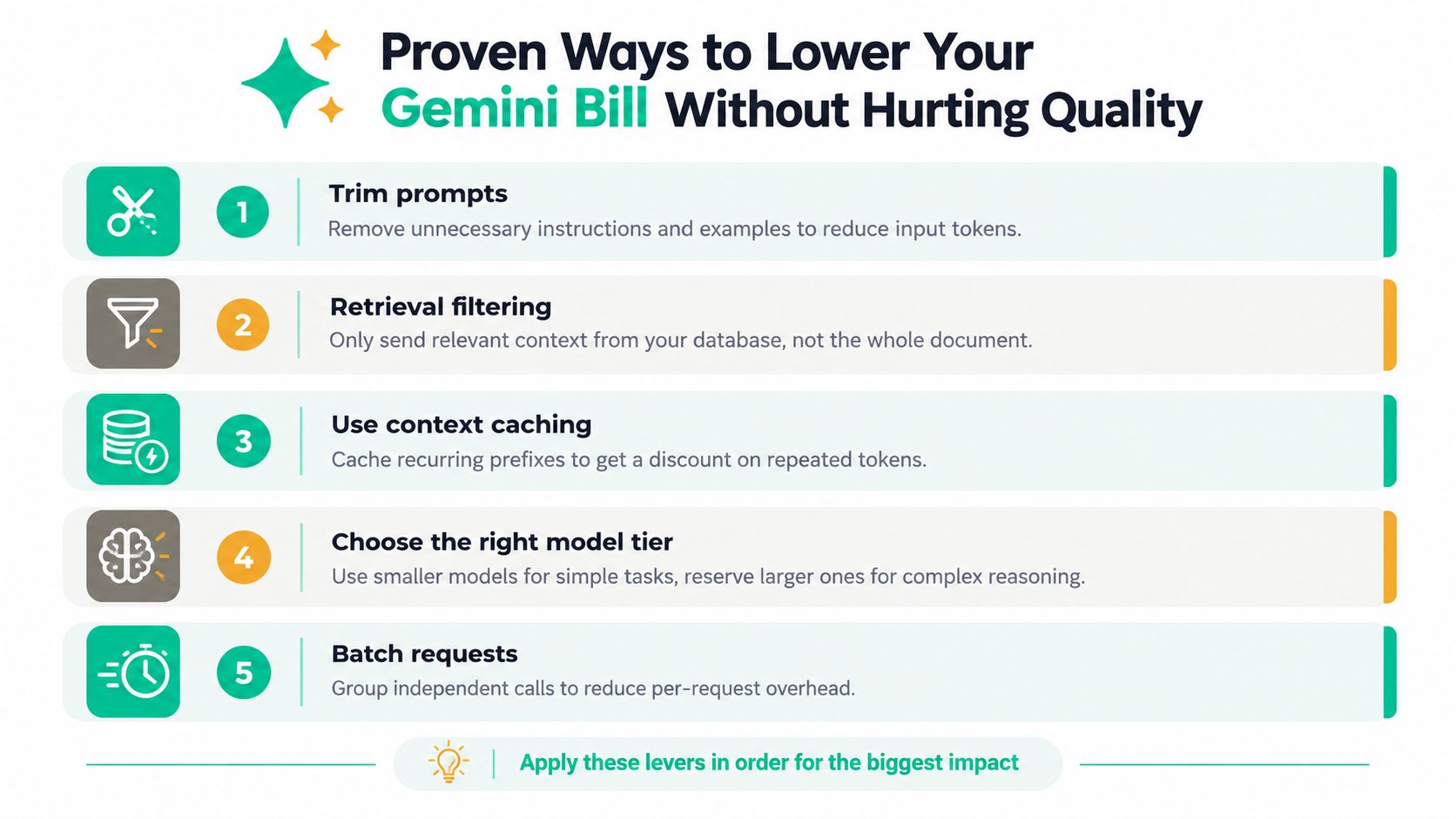
Cost control works best as an ordered playbook. Start with waste that doesn't contribute to answer quality, then test model substitutions, and only afterward tune more sensitive behavior.
Remove tokens that don't help
Trim repeated instructions, obsolete examples, verbose formatting requirements, and irrelevant conversation history. Retrieval filtering matters just as much. Sending the whole document when the answer depends on a small relevant passage increases input cost and can make the model's task harder.
For long-context calls, prompt trimming and retrieval filtering have an extra benefit. They can keep a request below a higher pricing band, avoiding a step change rather than merely reducing ordinary token volume. The effect is especially important for Pro workloads.
Reuse recurring context
Context caching can reduce the price of repeated input on eligible Gemini models. Independent pricing guides report cached input can be about 90% cheaper in some cases, including a change from $2.00 to $0.20 per 1 million tokens on Gemini 3.1 Pro and from $0.75 to $0.075 on Flash models; the pricing guide also notes that storage is billed separately.
For example, a support assistant may reuse the same policy manual across many calls. Compare fresh input tokens with cached input tokens, include storage in the calculation, and measure cache hits rather than assuming every request benefits. The saving is highest when a large prefix repeats frequently.
Control output length deliberately
Ask for the required format and level of detail. A structured response with a bounded schema can prevent a simple operation from producing a lengthy explanation. This saves token spend and often reduces downstream parsing time.
For a chat assistant, distinguish between an answer the user needs immediately and an internal reasoning or enrichment step. Don't pay for a long response when the product only displays a concise result.
Switch models using quality checks
Use Flash-Lite for simple classification and extraction when evaluation confirms acceptable accuracy. Reserve Flash or Pro for tasks where the additional capability prevents expensive correction, failed tool calls, or repeated attempts.
Run a representative evaluation before switching. Track task quality, retry behavior, latency, and monthly cost. The token cost optimization guide can help organize that analysis, while workload-level attribution shows where a model change would have the largest financial effect.
Find the highest-impact lever first
Don't optimize every prompt equally. Rank workflows by total monthly spend, then inspect the largest contributors for context bloat, excessive outputs, cache opportunities, and unnecessary model capacity. That order saves review time and produces a clearer before-and-after result.
Choosing the Right Gemini Model for Your Next Feature
Choose Gemini 2.5 Flash-Lite when the task is repetitive, high-volume, and easy to validate, such as classification, extraction, routing, or concise structured output. Its low input and output rates make it a strong baseline for cost-sensitive workloads.
Choose Gemini 2.5 Flash when the feature needs broader generation or conversational behavior but doesn't require the premium Pro tier. It can be a practical middle option for assistants and general-purpose content workflows.
Choose Gemini 2.5 Pro or Gemini 3.1 Pro when complex reasoning, long documents, advanced coding, or agentic behavior justifies the higher rate. Check whether the prompt crosses the 200K context threshold, because the applicable long-context price can change the economics.
Before launch, run a controlled comparison on representative inputs. Measure answer quality, output length, retries, latency, and total cost per successful result. A model that costs more per call may still be economical if it prevents manual review, but that value should appear in your evaluation rather than remain an assumption.
After launch, monitor spend by feature and watch for prompt changes that increase context or output volume. SpendLens AI can add lightweight attribution around LLM workloads, surface token and cache efficiency, and identify model-switch opportunities without placing a proxy in the request path. Visit SpendLens AI to connect Gemini usage visibility with practical cost experiments, then start with the highest-spend workflow and validate one change at a time.