Chat Completions API: Technical Reference & Cost
Explore the Chat Completions API with our technical reference, including cost optimization tips to help you save while building smarter AI applications.
Most tutorials still tell you to start with the Chat Completions API. That advice is no longer safe as a universal rule. OpenAI introduced Chat Completions in March 2023, and by the GPT-4 general availability announcement, it said the interface already represented 97% of its API GPT usage. The older Completions API had originally launched in June 2020, with older completion models scheduled for removal beginning January 4, 2024, so the industry learned to treat chat-native requests as the obvious next step. (OpenAI's GPT-4 API announcement)
The operational reality has changed. Chat Completions remains supported and useful, especially for stable text generation, but OpenAI now recommends the Responses API for new projects. The practical question isn't “How do I make my first chat completion?” It's “Will this interface still match the capabilities, portability, and cost controls my workload needs after it leaves the default position?”
Table of Contents
- Why Chat Completions May No Longer Be Your Default Choice
- Understanding the Chat Completions Request Structure
- Token Economics and Cost Calculation
- Implementation Examples in Python and JavaScript
- When to Use Chat Completions Versus Responses API
- Instrumenting Chat Completions for Cost Visibility
- Reducing Token Waste and Optimizing Prompts
- Handling Errors and Rate Limits in Production
- Quick Reference Guide for Chat Completions API
Why Chat Completions May No Longer Be Your Default Choice
The common assumption is that a supported API is automatically the right API for a new integration. That assumption breaks down when the provider's product direction moves elsewhere. OpenAI's migration guidance says Responses is recommended for all new projects, while Chat Completions remains supported. (OpenAI's migration guide)
That distinction matters in 2026 because a simple text-generation service and an agentic application have very different operating requirements. A request that accepts role-tagged messages and returns one assistant message can remain stable for a summarizer, classifier, support draft generator, or stateless chatbot. A workflow that needs built-in tools, background execution, file workflows, or richer state management faces a different decision.
OpenAI's Help Center highlights that Responses gained built-in tools, background mode, and encrypted content in May 2025. (OpenAI Help Center guidance) Those capabilities change the migration calculation. If Chat Completions forces your team to build and maintain external orchestration, the interface may look simple while the surrounding system becomes expensive to operate.
The maintenance signal
The current Chat Completions reference still documents stored completions and metadata updates. Requests created with store=true can later be retrieved, listed, or modified, but the supported modification is limited to the metadata field. (Chat Completions API reference) That looks like a maintained, operationally useful surface, not a rapidly expanding foundation for every new capability.
Use Chat Completions when the narrow interface is an advantage:
- Stable text workloads: You own the conversation history and need predictable message-based input and output.
- Provider portability: Your application targets a chat-shaped abstraction across multiple model providers.
- Low orchestration complexity: The model only needs to generate, classify, transform, or summarize text.
- Existing production integration: A migration would create compatibility work without solving a current capability problem.
Start with Responses when built-in tools, file uploads, background processing, or stateful multi-step behavior are central to the product. Treat Chat Completions as a deliberate compatibility choice, not an automatic starting point. That decision can save engineering time by avoiding a migration after your application has already embedded the older response shape across services, tests, and dashboards.
Understanding the Chat Completions Request Structure
A Chat Completions request is built around a messages array. Each message carries a role and content, allowing your application to distinguish high-level behavior instructions from the user's current request and prior assistant turns. The design replaced the older freeform prompt pattern with a conversation-shaped contract.
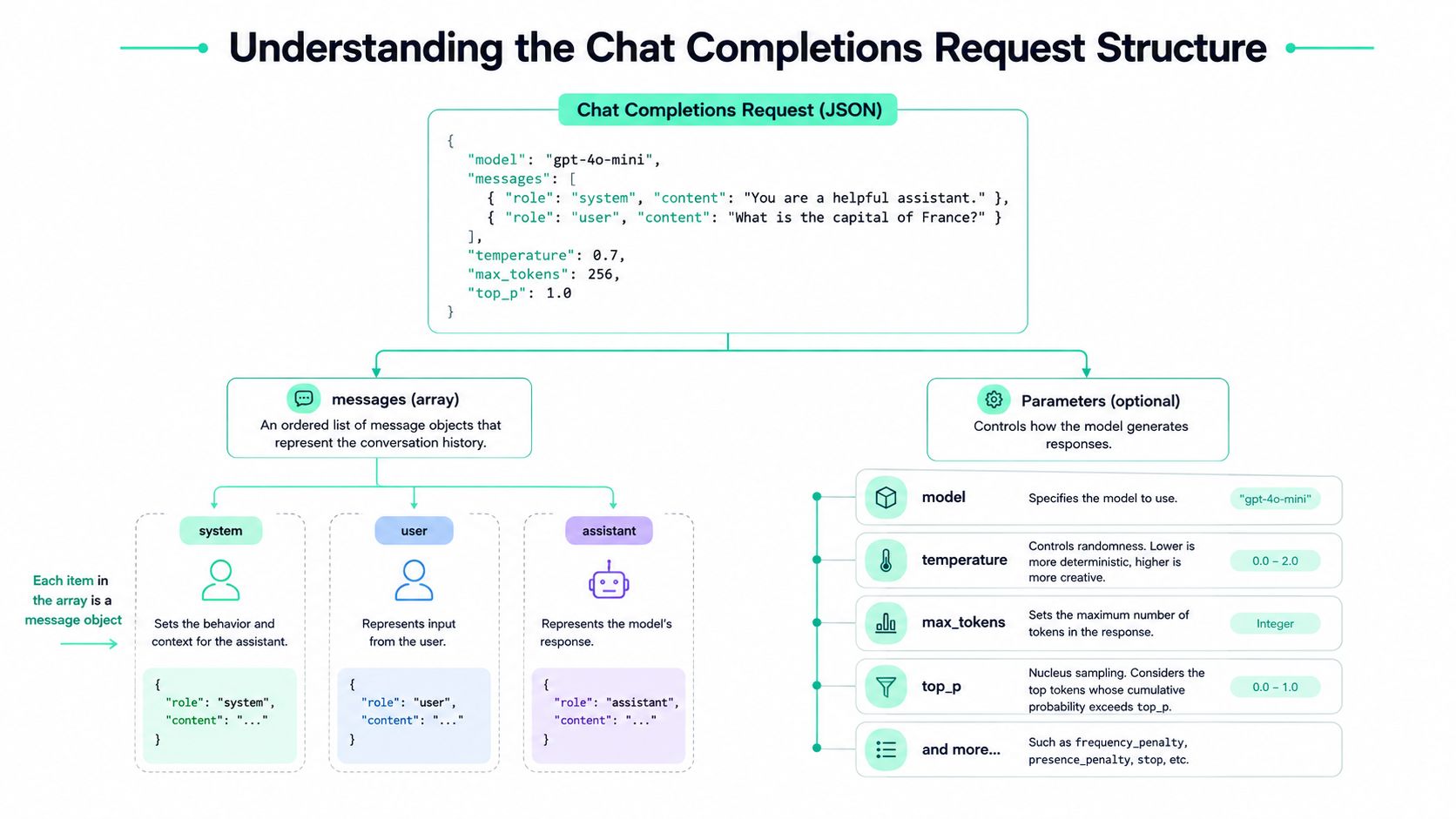
A practical request might look like this:
{
  "model": "gpt-4o-mini",
  "messages": [
    {
      "role": "system",
      "content": "You are a concise support assistant. Answer only from the supplied policy."
    },
    {
      "role": "user",
      "content": "Can I return an opened product?"
    },
    {
      "role": "assistant",
      "content": "I need the applicable policy details before answering."
    },
    {
      "role": "user",
      "content": "The policy allows opened returns within the stated return window."
    }
  ],
  "temperature": 0.2,
  "max_tokens": 150,
  "store": true,
  "metadata": {
    "workflow": "support_policy",
    "environment": "production"
  }
}
Assign roles intentionally
Use the system message for durable behavior, output constraints, and domain boundaries. Put the customer's request in a user message. Add prior assistant and user messages only when the model needs that conversational context. Chat Completions is stateless from your application's perspective, so your service must send the relevant history on each request.
The model selects the pricing and capability profile. temperature controls output variation, though production systems should tune it against the task rather than treating a lower value as universally better. max_tokens provides an output ceiling. You're billed for generated tokens, not for unused headroom, so a high ceiling doesn't itself create a charge unless the model produces more output. (OpenAI's completions guide)
Choose standard or streamed output
Without streaming, the API returns a standard completion object after generation finishes. With streaming enabled, it returns a sequence of chunk objects, which lets a user interface render text progressively instead of waiting for the complete response. (Chat Completions API reference)
Use store=true only when later retrieval or native metadata operations justify storing the request. Metadata is useful for lightweight attribution, such as associating a request with a workflow, experiment, or customer segment. It isn't a substitute for a full event pipeline, but it can preserve useful labels without changing the provider request path.
Token Economics and Cost Calculation
Token usage affects billing, latency, and context fit. Input and output tokens both count, and models may charge different rates for each. A long system prompt, repeated conversation history, or oversized retrieved document therefore increases more than the invoice. The model must process that material before generating its answer, which can also raise response time.
For English text, OpenAI gives the rough estimate 1 token ≈ 4 characters or 0.75 words. The text ChatGPT is great! becomes six tokens, including fragments such as Chat, G, and PT. Short strings therefore do not always correspond neatly to word counts. (OpenAI's token management guidance)
The response reports usage through usage, including prompt_tokens, completion_tokens, and total_tokens. OpenAI's example shows prompt_tokens: 13, completion_tokens: 7, and total_tokens: 20. Recording these fields gives each request a basis for cost attribution. (OpenAI's token usage guidance)
Compare the model economics
Chat Completions has no separate token price. The selected model sets the input and output rates. OpenAI lists GPT-4 at $30 per 1 million input tokens and $60 per 1 million output tokens, while GPT-4o mini is listed at $0.15 per 1 million input tokens. (OpenAI API pricing)
| Model | Input Cost (per 1M tokens) | Output Cost (per 1M tokens) | Best For |
|---|---|---|---|
| GPT-4 | $30 | $60 | Workloads requiring the GPT-4 capability profile |
| GPT-4o mini | $0.15 | Not specified in the cited pricing data | Cost-sensitive lightweight input processing |
A request with 10 input tokens and 20 output tokens is billed for 30 tokens. The dollar amount depends on the selected model's separate input and output rates. (OpenAI's completions guide) A cheaper model reduces spend only when its output remains suitable for the task. Removing repeated prompt text can reduce spend and processing time across either model.
Cached input may change the effective cost when the provider and model offer cached-input pricing. Treat caching as a measured optimization, not an assumption. Track the relevant usage fields, keep stable prompt prefixes unchanged, and compare cache behavior with actual request volume.
Use OpenAI's token-counting capability before sending requests to estimate cost and check context limits. (OpenAI's token-counting guide) For monthly planning, aggregate captured input and output tokens by model, apply the applicable rates, and test the result against a shortened prompt or alternate model. For a practical budgeting workflow, see this guide to the cost of API usage.
Implementation Examples in Python and JavaScript
A production integration should make four things observable from the start: the selected model, request labels, token usage, and failure behavior. The SDK call itself is short. The surrounding controls determine whether you can explain a bill, replay a prompt change, or recover when the provider is constrained.
Python with usage and retry handling
import os
import time
from openai import OpenAI

client = OpenAI(api_key=os.environ["OPENAI_API_KEY"])

def classify_ticket(text: str) -> dict:
    for attempt in range(3):
        try:
            response = client.chat.completions.create(
                model="gpt-4o-mini",
                messages=[
                    {
                        "role": "system",
                        "content": "Classify the ticket as billing, technical, account, or other. Return one label."
                    },
                    {"role": "user", "content": text}
                ],
                temperature=0,
                max_tokens=20,
                store=True,
                metadata={"workflow": "ticket_classification"},
                seed=17
            )

            usage = response.usage
            return {
                "label": response.choices[0].message.content,
                "prompt_tokens": usage.prompt_tokens,
                "completion_tokens": usage.completion_tokens,
                "total_tokens": usage.total_tokens
            }

        except Exception as exc:
            if attempt == 2:
                raise
            time.sleep(2 ** attempt)

result = classify_ticket("My invoice doesn't match the plan I selected.")
print(result)
The fixed seed supports deterministic replay when you hold request parameters constant. OpenAI recommends this pattern for A/B comparisons and regression testing of prompt changes. (OpenAI advanced usage guidance) The retry loop above is intentionally small. In a real service, distinguish retryable status codes from invalid requests, add jitter, and record the final failure without logging sensitive prompt content.
JavaScript with streaming
import OpenAI from "openai";

const client = new OpenAI({
  apiKey: process.env.OPENAI_API_KEY
});

async function streamAnswer(question) {
  const stream = await client.chat.completions.create({
    model: "gpt-4o-mini",
    messages: [
      {
        role: "system",
        content: "Answer in concise, plain English."
      },
      {
        role: "user",
        content: question
      }
    ],
    temperature: 0.2,
    max_tokens: 200,
    stream: true,
    metadata: {
      workflow: "customer_answer"
    }
  });

  for await (const chunk of stream) {
    const text = chunk.choices?.[0]?.delta?.content;
    if (text) process.stdout.write(text);
  }
}

streamAnswer("Explain why my request is waiting.");
Streaming improves perceived responsiveness, not token economics. The generated output still counts toward usage, so retain a non-streamed path for tests that need straightforward usage assertions. Teams standardizing Node clients can also consult this Node SDK documentation.
For multi-turn conversations, store history in your own application state and send only the context needed for the current answer. Keep the message construction separate from the transport call. That makes it easier to test prompt revisions, cap history, and compare a stable request with a migrated Responses implementation.
When to Use Chat Completions Versus Responses API
The choice is less about age than workload shape. Chat Completions is a compact, familiar contract. Responses is designed for applications that need more than a single assistant message, particularly when tools, background execution, or richer state are part of the product.
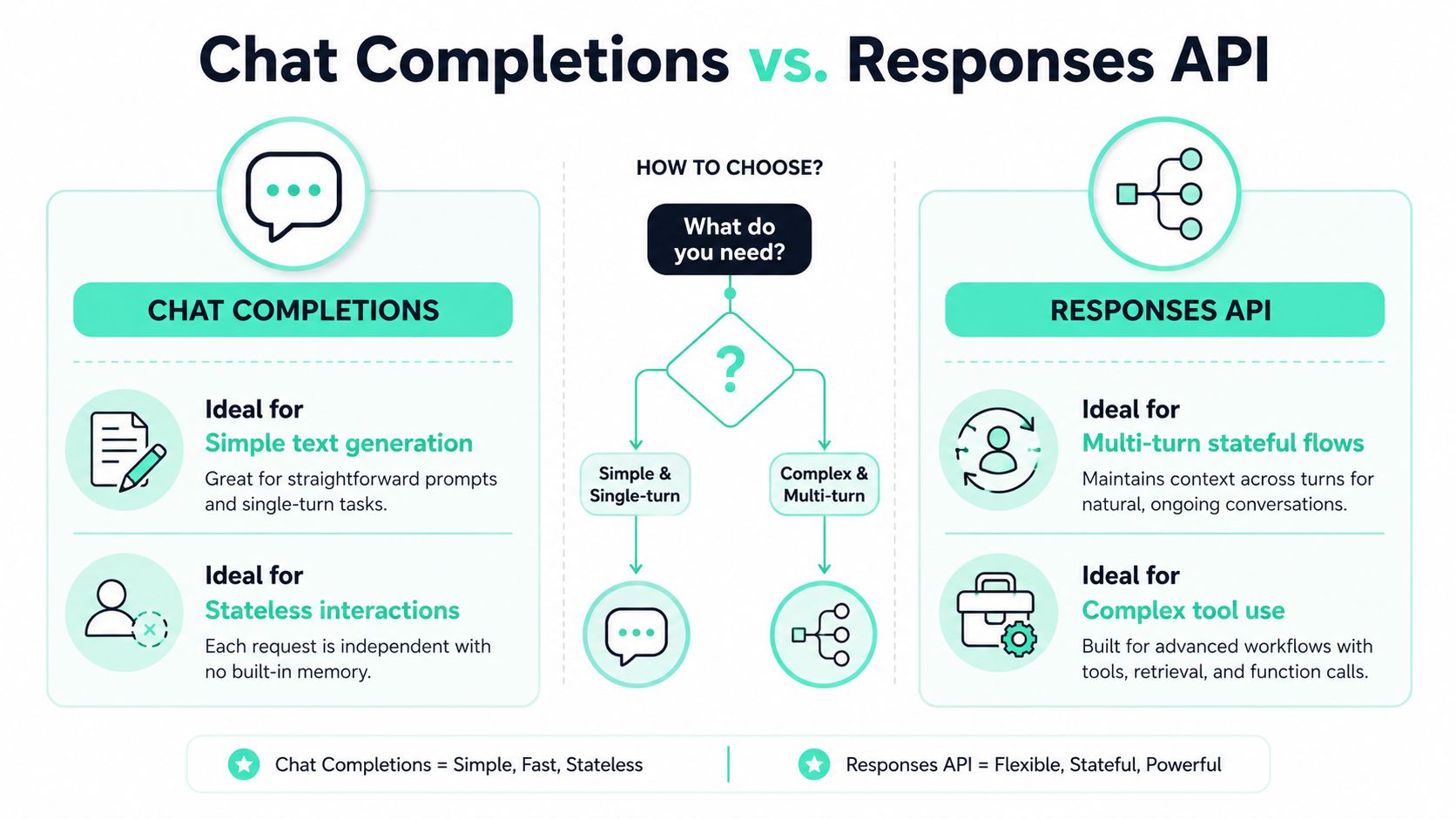
Stay with Chat Completions when simplicity has value
A product FAQ bot that receives a question and returns a text answer doesn't need a hosted tool loop. A nightly classification worker may benefit from a provider-agnostic message format. A summarization endpoint with manually selected context often works better with explicit application-owned history than with server-side state.
Chat Completions also remains attractive when your organization has invested in adapters, test fixtures, gateways, and fallback providers that expect its shape. The migration cost includes response parsing, tool orchestration, observability changes, and regression testing. If those costs don't buy a needed capability, staying put can be the more responsible engineering decision.
Migrate when the surrounding system is the problem
Responses becomes the stronger candidate when the model must use built-in tools, manage multi-step behavior, or process workflows that don't fit a single message response. OpenAI's migration guidance frames Responses as the recommended path for new projects, and the Help Center identifies built-in tools and background mode among its newer capabilities. (OpenAI's migration guidance)
File workflows deserve a specific compatibility check. Independent commentary and community reporting described a 2025 regression in which Files were no longer supported as inputs in Chat Completions, forcing client-side workarounds. (Simon Willison's comparison of Responses and Chat Completions) A workaround may preserve delivery, but it can add upload handling, retrieval logic, permissions, cleanup, and another source of token overhead.
Use this decision test:
- Text only: Stay with Chat Completions if the response is a single generated message and your team owns context.
- Tool-dependent: Prefer Responses if built-in web, file, code, or background capabilities are core requirements.
- Portability first: Keep Chat Completions when provider interchangeability outweighs native feature access.
- Migration trigger: Move when workarounds are multiplying, response parsing is becoming brittle, or a new feature is unavailable on the chat endpoint.
The right choice can save both implementation time and future migration effort. Don't pay the complexity cost of Responses for a basic request, but don't build a tool-heavy product around an interface that requires increasingly elaborate external plumbing.
Instrumenting Chat Completions for Cost Visibility
A request without attribution becomes an invoice line with no owner. Capture enough context to answer four operational questions: which project made the call, which workflow triggered it, which model served it, and how many input and output tokens it consumed.
The native usage field supplies the token counts after the response arrives. The metadata field supplies lightweight labels when you create stored requests. Together, they let a service associate an API call with a feature or experiment without changing the provider request path. (Chat Completions API reference)
Tag at the workflow boundary
Decorate the function that represents a business operation, not every low-level string helper. A useful event record contains:
- Workflow:
support_reply,document_summary, orticket_classification. - Environment: production, staging, or evaluation.
- Model: the exact selected model.
- Token usage: prompt, completion, and total tokens.
- Outcome: success, retry, timeout, or non-retryable failure.
- Release context: application version or prompt revision.
This structure lets you compare a prompt revision against its predecessor without guessing which service generated the traffic. It also exposes prompt waste. If one feature has a much larger prompt_tokens total than similar workflows, inspect its templates and conversation-history policy before switching models.
Practical rule: Keep instrumentation outside the provider client's retry and authentication logic. Record the final request outcome and usage once, then preserve the existing client configuration.
Cross-provider tracking needs a normalized event schema. OpenAI and Anthropic expose different response structures and pricing categories, but your internal record can still use provider, model, input tokens, output tokens, cache-related fields when available, workflow, and timestamp. That gives FinOps and engineering a shared vocabulary for comparing workloads.
SpendLens AI is one option for this workflow. Its developer-first platform uses lightweight instrumentation with existing OpenAI and Anthropic clients, attributes calls by workflow and model, and surfaces token usage, cache efficiency, spend drivers, and model-switch opportunities. Teams evaluating broader monitoring patterns can also review this guide to an AI observability platform.
The value is measurable in operational terms: engineers spend less time reconstructing bills after a deployment, finance can assign costs to features, and product teams can identify where a lower-cost model trial might save money without changing unrelated services.
Reducing Token Waste and Optimizing Prompts
Effective prompt optimization begins with measurement. Input tokens grow when requests append complete histories, repeat policy text, include irrelevant retrieval results, or restate verbose instructions. Output tokens grow when the model can explain beyond what the product uses. These costs remain operationally important whether the workload stays on Chat Completions or moves to the Responses API.
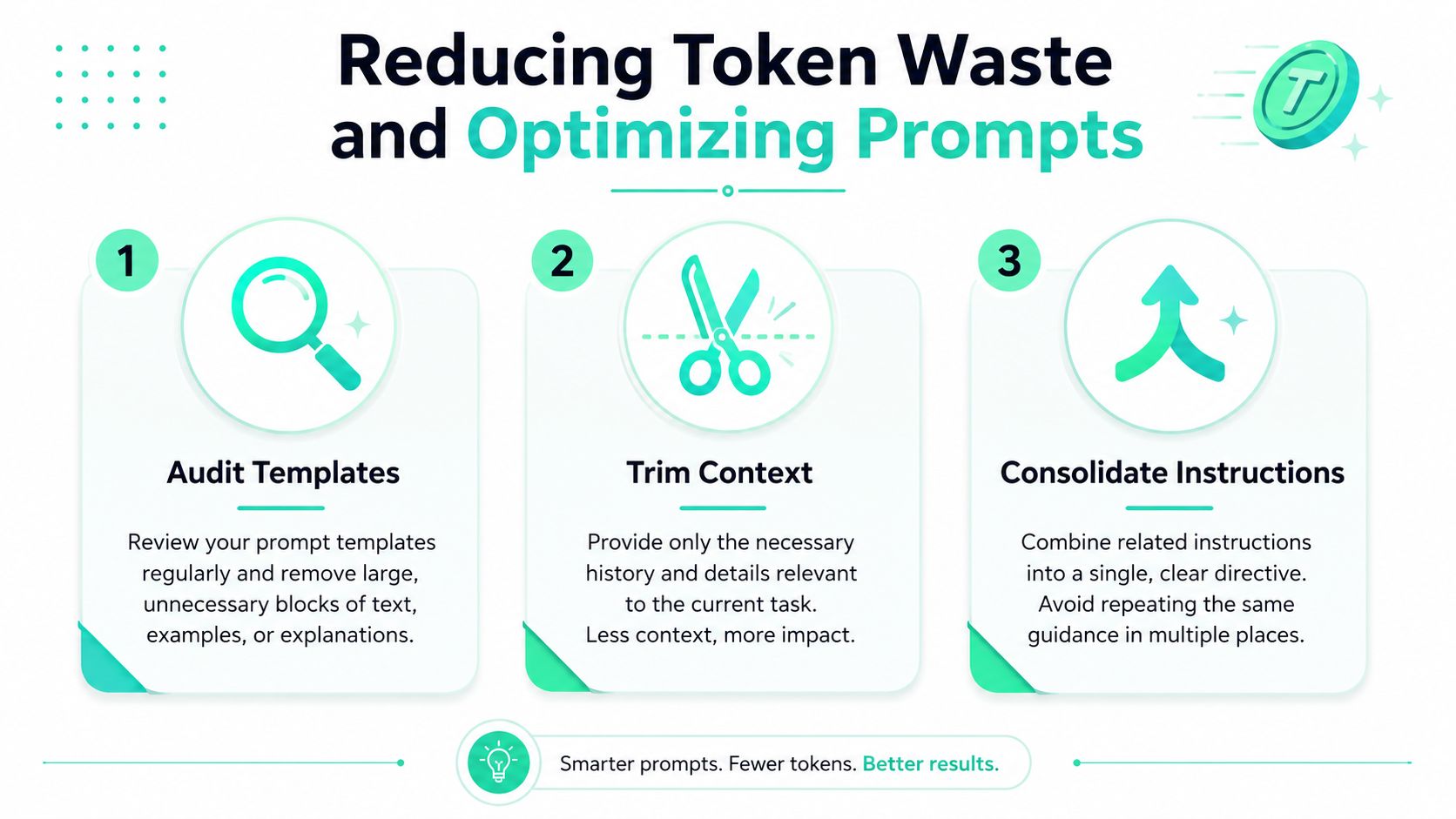
Audit templates before changing models
Inspect the largest repeated blocks first. Count the production prompt before sending it, locate instructions duplicated across system and user messages, and remove examples that do not affect the decision. Pre-request token counting helps teams check context limits and estimate request costs.
A small reduction can matter across a high-volume workflow. The saving depends on traffic, model rates, and whether the removed material was input or output, so calculate it from captured token totals instead of assuming a fixed percentage. Keep the same usage fields in your telemetry during any migration, allowing prompt changes and interface changes to be evaluated separately.
Trim context with a relevance rule
Do not send every prior turn just because it is available. Keep the system instruction, active user request, and history required to resolve references or maintain safety. In a support workflow, a compact policy excerpt and current issue may be more useful than an entire ticket thread.
A practical history policy retains recent turns, summarizes older context, and removes repeated acknowledgements. Apply the same rule to retrieved documents. Return passages that answer the question rather than the complete source corpus. Teams building these flows can use this guide to manage multi-turn conversations.
Consolidate instructions and control output
Put durable constraints in one system message. Avoid repeating “be concise” in every user turn, and request the output shape that the application consumes. If the interface needs a label, do not ask for an essay and discard most of it in application code.
max_tokens sets an upper bound for output, while billing reflects tokens the model produces. Set a reasonable cap to limit runaway responses, but leave enough room for valid answers. Compare revisions with fixed request parameters and, where appropriate, a fixed seed, so quality and token changes are easier to attribute.
Prompt caching can reduce repeated-context cost when the selected provider and model support it. Treat cache efficiency as an observed signal. Stable prefixes, consistent request construction, and recorded cache fields provide a clearer basis for decisions than assuming repeated instructions will always receive a discount.
Handling Errors and Rate Limits in Production
A production Chat Completions client needs a recovery policy, not just a try statement. A 429 rate limit error usually calls for controlled retry behavior, while an invalid request should be fixed or rejected rather than replayed. Authentication failures, malformed parameters, and unsupported features also belong in the non-retryable path unless the underlying configuration changes.
Use exponential backoff with jitter for retryable failures. Keep the retry count bounded, record the status and request identifier when available, and avoid retrying every request simultaneously after an outage. A circuit breaker can temporarily stop new attempts when failures cross your service's threshold, protecting your own worker pool from a cascading backlog.
Separate recovery from degradation
When the provider is constrained, decide what the product can still do:
- Queue low-priority work: Defer batch summarization or enrichment rather than blocking interactive traffic.
- Use a fallback model: Select a tested lower-cost or lower-capability model for tasks with a defined quality floor.
- Return a useful partial state: Acknowledge receipt and let the user retry when an immediate answer isn't essential.
- Preserve idempotency: Attach an application request identifier so a retry doesn't create duplicate side effects.
Monitor error rates by model, endpoint, workflow, and release. A rise in failures after a prompt or model change can indicate an invalid parameter, context overflow, or unsupported feature rather than general provider pressure. Alert on both errors and latency, since a service can degrade materially before requests begin failing.
max_tokens deserves careful interpretation. A high ceiling doesn't increase billing unless the model generates more text, but it can allow responses that are too long for the product or consume capacity unnecessarily. OpenAI's usage guidance confirms that input and output tokens affect cost, latency, and context limits, so output control remains part of reliability engineering. (OpenAI advanced usage guidance)
A resilient implementation treats retries as a scarce resource. It backs off, caps concurrency, classifies failures, and measures the value of degradation paths in advance. That design saves time during incidents because operators can choose a known fallback instead of improvising against a growing queue.
Quick Reference Guide for Chat Completions API
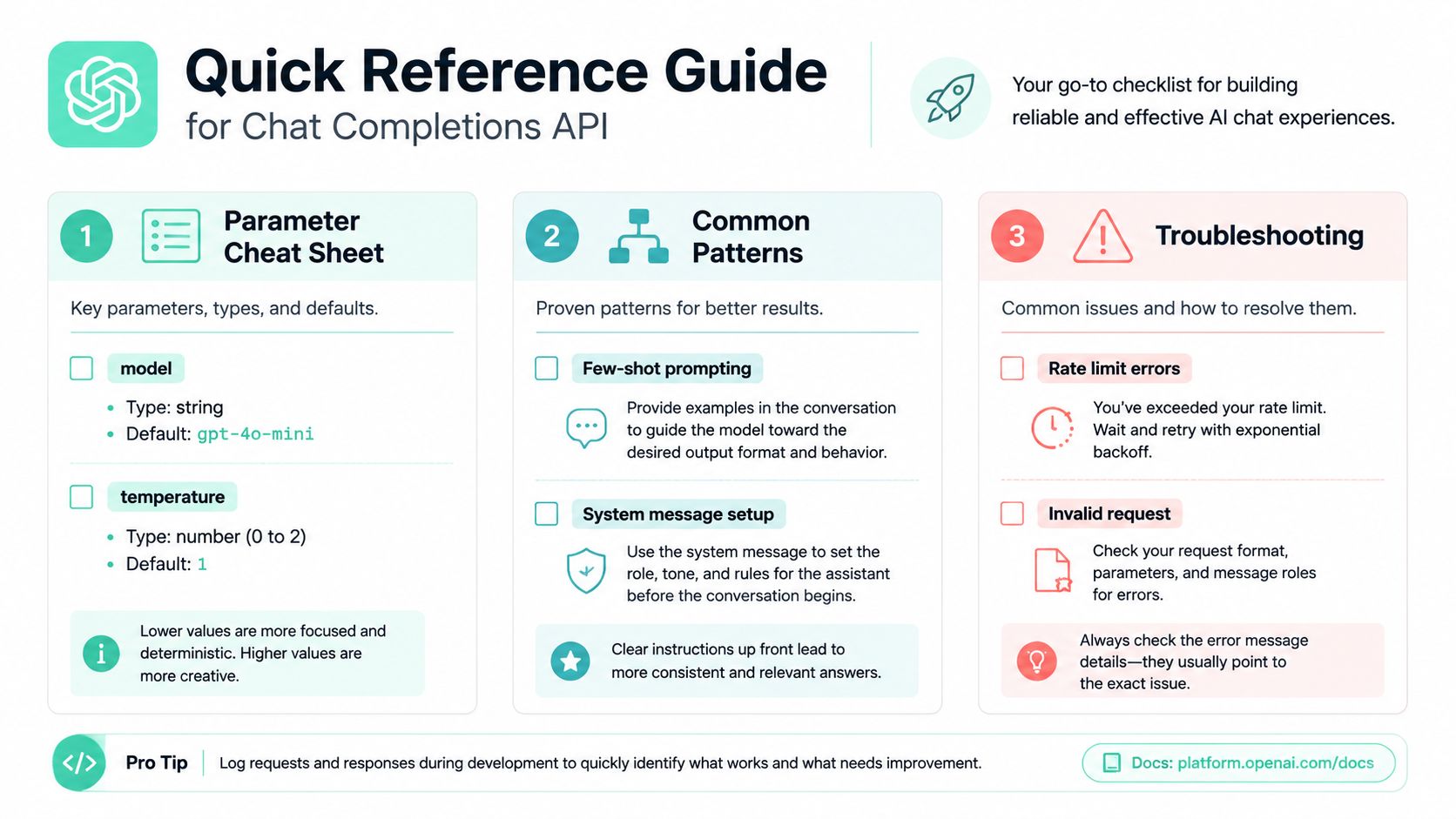
Use this as a compact operating checklist.
| Parameter or field | Practical use |
|---|---|
model |
Selects capability and pricing profile |
messages |
Supplies role-tagged conversation context |
temperature |
Controls output variation |
max_tokens |
Caps generated output |
stream |
Returns chunks for progressive rendering |
store |
Enables later retrieval when set to true |
metadata |
Adds lightweight attribution labels |
usage |
Reports prompt, completion, and total tokens |
seed |
Supports deterministic replay when parameters remain constant |
For a single-turn call, send one system message and one user message. For a multi-turn call, retain only the history needed for the current response. For streaming, consume delta chunks and keep a separate test path that inspects complete usage. For cost attribution, record usage, model, workflow, environment, and request outcome together.
When debugging, check the request shape first, then model availability, token limits, authentication, and rate-limit behavior. Count tokens before expensive or context-heavy calls, and compare actual input and output totals after the response. If your application needs built-in tools, file workflows, or background processing, evaluate Responses before adding another workaround to Chat Completions.
SpendLens AI helps teams instrument existing OpenAI and Anthropic clients, attribute token usage by workflow and model, and identify prompt waste, cache-efficiency gaps, and lower-cost model opportunities. Visit SpendLens AI to connect Chat Completions usage to concrete spend reports and prioritize changes that can save money without refactoring the provider request path.