
Cost of API: A Practical Guide to LLM Spend
Learn what drives the cost of API usage, how to forecast LLM spend, and how to cut OpenAI and Anthropic bills with proven optimization strategies.
Most cost of api advice starts and ends with the headline rate card. That's the wrong frame. If you've ever opened a bill and wondered why a “cheaper” API or model still cost more than expected, the answer is usually buried in payload size, token mix, retries, caching behavior, and model choice, not the posted per-call number.
A FinOps lens fixes that mistake. API spend is really a question of architecture and instrumentation, because the invoice reflects how requests are shaped, how much context they carry, and which workloads are routed to which model. In practice, the teams that control spend don't just compare rates, they measure the actual value metric, meter usage at the gateway or decorator level, and tie cost back to the workflow before the invoice arrives.
Table of Contents
- Why the Per-Call Price Is a Lie
- How Token-Based Pricing Works
- Comparing Providers on Real Dollar Math
- Forecasting Your Next Invoice With Confidence
- Billing Pitfalls That Survive Good Forecasts
- Optimization Moves With Measured Savings
- Instrumenting Spend Before the Invoice Arrives
- Your 30-Day Cost of API Action Plan
Why the Per-Call Price Is a Lie
A per-call price looks clean because it hides the shape of the bill. The posted rate might be simple, but the invoice usually isn't, because the cost of API usage depends on more than requests. A workload that sends longer prompts, returns verbose output, or moves large payloads can cost more even when the call count looks identical.
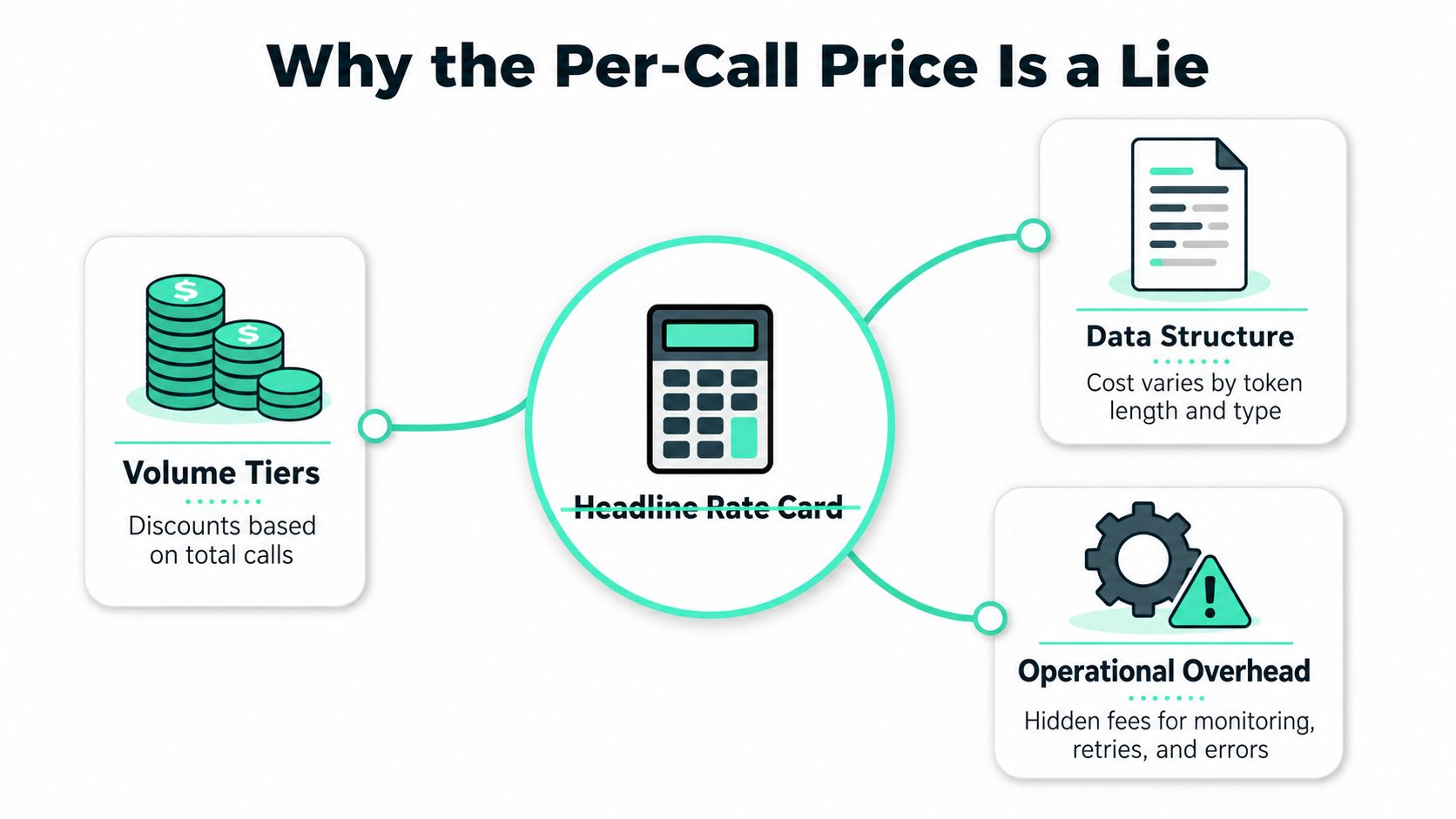
The useful mental model is simple. Request volume is only one driver, payload size changes transfer cost, model choice changes token economics, and prompt engineering changes how many tokens each call consumes. That's why the industry shift toward usage-based pricing tied to the actual value metric matters, because call counts often fail to reflect the service's real cost or customer value, and teams now meter transactions processed, messages delivered, or predictions made instead of stopping at request totals.
Practical rule: if a dashboard only shows “calls,” it's incomplete. You need endpoint-level usage, cache visibility, and a way to attribute spend to the workflow, team, or customer that drove it.
The AWS API Gateway benchmark makes the point brutally clear. HTTP APIs cost $1.00 per million requests, while REST APIs cost $3.50 per million requests, and response payload transfer is billed separately at standard EC2 data transfer rates, with the first 100 GB/month free, then $0.09/GB for the first 10 TB and as low as $0.05/GB beyond 150 TB monthly (AWS pricing). So the same workload can have very different unit economics depending on API type and response size.
| Driver | How It Inflates Cost | Typical Signal |
|---|---|---|
| Request volume | More calls mean more metered usage | Spikes in call volume |
| Payload size | Larger responses increase transfer cost | Bigger response bodies |
| Prompt length | More context means more tokens | Growing input size |
| Model choice | Different tiers bill at different rates | Uneven spend by workload |
| Operational overhead | Monitoring, retries, and attribution add cost | Hidden support and tooling spend |
The key point is that cost of API is architectural, not just pricing-table math. If a team optimizes the rate card but ignores how the system generates tokens, payloads, and retries, the invoice wins every time.
How Token-Based Pricing Works
Token pricing gets easier once you stop thinking in terms of “one call equals one price.” LLM billing usually splits usage into input tokens, cached input tokens, and output tokens, and the output side usually costs more because the model is generating new text instead of just reading it. The practical lever is prompt length, because every extra chunk of context gets charged again across calls.
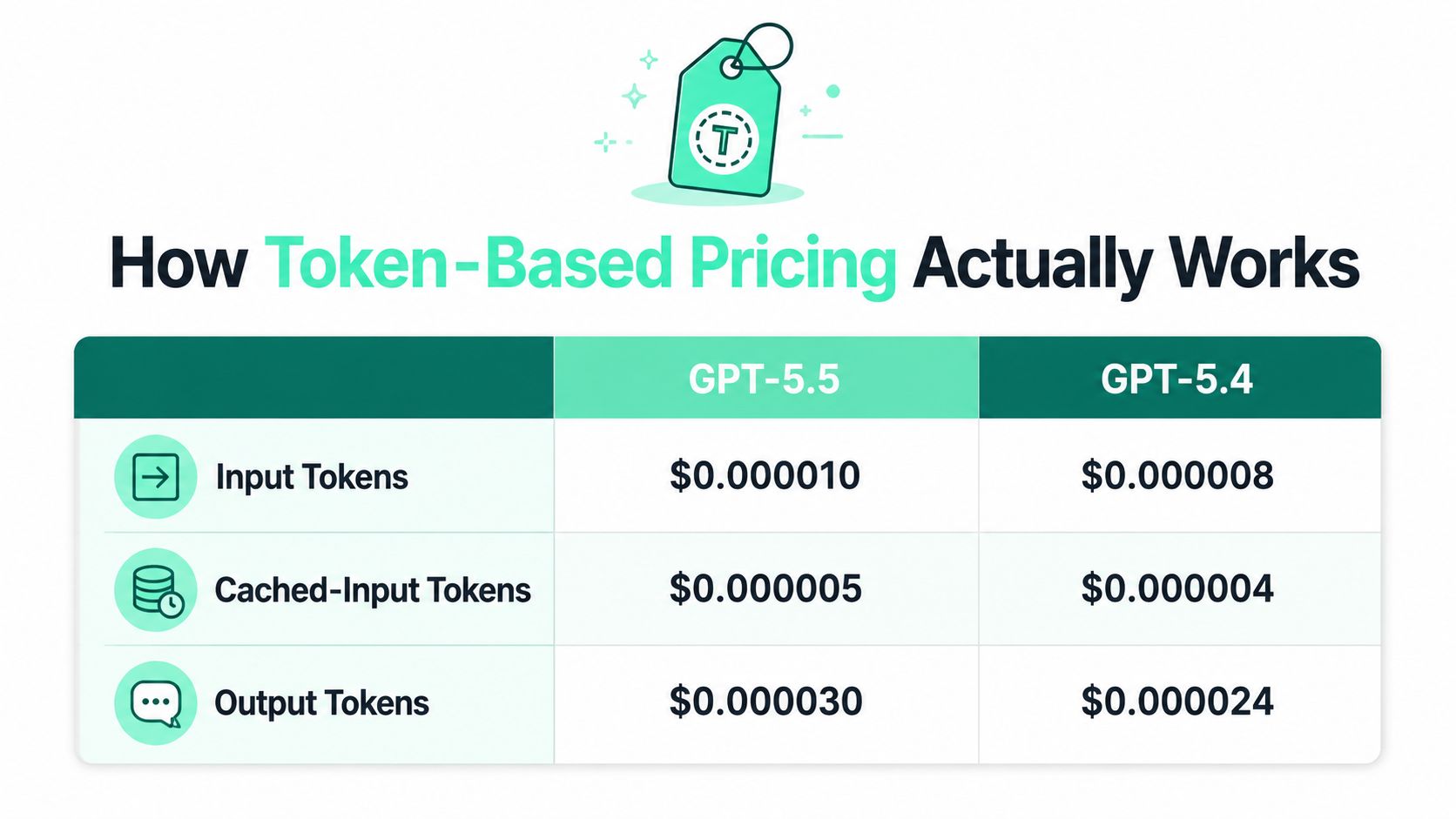
OpenAI's published pricing gives a clean side-by-side example. gpt-5.5 is priced at $5.00 per 1M input tokens, $0.50 per 1M cached input tokens, and $30.00 per 1M output tokens, while gpt-5.4 is $2.50 input, $0.25 cached input, and $15.00 output, which is 50% cheaper across the same token categories (OpenAI pricing). For a workload with 10M input tokens and 5M output tokens, that works out to about $200 on gpt-5.5 versus about $100 on gpt-5.4, a real $100 difference for identical usage.
The simplest mental model is this:
Cost = token price × token count × call frequency
That formula sounds basic, but it keeps teams honest. If the prompt gets longer, cost rises. If calls increase, cost rises. If the model shifts to a more expensive tier, cost rises. The bill only drops when one of those variables comes down, or when cached input replaces repeated context on supported models.
For a practical breakdown of how inference fits into that equation, the internal guide on LLM inference basics is worth pairing with this pricing view. In day-to-day engineering, the point is not to memorize every rate card. The point is to see which part of the prompt is reusable, which part is waste, and which part deserves the expensive model.
Output tokens deserve special attention because they are often the silent multiplier. Teams usually optimize prompts first, but response style can still drive spend if it keeps producing long, unnecessary answers.
Comparing Providers on Real Dollar Math
Rate cards are much easier to understand when the workload stays fixed. A useful comparison is 10M input tokens and 5M output tokens per month, because it forces the provider choice to stand on real dollar math instead of brand preference. Once you do that, the cost of API becomes a portfolio decision, not a philosophical one.
| Provider | Input Rate | Output Rate | Monthly Cost |
|---|---|---|---|
| OpenAI gpt-5.4 | $2.50 per 1M input tokens | $15.00 per 1M output tokens | About $100 |
| Google Gemini Developer API | $1.50 per 1M input tokens | $9.00 per 1M output tokens | About $60 |
| OpenAI gpt-5.5 | $5.00 per 1M input tokens | $30.00 per 1M output tokens | About $200 |
Google's Gemini Developer API is the lowest-cost benchmark in this set, with $1.50 per 1M input tokens and $9.00 per 1M output tokens, plus context caching storage at $0.15 per 1,000,000 tokens per hour (Gemini pricing). On the same 10M input and 5M output workload, that comes out to about $60, which is materially lower than the OpenAI flagship example and useful when you're building a mixed-provider stack.
The table is more than a pricing exercise. It shows why model selection is often the most impactful decision in the bill, because a workload can be economically viable on one provider and expensive on another without changing the product at all. That's why a team should compare providers at the workload level, not the model page level.
For a broader comparison mindset, the internal guide at cheapest AI API fits well here. The practical move is to build one sheet with the same token assumptions across providers, then test the cheapest model that still meets quality requirements for each workload category. A classification task and a customer-support draft don't deserve the same spend ceiling.
Cross-provider flexibility is itself an optimization strategy. If you can move low-risk extraction or classification work to a lower-cost tier without breaking quality, you buy room for the expensive workloads that actually need it.
Forecasting Your Next Invoice With Confidence
A decent forecast starts with a simple formula, not a guess. Estimate spend as calls per day × tokens per call × days per month × blended rate, then adjust for output ratio and cache hit rate. That gives finance a number that can be defended, and it gives engineering a target that can be improved.
The published chatbot benchmark makes the variance obvious. A workload of 100,000 messages per month, 1,000 tokens per message, and a 75% input / 25% output split costs about $13.75 on GPT-5 Nano, $68.75 on GPT-5 Mini, $343.75 on GPT-5, and $562.50 on GPT-5.4 (2026 benchmark article). The same source shows that when messages grow to 2,000 tokens each, GPT-5 Mini rises to $137.50 and GPT-5 rises to $687.50, which is a blunt reminder that prompt length drives spend directly.
| Scenario | Messages per Month | Tokens per Message | Model Example | Monthly Cost |
|---|---|---|---|---|
| Light | 100,000 | 1,000 | GPT-5 Nano | About $13.75 |
| Baseline | 100,000 | 1,000 | GPT-5 Mini | About $68.75 |
| Heavy | 100,000 | 1,000 | GPT-5.4 | About $562.50 |
The easiest way to forecast is to build three rows in a spreadsheet, one for light usage, one for the current baseline, and one for a heavier month. Then change only one variable at a time, usually prompt length or call frequency, so the sensitivity is obvious. If a workload doubles in tokens, it usually doubles in cost, and that's the number product managers understand fastest.
For a quick hands-on estimator, the internal calculator is a useful companion to the spreadsheet. It's also worth watching the embedded walkthrough below, because a forecast is only useful when it changes how the team behaves.
The operational goal is simple. Forecast before launch, refresh monthly, and compare actuals against the scenario you expected to be normal. That habit saves time in finance reviews and prevents the “surprise invoice” scramble that burns engineering hours after the fact.
Billing Pitfalls That Survive Good Forecasts
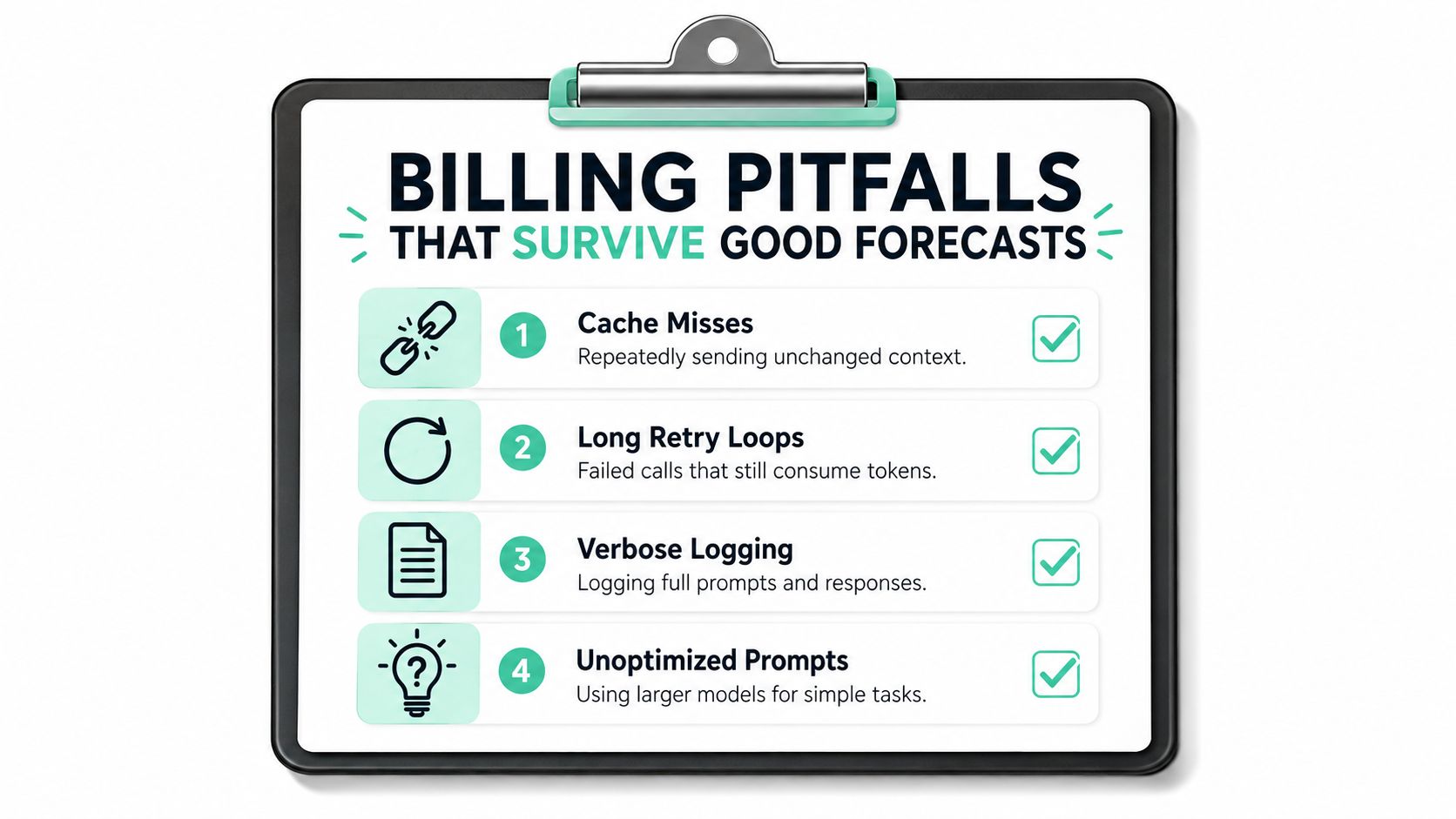
Good forecasts still miss cost drivers when the instrumentation is too shallow. The invoice usually exposes what the dashboard ignored, especially when the system resends repeated context, retries failing requests, or logs too much payload. That is where the hidden cost of API work starts to slip past the forecast.
Payload size matters for more than token cost. Larger requests can also increase transfer spend, so a raw request counter hides which endpoint is driving the bill. Stripe's cost guidance points in the same direction, because teams need continuous monitoring, endpoint-level breakdowns, alerts, historical trend analysis, and attribution by team or customer to see the drivers (Stripe guidance).
The four problems that survive a decent forecast are usually the same ones:
- Cache misses, which resend unchanged context and make repeated work look like fresh work.
- Long retry loops, which burn tokens again when upstream services fail.
- Verbose logging, which records full prompts and responses and bloats storage or observability spend.
- Unoptimized prompts, which send simple tasks to expensive models or keep instructions longer than they need to be.
A fast diagnostic checklist helps. Compare cache hits against repeated prompt templates. Look at retry counts for flaky endpoints. Check whether logs store full payloads or just metadata. Review whether simple extraction or classification tasks still route to flagship models.
If a bill surprises you, inspect the retry path first. Teams often blame the model when the real problem is a loop that keeps paying for the same failed attempt.
The point is not to chase every penny. It is to identify the few patterns that compound into real spend, then fix the ones that recur every day.
Optimization Moves With Measured Savings
The best savings usually come from boring moves, not heroic rewrites. Start with the levers that change cost without changing the product experience, then move to higher-risk model substitutions only where the workload is stable. That order matters because it keeps the team from trading savings for support tickets.
A practical triage sequence looks like this:
- Prompt caching first, because repeated context is the easiest waste to remove on supported models.
- Model downshift next, especially for classification, extraction, and other low-risk tasks that do not need flagship reasoning.
- Output trimming after that, since shorter responses mean fewer tokens and cleaner UX.
- Request batching where it fits, especially for internal workflows that do not need per-item immediacy.
- Structured outputs last, because clearer schemas often reduce retries and downstream parsing work.
The savings potential depends on the workload. The verified pricing data shows that switching from gpt-5.5 to gpt-5.4 cuts the same token categories by 50%. For repeated context, cached input pricing is much lower than uncached input, so cache-friendly workloads can see a large drop in repeated-context cost when the provider supports it. Gemini shows a different low-cost baseline for the same token mix, so model choice changes the bill in more than one direction.
For teams that want a lower-cost model option inside a cost-tracking workflow, SpendLens AI is one option. It adds lightweight instrumentation for OpenAI and Anthropic workloads, tracks spend by project and model, and surfaces savings recommendations alongside cache efficiency and prompt waste signals. That matters when the optimization problem is not “find the cheapest model,” but “find the cheapest model that still works for this endpoint.”
The most significant mistake is using a flagship model everywhere because one workflow once needed it. A better pattern is to separate the workload by intent, then route simple jobs to cheaper tiers and reserve expensive models for cases where quality directly moves the product.
For endpoint-level analysis, endpoint monitoring gives the team the context needed to see whether a savings move is holding up in production. A model switch that looks clean in a spreadsheet can still fail if retries climb, prompts get longer, or cache hit rates fall after the rollout.
Instrumenting Spend Before the Invoice Arrives
Telemetry changes the argument. A single decorator and a few workload tags turn each call into a labeled event with the project, model, provider, cache efficiency, and estimated cost attached. Keep the instrumentation outside the request path so measurement does not add latency or force awkward routing decisions.
That setup also helps with privacy. Metadata-only tracking, hashed API keys, and template-only prompt sampling preserve enough structure to analyze spend without storing every prompt and response by default. Engineering teams get a usable cost map without turning observability into a compliance headache.
The internal guide on endpoint monitoring is the right follow-on if you are deciding where to attach that decorator. Once the data is there, the dashboard should answer three questions quickly, which workload is expensive, which model is being overused, and where the biggest savings opportunity sits. Anything less is just a prettier invoice.
A dashboard is useful only when it changes behavior. If it cannot point to one workflow, one model, and one next action, it is reporting, not control.
The daily operating habit is simple. Tag once, measure continuously, and review spend by workload instead of by provider alone. That gives finance a chargeback story, engineering a model-switch path, and product a way to keep AI features aligned with budget. It also makes the next review faster, because the team can identify the primary drivers instead of arguing over noise, and it avoids the failure mode where the root cause is a loop that keeps retrying the same expensive request.
Your 30-Day Cost of API Action Plan
Week one is visibility. Tag every LLM call, capture the workload name, and record a baseline cost per endpoint so the team can see where money is going before trying to save it. That one move usually saves time later because the next review starts with facts instead of guesswork.
Week two is quick wins. Enable prompt caching where the same context repeats, then trim the longest system prompts and remove duplicate instructions that don't change output quality. Week three is model triage, where you test cheaper tiers on extraction, classification, and other low-risk tasks, then measure quality against the current baseline.
Week four is governance. Set spend alerts by project, ship a daily summary to leadership, and compare actual spend against your forecast so surprises don't linger until month-end. If you want to replace the spreadsheet with telemetry, use the hosted savings calculator and quickstart in SpendLens AI's docs, then keep one rule in place permanently, every new AI workflow gets instrumented before it scales.
If you're tired of guessing at the cost of API work, use SpendLens AI to tag workloads, break down spend by model and provider, and surface the savings opportunities hiding in your current prompts. It's built for teams that want to see the invoice while there's still time to change it, not after finance has already closed the month.