
10 AI Coding Prompts for Smarter LLM Costs
Explore 10 AI coding prompts for debugging spend, optimizing tokens, testing models, tracking savings, and reducing LLM costs with practical templates.
A technically correct script can still make your AI bill worse. The code may use an unnecessarily expensive model, resend the same repository context, miss cache opportunities, generate oversized outputs, or provide no way to attribute the request to a feature or customer. That's why the best AI coding prompts optimize more than code.
The timing matters. The 2024 Stack Overflow AI survey found that 76% of respondents were using or planning to use AI tools in development, up from 70% the year before. Prompt-driven engineering is now part of normal software operations, not a side experiment. A large-scale ICSE 2024 survey also found that GitHub Copilot users reported 30.5% of their code was written with help from the tool (ICSE research).
The 10 prompts below focus on attribution, model choice, token waste, caching, batching, anomaly response, reporting, ROI, forecasting, and governance. Adapt each template with the smallest necessary context. Evaluate implementation effort, quality or reliability risk, time saved, and potential monthly savings. SpendLens AI can help teams validate attribution, token waste, cache efficiency, model alternatives, and workload-level spend without replacing existing provider clients.
For a broader introduction to natural-language development, see this practical guide to vibe coding.
Table of Contents
- 1. LLM Cost Attribution and Spend Tracking Prompt
- 2. Model Comparison and Cost Optimization Prompt
- 3. Prompt Optimization and Token Waste Detection Prompt
- 4. Prompt Caching Strategy and Cache Hit Maximization Prompt
- 5. Batch Processing and Async Workload Optimization Prompt
- 6. Cost Anomaly Detection and Spike Investigation Prompt
- 7. Multi-Provider Cost Reconciliation and Unified Reporting Prompt
- 8. Feature-Level ROI and Cost-Per-Value Prompt
- 9. Cost Forecasting and Budget Planning Prompt
- 10. Compliance, Security and Cost Governance Prompt
- 10 AI Coding Prompts: Cost & Optimization Comparison
- Turn Prompt Experiments Into Measured Savings
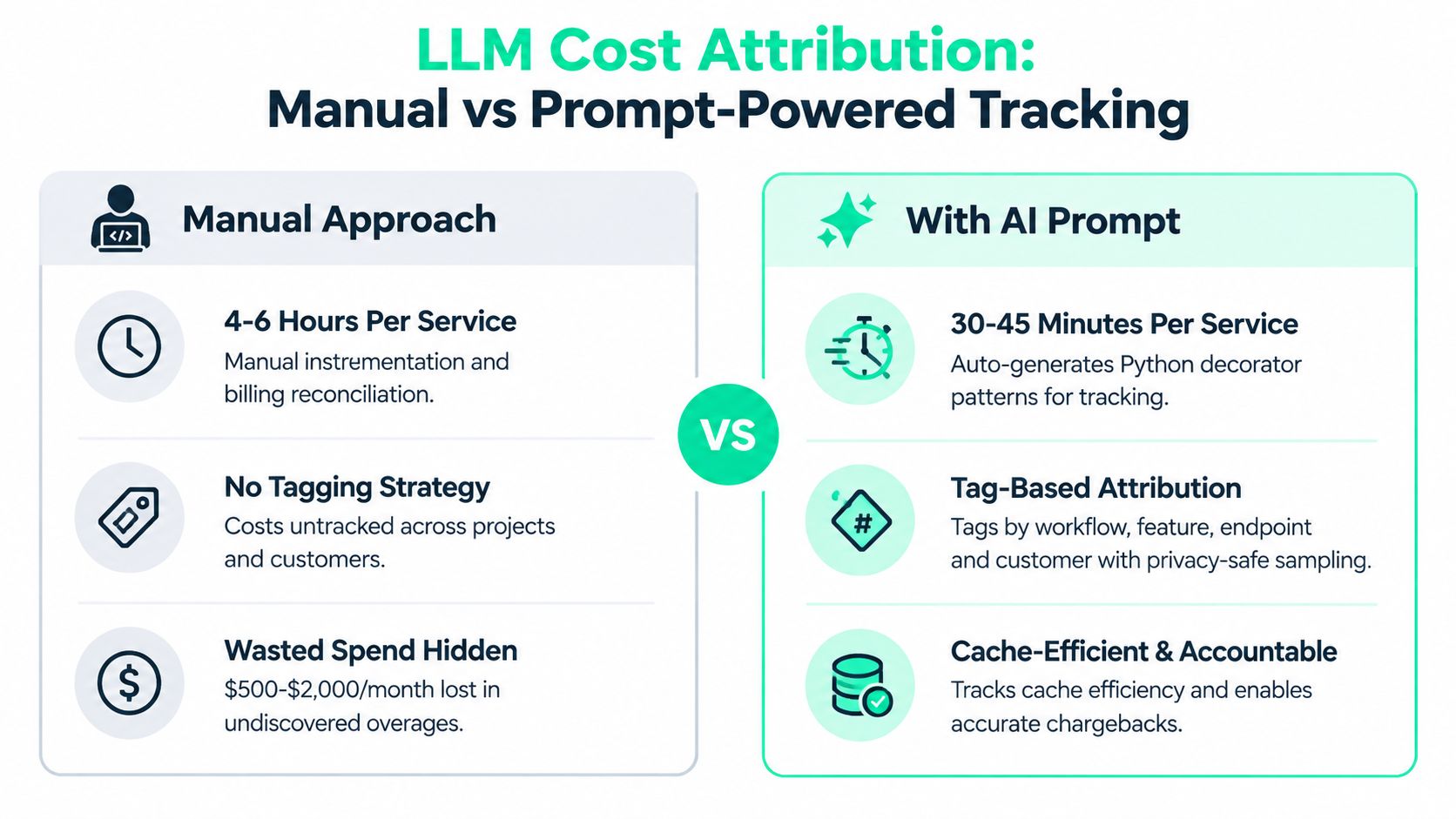
1. LLM Cost Attribution and Spend Tracking Prompt
Unattributed usage turns an AI invoice into an argument. Engineering sees aggregate provider spend, product sees feature activity, and finance can't tell which customer or workflow caused the increase. The first prompt should generate instrumentation that makes every meaningful call explainable.
Use a prompt like this:
“Add lightweight instrumentation to these existing OpenAI and Anthropic calls. Preserve the current clients, retries, and error handling. Tag each call by service, environment, project, workflow, task, feature, endpoint, and customer where available. Use hierarchical tags, record input, cached, and output token usage, and return a small patch plus a validation query. Avoid storing raw user content. Explain the expected implementation effort and privacy risks.”
The important design choice is tag hierarchy. Start with service and environment, then add project, workflow, and task dimensions. A SaaS platform might tag calls with customer_id and discover that one account consumes 40% of the budget, while an e-commerce company could tag search, recommendations, and support to find that search uses three times more tokens than expected. A fintech team might attribute spend to endpoints and uncover a legacy route using a more expensive model than a newer route.
Use consistent naming across teams before rollout. Sample only 5% to 10% of prompts initially, balancing diagnostic value with privacy overhead. A developer-first tracker such as SpendLens AI's LLM cost tracking approach can help connect calls to projects, workloads, features, experiments, and endpoints.
The payoff is faster investigation. Instead of searching provider logs manually, an engineer can identify the high-cost customer, feature, or endpoint and test one targeted change.
2. Model Comparison and Cost Optimization Prompt
The expensive model is often handling work that doesn't need its full reasoning or context capacity. But switching models based on benchmark reputation is risky because your prompts, schemas, context windows, latency requirements, and failure modes are different.
Ask the coding assistant to create an evaluation harness rather than a replacement:
“Build an A/B test for this exact workload across OpenAI, Anthropic, Gemini, Qwen, Mistral, DeepSeek, and Llama options. Reuse the same prompts, inputs, schemas, and validation tests. Capture token usage, latency, retries, invalid outputs, human ratings, and cost. Define a quality gate before recommending a switch. Start with a low-traffic or offline cohort and return the smallest production-safe patch.”
A model comparison is useful only when it measures quality and cost together. An AI startup might move routine tasks from GPT-4 to GPT-3.5-turbo and save $3,200 per month without quality degradation. A content platform could replace Claude for summarization with Llama 2, cutting inference costs 65% with an accuracy drop below 2%. A support chatbot might use Mistral for tier-one routing, reducing costs 45% while maintaining accuracy. These are scenarios to test, not assumptions to copy into production.
Set the quality threshold before the experiment. The prompt should specify what counts as failure, such as schema errors, factual defects, escalation mistakes, or unacceptable user ratings. Track latency and retry rates as well as tokens, because a cheaper model that fails more often can increase total spend.
For a practical comparison workflow, use AI model cost comparison guidance to organize workload-level evidence.
3. Prompt Optimization and Token Waste Detection Prompt
Token waste rarely comes from one dramatic mistake. It accumulates through duplicated system instructions, oversized templates, repeated examples, irrelevant files, and outputs that answer more than the application needs. Code assistants can find these patterns, but only if you ask them to preserve behavior while measuring the reduction.
A useful prompt is:
“Analyze this prompt template and its call site for redundant instructions, repeated context, unnecessary examples, oversized output requirements, and irrelevant repository content. Produce a shorter version that preserves the required behavior. Return the before-and-after token estimate, expected quality risks, test cases for edge inputs, and a focused diff. Don't remove constraints that protect safety, formatting, or correctness.”
The operational sequence matters. Use prompt sampling to identify the largest templates, then refactor one workload at a time. A customer-support system might consolidate system messages and reduce token use 40%, saving $1,400 per month. A document pipeline could trim context from 8K to 2K tokens and cut costs 60%. A multi-step reasoning template might shrink from 1,200 to 400 tokens while retaining accuracy.
Those figures describe possible optimization outcomes, not a guarantee. Test diverse inputs because a shorter prompt can look successful on ordinary cases and fail on exceptions. Measure latency too. Compression may reduce input cost while adding preprocessing work or increasing retries.
Preserve the contract: Ask for a patch, test cases, and a quality comparison. A shorter prompt isn't an improvement if it creates more invalid outputs.
Version every template and tag its workload. That lets you connect a prompt revision to token use, latency, failures, and spend rather than relying on a developer's impression.

4. Prompt Caching Strategy and Cache Hit Maximization Prompt
Repeated context is a billing problem and a design problem. System instructions, policy text, schemas, and reference material often remain stable while only the user input changes. If the application constructs the prompt nondeterministically, it may prevent the provider from recognizing that reusable prefix.
Ask for caching code with explicit key analysis:
“Inspect this prompt construction for stable and dynamic sections. Generate an OpenAI and Anthropic caching configuration that caches large static instructions and reference content while leaving user-specific data dynamic. Remove timestamps and random identifiers from cached sections. Add cache-hit, token, latency, freshness, and fallback metrics. Return a small patch and an ROI calculation based on observed usage.”
Start with stable system messages and instruction sets. Don't cache data that changes frequently until the freshness and invalidation rules are clear. A document-retrieval system might cache system prompts and chunked documents, achieving a 75% cache hit rate and saving $4,500 per month. A legal-review platform could cache contract templates and reduce per-review cost from $2.40 to $0.65. A reporting engine might cache large reference datasets and reduce token spend 70% on repeated quarterly reports.
The economics support measuring this carefully. A 2026 guide reports cached GPT-5 input tokens at about $0.125 per million, compared with $1.25 per million for standard input tokens, making cached tokens around 10 times cheaper in that pricing example (DigitalOcean's prompt-caching guide). Another evaluation found caching reduced API costs 45% to 80% and improved time to first token 13% to 31% across providers (the long-horizon caching evaluation).
Track hit rate and freshness together. Cache hit ratio guidance helps teams decide whether the added complexity is producing measurable savings.
5. Batch Processing and Async Workload Optimization Prompt
Interactive requests need fast responses. Nightly enrichment, backfills, reports, and bulk classification usually don't. Sending every offline task through a synchronous path forces the application to pay for immediacy it doesn't need and makes throughput harder to manage.
Give the assistant the workload boundary first:
“Convert this synchronous LLM workflow into an asynchronous queue with batching for non-urgent jobs. Preserve retries, idempotency, ordering requirements, validation, and the existing SLA. Add a circuit breaker that falls back to the standard API if the batch queue falls behind. Report batch size, wait time, throughput, failures, token use, and cost. Return the schema changes, worker patch, and rollback plan.”
Good candidates include daily reports, document backfills, bulk moderation, and data enrichment. An analytics platform could batch daily report generation and cut LLM costs 50%, moving from $2,000 per month to $1,000. A moderation system might use a batch API for non-urgent review and save $5,000 per month while maintaining its SLA. A data-enrichment pipeline processing 10,000 or more records nightly could reduce monthly cost from $8,000 to $3,200.
The risk is delayed or uneven completion. The generated code should include queue-depth alerts, a deadline, idempotency keys, and a fallback route. Schedule work during off-peak periods when possible, but validate that the provider's batch behavior matches your required completion window.
Use workload-level spend data to separate high-volume offline jobs from customer-facing requests. That prevents a cost optimization from accidentally changing the user experience.
6. Cost Anomaly Detection and Spike Investigation Prompt
A bill spike is only useful as a signal if the team can explain it. Raw spend doesn't identify whether a deployment expanded context, a retry loop multiplied calls, a customer triggered abnormal usage, or a model switch changed unit economics.
Ask the coding assistant to generate both detection and investigation logic:
“Create monitoring and alerting for cost per request, cost per feature, token counts, model selection, retries, and customer-level usage. Compare current behavior with a stable baseline. When an anomaly appears, correlate it with deployments, prompt versions, onboarding events, and configuration changes. Return alert queries, a drill-down report, a rollback suggestion, and a daily digest.”
A startup might detect a three-times cost increase 12 hours after deployment, trace it to a 10-second context window, roll back, and avoid $1,500 in additional spend. A SaaS platform could catch GPT-4 usage where GPT-3.5-turbo was intended, then find retry logic on one endpoint and fix it in 30 minutes. A B2B product might detect a two-times increase from one customer sending 50,000 daily requests because of an integration bug, preventing $3,000 per month in unexpected spend.
These scenarios show why alerts need dimensions, not only totals. Start with thresholds around 20% to 30% above normal variance, then tighten them as usage patterns stabilize. Correlate spend with prompt versions and deployments so the alert points toward a cause.

A daily digest serves a different purpose from an emergency alert. It should name the top driver, the affected workload, the likely cause, and the highest-impact recommendation.
Cost anomaly detection workflows can support this investigation model.
7. Multi-Provider Cost Reconciliation and Unified Reporting Prompt
Provider dashboards use different names, token categories, billing exports, and cache fields. Without normalization, a team can mistake a lower listed token price for a lower total workload cost, especially when retries, completions, or cached prefixes differ.
Use this prompt to generate a reporting layer:
“Ingest billing and usage data from OpenAI, Anthropic, Gemini, Groq, Qwen, Mistral, DeepSeek, and Llama-based providers. Normalize provider-specific fields into a common schema. Separate input, cached input, output, retries, latency, and workload tags. Reconcile provider totals daily and flag discrepancies. Generate product-team chargeback reports and a query for per-1,000-token cost.”
Normalize to per-1,000-token units for an initial comparison, but don't stop there. Preserve raw provider fields so finance can reconcile invoices and engineering can investigate cache behavior. Run reconciliation daily or weekly, depending on billing latency and reporting needs.
An enterprise SaaS team might unify three providers and discover that 15% of spend on Groq could move to Anthropic at a 30% cost reduction. A fintech startup could reconcile four product teams and reduce total spend 12% through accountability. A consultancy might find Gemini's cheaper model sufficient for 40% of workloads, saving $2,200 per month.
Reporting rule: Keep cost by provider, model, workload, and team visible at the same time. Aggregation without attribution hides the decision.
The useful output isn't a decorative dashboard. It's a reconciled dataset that supports model tests, chargeback, budget reviews, and migration decisions.
8. Feature-Level ROI and Cost-Per-Value Prompt
Usage isn't value. A feature can be popular, expensive, and commercially weak. Conversely, a low-volume workflow may justify its cost because it improves retention, conversion, resolution quality, or another outcome that matters to the business.
Ask the assistant to connect operational data with product metrics:
“Create a feature-level ROI query and dashboard for this AI workflow. Join LLM cost, request volume, margin, conversion or revenue impact, satisfaction, and non-AI comparison data. Show cost per successful outcome and contribution margin. Separate results by user segment and use case. Return the SQL, metric definitions, data-quality checks, and a recommendation threshold for expanding, optimizing, or retiring the feature.”
Start at feature level. Refine to user segments and use cases once attribution is reliable. An e-commerce recommendation feature might cost $800 per month and generate $12,000 per month in incremental revenue, a 15-times ROI, supporting increased investment. A support platform could find AI response suggestions produce 0.2-times ROI for tier-two support and save $400 per month by disabling them there. A content platform might retire an AI-tagging feature costing $600 per month with no measurable user impact and redirect funding to search AI with eight-times ROI.
Treat these as decision scenarios, not universal benchmarks. The prompt should require margin, not revenue alone. High usage with thin margins can damage profitability, while a smaller feature can create stronger economic value.
Review the model regularly. Prompt optimization, caching, and volume changes can improve margins, but only if the dashboard preserves the relationship between spend and successful outcomes.
9. Cost Forecasting and Budget Planning Prompt
A monthly total tells you what happened. It doesn't tell you whether a product launch, seasonal peak, provider change, or usage trend will make the next budget inadequate. Forecasting becomes more useful when the model separates the drivers instead of projecting one aggregate line.
Ask for multiple scenarios:
“Build a forecasting model for AI spend using historical usage, provider, model, workload, seasonality, token mix, retries, and planned launches. Forecast total cost and cost by provider and workload. Include upside and downside cases with a 20% usage variance, pricing-change assumptions, confidence intervals, and a weekly update query. Return the data model, assumptions, and procurement decision points.”
A SaaS startup might forecast 18% monthly AI cost growth, size capacity contracts six months ahead, and save $8,000 over a year through a volume discount. A B2B platform could predict a two-times increase after a feature launch and secure budget approval before the quarter changes. An enterprise with seasonal Q4 demand might align token or GPU purchases with tax planning and working capital.
Those outcomes depend on accurate inputs. Forecast total spend, then disaggregate by provider and workload. Update weekly using a trailing 8 to 12 weeks of data where that history exists. Model upside and downside usage at plus or minus 20% so finance can see the cost of being wrong.
Include possible provider price changes as assumptions, not hidden facts. A forecast should show which variables the team can control, such as model routing, prompt size, cache utilization, and batch eligibility.
10. Compliance, Security and Cost Governance Prompt
Cost controls can create security controls, but blunt limits can interrupt legitimate work. Teams need a staged policy that begins with visibility, identifies unauthorized models and keys, and adds enforcement after the normal usage pattern is understood.
Use a governance prompt like this:
“Create a policy and audit automation layer for LLM usage. Require project, team, environment, feature, and customer tags. Detect unauthorized models, unrotated API keys, missing owners, and requests without cost metadata. Hash prompt content in audit logs rather than storing raw prompts. Add alerts first, then optional team caps, approval rules, rollback behavior, and a report showing prevented or redirected spend.”
A startup might set per-team caps of $500 per day and prevent a $12,000 mistake caused by an unchecked script. An enterprise could whitelist prompt templates and block developers from using an expensive model without approval, saving $3,500 per month. A SaaS platform might require cost tags on every new integration and improve budgeting accuracy 30% by reducing shadow spending.
Treat caps as guardrails, not the whole strategy. Initial team limits could sit at 120% to 150% of average historical spend, then tighten by 5% per quarter as teams remove waste. The exact policy should reflect service criticality and operational history.
Audit records should include the user, API key identifier, model, hashed prompt or template, workload, and cost. Privacy-aware tracking matters because teams need attribution without storing customer content by default. Governance is successful when it prevents surprises while preserving a clear path for approved exceptions.
10 AI Coding Prompts: Cost & Optimization Comparison
| Prompt | 🔄 Implementation Complexity | Resources Required | ⚡ Efficiency / Time Saved | 📊 Expected Outcomes & ⭐Quality | 💡 Ideal Use Cases / Key Advantages |
|---|---|---|---|---|---|
| LLM Cost Attribution & Spend Tracking Prompt | Medium, tagging strategy & code review | Dev effort, cross-team tag schema, instrumentation, privacy-safe sampling | 4–6 hrs → 30–45 mins per service | $500–$2,000/month saved; enables accurate chargebacks; ⭐⭐⭐⭐ | Chargeback, cost visibility, multi-feature cost breakdown |
| Model Comparison & Cost Optimization Prompt | Medium‑High, A/B harness + calibration | Representative production data, multi-provider access, test harness | 15–20 hrs → 2–3 hrs | 20–40% cost reductions; $1,000–$5,000/month; migration risk ratings; ⭐⭐⭐⭐⭐ | Provider selection, safe model migration, cost-for-quality tradeoffs |
| Prompt Optimization & Token Waste Detection Prompt | Low‑Medium, iterative prompt testing | Sample prompts, QA testing, prompt versioning | 8–12 hrs → 30–45 mins | 25–50% token reduction; $500–$3,000/month; latency ↓15–30%; ⭐⭐⭐⭐ | High-token templates, response-size reduction, immediate cost wins |
| Prompt Caching Strategy & Cache Hit Maximization Prompt | Medium, cache design & invalidation logic | Caching infra, high request volume, monitoring & ROI calc | 6–10 hrs → 1–2 hrs | Cached token cost ↓≈90%; $2,000–$8,000/month; latency ↓20–40%; ⭐⭐⭐⭐⭐ | High‑volume repetitive workloads (templates, reference data) |
| Batch Processing & Async Workload Optimization Prompt | High, queueing, batching, retry logic | Queue infra, batch API support, robust error handling | 10–15 hrs → 2–3 hrs | Batch pricing ~50% savings; $3,000–$10,000+/month; throughput ×3–5; ⭐⭐⭐⭐⭐ | Offline/throughput-focused jobs: reports, backfills, enrichment |
| Cost Anomaly Detection & Spike Investigation Prompt | Medium, tuning alerts & correlations | Monitoring, historical cost data, alerting, on-call playbooks | 4–8 hrs → 15–30 mins | Detect spikes in hours; $500–$2,000/month saved; faster RCA; ⭐⭐⭐⭐ | Rapid incident detection, post-deploy cost guardrails |
| Multi-Provider Cost Reconciliation & Unified Reporting Prompt | Medium‑High, normalization & upkeep | Provider APIs, normalization logic, FinOps processes | 3–4 hrs/week saved (manual reconciliation) | $800–$1,500/month labor saved; accurate cross‑provider reports; ⭐⭐⭐⭐ | Enterprises with multi‑provider deployments, chargeback needs |
| Feature-Level ROI & Cost-Per-Value Prompt | Medium, integrate business metrics | Cost + revenue/usage data, analytics, stakeholder alignment | 8–12 hrs → 1–2 hrs per feature | $1,000–$5,000+/month by deprecating/optimizing low ROI; ⭐⭐⭐⭐ | Prioritizing product roadmap, ROI-driven feature decisions |
| Cost Forecasting & Budget Planning Prompt | Medium, model setup & ongoing updates | 2–3 months historical data, forecasting tools, finance input | 3–5 hrs/month saved | Forecast error ↓ to ±10–15%; better budgeting; prevents bill‑shock; ⭐⭐⭐⭐ | Budget planning, procurement, seasonality & scenario analysis |
| Compliance, Security & Cost Governance Prompt | Medium, policy & cross-team coordination | RBAC, audit logs, secret management, enforcement hooks | 2–3 hrs/week audits eliminated | Prevents ~80% potential overages; $2,000–$8,000/month saved; compliance support; ⭐⭐⭐⭐⭐ | Enforcing spend caps, audit trails, regulatory compliance |
Turn Prompt Experiments Into Measured Savings
The sequence matters because optimization without attribution is guesswork. Start by tagging provider calls so you know which project, feature, workflow, or customer owns the spend. Then remove token waste from the largest templates. After that, test caching or batching where the workload fits, compare models behind quality gates, and add anomaly detection before a change reaches the invoice.
ROI reporting, forecasting, and governance come after the measurement foundation, but they shouldn't wait for a perfect platform. A coarse feature-level view can reveal whether an AI workflow creates value. A provider-normalized report can expose routing opportunities. A forecast can turn usage growth into a budget decision, while governance can stop a retry loop or unapproved model from becoming a financial incident.
The implementation pattern stays consistent across all 10 prompts. Keep every generated change small and testable. Supply only the relevant function, schema, sample input, constraints, and success metric. Ask for a patch, focused query, instrumentation wrapper, or isolated worker rather than a full rewrite.
Validate four dimensions before deployment:
- Token use: Did the change reduce input, cached, or output tokens without removing necessary context?
- Latency: Did batching, compression, routing, or retries change response time?
- Quality: Did schema validity, task accuracy, human ratings, or business outcomes remain within the agreed threshold?
- Cost: Did the workload's total cost per request or successful outcome fall after accounting for retries and implementation overhead?
Structured prompting itself can produce measurable engineering benefits. One study reported that goal-specific prompts increased accuracy by about 25% while cutting task completion time in half, while step-by-step prompts increased accuracy by about 40% with similarly faster completion (the prompt-engineering study). Another empirical assessment found task-specific prompting improved GPT-4 results by 8.33 percentage points on code summarization and 8.59 percentage points on HumanEval, while conversational prompts improved participant performance by 15.8, 18.3, and 16.1 percentage points across tested tasks (the code-generation assessment). Prompt format changes results, but testing still decides whether a change belongs in production.
The cost loop should be operational, not occasional. Use SpendLens AI to tag workloads, inspect prompt waste and cache efficiency, compare model alternatives, and rank recommendations by estimated impact, confidence, and migration risk. Its prompt sampling can focus on reusable templates rather than storing full user prompts by default. Measure the result in terms executives and engineers can act on, such as review time avoided, hours saved during investigation, lower cost per successful request, or monthly savings.
Prompt advice for code editing deserves particular care. A qualitative study identified five kinds of information often missing from prompts for modifying existing code, and an auto-improving prompt tool improved edit correctness by 27% on its test set (the code-editing study). That finding reinforces the central rule here: context should be minimal, but it must include the constraint that determines correctness.
A good AI coding prompt doesn't ask for more output. It asks for the smallest reliable change, the evidence needed to validate it, and the measurement that proves whether it saved time or money.
SpendLens AI adds lightweight instrumentation to existing OpenAI and Anthropic workloads, with views for spend drivers, token usage, cache efficiency, prompt waste, and model-switch opportunities. Visit SpendLens AI to tag your coding workloads, test measurable cost improvements, and turn prompt experiments into accountable monthly savings.