
Adoption of Cloud Computing: A Practical Guide
Master the adoption of cloud computing with strategies for migration, cost control, and governance. Learn how engineering leaders optimize multi-cloud
The popular advice is simple: move everything to the cloud, shut down the data center, and call the project complete. That advice is increasingly wrong. The adoption of cloud computing has moved past the migration milestone, and engineering leaders now face a harder operational question: where should each workload run today, and what evidence would justify moving it tomorrow?
Cloud can provide elastic capacity, managed services, faster provisioning, and access to capabilities that are difficult to build internally. It can also create opaque bills, fragmented identity systems, portability constraints, and governance gaps. AI workloads add another variable by increasing demand for compute, storage, data movement, and model-serving infrastructure.
The practical approach is neither public-cloud absolutism nor reflexive repatriation. It's a controlled operating model built around workload placement, measurable service outcomes, security requirements, and continuous cost governance.
Table of Contents
- Why Cloud Adoption Is Not a One-Time Decision
- The Current State of Enterprise Cloud Adoption
- Choosing Between IaaS PaaS and SaaS Models
- Migration Strategies That Actually Work
- Hidden Costs and Governance Gaps After Migration
- When Hybrid and Multi-Cloud Become the Default
- Security and Compliance Practices for Cloud Environments
- Building Cloud Maturity Through FinOps and Cost Visibility
Why Cloud Adoption Is Not a One-Time Decision
Migration has a finish line. Cloud adoption is an operating model that keeps changing as workloads, traffic, compliance requirements, and prices change. An application can move successfully while the organization still lacks ownership tags, dependable cost allocation, recovery tests, identity controls, or a defensible reason for keeping that workload in its current environment.
Industry figures show how broad adoption has become: 94% of enterprises use cloud services in some form, while only about 3% report having no plans to move to the cloud, according to the 2025 cloud computing statistics summary. Those figures indicate reach, not maturity. Using a SaaS application, running a production database in a public cloud, and operating a multi-cloud platform involve very different commitments, controls, and operating costs.
Practical rule: Do not measure cloud maturity by migration volume alone. Measure whether teams can explain placement, ownership, risk, reliability, and spend for every important workload.
Placement changes over time
A workload's best location depends on its behavior and constraints. A stateless API may suit managed autoscaling and global distribution. A stateful system with strict latency requirements may need to stay close to an existing database. A regulated dataset may require tighter residency and access controls, while a batch process can use elastic capacity when demand varies.
AI makes placement and cost review more frequent. A model inference service may begin as a small public-cloud deployment and become a significant cost center as usage grows. The response could include caching, a different model, batching, dedicated capacity, or another hosting location. These are operating decisions, not migration tasks completed once.
Governance must keep pace
Distributed infrastructure also distributes decisions. Product teams provision resources, platform teams define patterns, security teams set controls, and finance teams need attribution that connects spend with business outcomes. Without shared policies, each group optimizes locally and the organization absorbs the resulting waste, risk, and operational friction.
The workable model combines self-service with guardrails. Teams should deploy approved patterns quickly, while policies enforce ownership, environment classification, encryption, logging, and lifecycle rules. A cloud center of excellence can maintain those standards without turning every deployment into a manual approval queue.
Cloud adoption is continuous workload placement and cost governance. The practical test is whether the organization can adjust its estate as demand changes, including AI demand, without losing visibility, control, or service reliability.
The Current State of Enterprise Cloud Adoption
Finout's 2026 analysis puts the operational picture in sharper focus: 73% of organizations run hybrid cloud, 56% run workloads in public cloud, and 53% keep data there. It also reports that 89% use multicloud and 59% use multiple public clouds, according to its 2026 cloud computing statistics analysis.
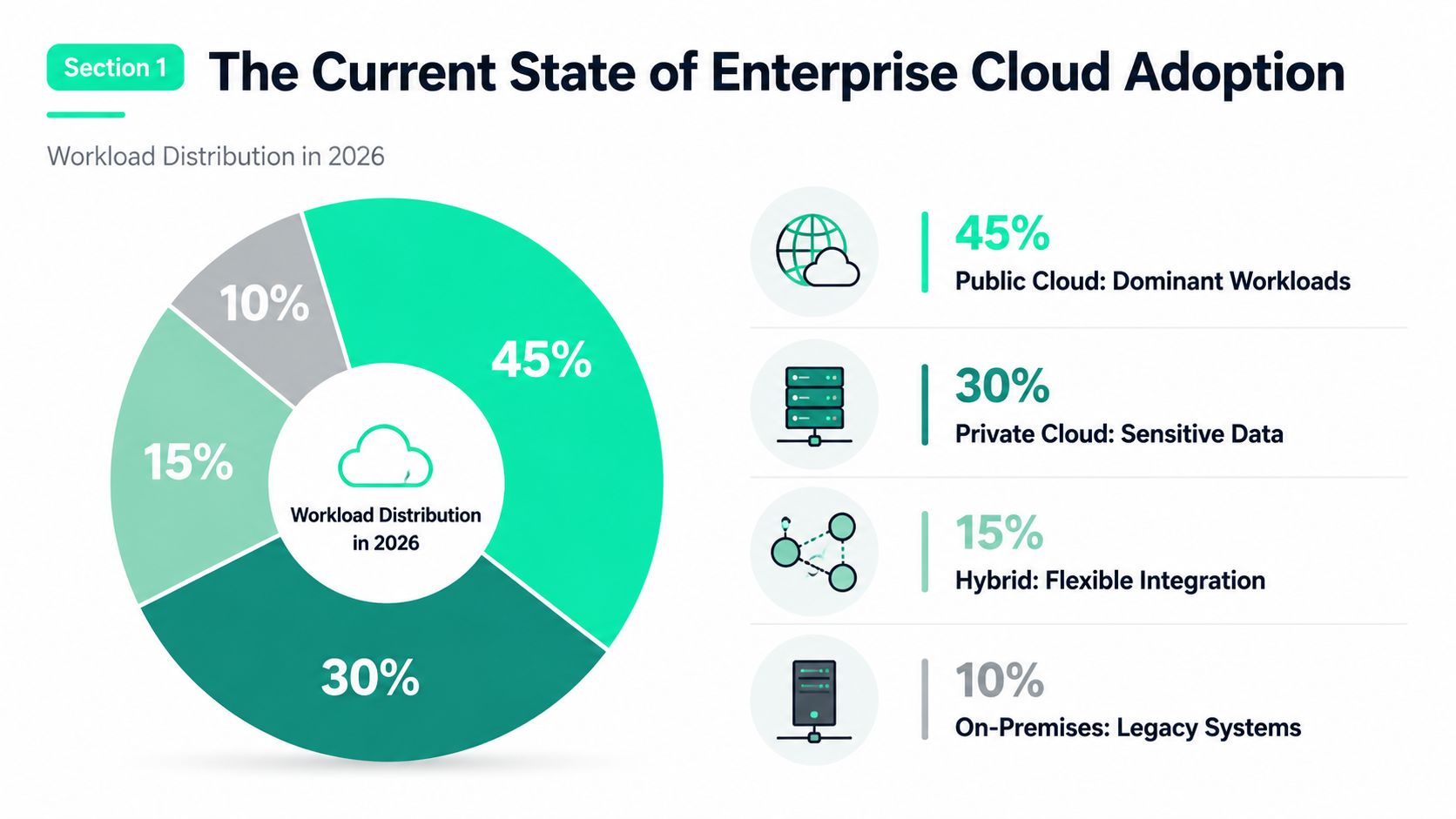
These figures describe a workload placement problem, not a completed migration. Enterprises may use cloud services broadly while retaining sensitive, stateful, latency-sensitive, or operationally entrenched systems elsewhere. That arrangement can reflect deliberate engineering and compliance choices rather than incomplete adoption.
The broader adoption picture supports that view. Industry reporting indicates that 94% of enterprises use cloud in some form, while 60% of business data is stored in the cloud. Cloud-hosted workloads and data reach 74% for large enterprises versus 44% for small businesses, showing how team capacity, operating models, and existing systems affect migration depth, as summarized in the cloud adoption statistics overview from N2WS.
Adoption is broad, but workload movement is selective
Public-cloud placement continues to grow, though it varies by organization and workload. G2 reports that 54% of enterprise workloads and 63% of SMB workloads run in public cloud, with roughly 50% of workloads overall there, up from 39% in 2022. It also reports that 63% of organizations have established a cloud center of excellence or central cloud team, according to its cloud computing statistics report.
Migration activity remains high. A Foundry survey found that 70% of IT decision-makers said their organization accelerated cloud migration in the past year, compared with 63% in 2024 and 57% in 2023, according to the Foundry 2025 cloud report.
For planning, “Are we in the cloud?” is too blunt a measure. Track which workload categories moved, which stayed, the reasons for each decision, and whether cost, reliability, security, and ownership remain visible. That inventory shows whether the next requirement is migration execution, platform standardization, or tighter placement and cost governance.
Choosing Between IaaS PaaS and SaaS Models
The service model determines how much infrastructure your team operates and how much control it gives up. IaaS provides the most control over virtual machines, networks, operating systems, and storage. PaaS abstracts more of that foundation so developers can focus on application behavior. SaaS transfers most operational responsibility to the vendor and usually offers the fastest path to business capability.
The textbook definitions are accurate, but they don't make the decision for you. A team with deep infrastructure skills may run a stateful database on IaaS because it needs operating-system control, custom extensions, or a specific replication design. A stateless API may fit PaaS better because managed deployment, scaling, patching, and observability reduce the platform burden.
| Criteria | IaaS | PaaS | SaaS |
|---|---|---|---|
| Operational control | High, including operating system and network configuration | Moderate, focused on application and service configuration | Low, with vendor-managed application infrastructure |
| Cost predictability | Requires careful capacity and lifecycle management | Often easier to align with application usage, but pricing can be complex | Usually clear at the subscription or user level, with usage and tier limits to review |
| Team capability | Strong infrastructure and systems skills | Application, deployment, and platform skills | Integration, administration, security, and vendor-management skills |
| Best fit | Custom workloads, legacy applications, specialized stateful systems | APIs, event-driven services, managed application components | Standard business functions such as collaboration or customer support |
| Main trade-off | More control means more maintenance | Faster delivery can increase provider dependency | Lowest infrastructure burden can mean the greatest portability constraint |
Control has a cost
IaaS looks flexible because it resembles familiar infrastructure. That familiarity can hide the work involved in patching, hardening, resizing, backing up, and retiring resources. PaaS reduces that work, but teams must understand service limits, regional availability, deployment behavior, and provider-specific APIs.
SaaS removes still more infrastructure responsibility, yet integration and governance become central. A SaaS system still needs identity federation, data classification, retention policies, audit access, and an exit plan.
Before selecting a model, document the workload's data sensitivity, latency profile, availability requirement, integration surface, and expected change rate. Then compare the total operational cost, not just the infrastructure line item. A useful cloud cost optimization services guide can support that analysis, but the decision still belongs to the team that owns the service outcome.
Multi-cloud complicates the choice. Portable primitives may ease relocation, while provider-native services can deliver more capability with less engineering effort. Don't pay a permanent portability tax for a hypothetical future move. Define the exit conditions first, then decide how much abstraction they justify.
Migration Strategies That Actually Work
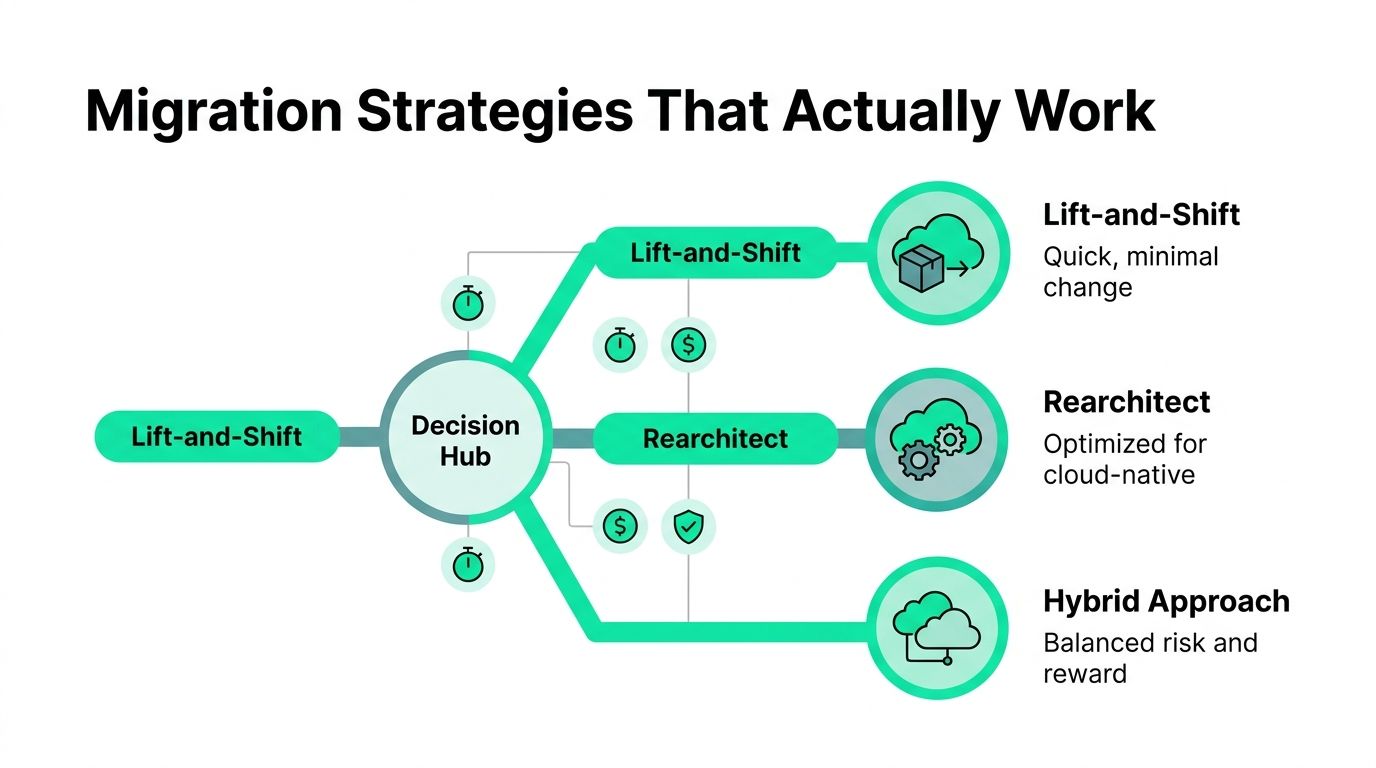
The right migration strategy depends on the workload's condition, not on a preferred methodology. A neglected application with brittle dependencies shouldn't be treated like a well-tested stateless service. Likewise, a critical database shouldn't be moved because its virtual machine can be copied.
Start with a portfolio classification that captures business criticality, technical health, data sensitivity, dependency complexity, and target operating model. Then choose the least disruptive strategy that produces an acceptable long-term result.
Lift and shift
Lift and shift works when the immediate objective is data-center exit, capacity relief, or faster relocation. It changes the hosting location while preserving most application behavior. This approach can reduce initial change risk and deliver value sooner, especially for applications with stable resource requirements and well-understood dependencies.
It doesn't automatically improve architecture. A virtual machine that was oversized on-premises remains oversized in cloud. A tightly coupled application can also become more expensive when its components communicate across availability zones or regions.
Use lift and shift as a deliberate first stage, not as a promise that modernization will happen later without funding or ownership.
Rearchitecting
Rearchitecting makes sense when the application's constraints prevent it from benefiting from cloud capabilities. Stateless services, managed databases, event-driven processing, and automated deployment can improve scalability and reduce operational work. The trade-off is substantial design, testing, and migration effort.
A team may save money over the long term by removing idle capacity and simplifying operations, but the organization waits longer for the benefit and assumes more delivery risk. Protect production by running the old and new paths in parallel where appropriate, validating data consistency, and shifting traffic gradually.
Hybrid migration
Hybrid migration is often the safest answer for stateful or data-intensive systems. Keep the system of record in its existing environment while moving an API tier, analytics workload, or burst capacity into cloud. This pattern limits disruption, but it introduces network dependencies, identity integration, and cross-environment observability requirements.
Migration test: If you can't explain how data moves, how failure is handled, and who pays for the resulting network traffic, the design isn't ready.
Sequence migration around measurable checkpoints. Validate discovery, connectivity, data integrity, performance, rollback, and post-cutover cost. Teams can use AWS cost reduction practices during and after migration, but savings work best when the target architecture, ownership, and success criteria are defined before resources are deployed.
Hidden Costs and Governance Gaps After Migration
Cloud adoption becomes expensive when usage remains an infrastructure detail instead of a product responsibility. Compute is only one line item. Network egress, idle resources, incorrect storage tiers, unattached volumes, excessive logging, and autoscaling thresholds can each undermine the expected economics.
The operating problem is broader than the invoice. A development environment left running, a database snapshot retained indefinitely, or a cross-region data path added for convenience may seem harmless alone. Across a growing portfolio, those choices become recurring expense. Finance sees the aggregate bill, while each owning team often sees only one fragment.
Cloud spending also changes as workloads change. AI training and inference can introduce volatile demand, expensive accelerator capacity, large data movement, and storage growth. A migration plan that sets a budget once cannot govern those patterns. Teams need placement reviews and cost controls that continue after cutover.
A survey reports that 85% of organizations identify cloud spend management as their top challenge for the fourth consecutive year, while 73% run hybrid cloud, according to the IDC cloud survey summary. The practical implication is clear: cost ownership must span a distributed estate, not stop at the migration budget.
Make ownership visible
Start with mandatory metadata. Every resource should map to an application, team, environment, business owner, and cost center. Enforce these fields through infrastructure-as-code modules and admission policies, rather than relying on engineers to remember them during an incident.
Classify workloads beyond “development” and “production.” Record whether each one is latency-sensitive, data-intensive, regulated, bursty, stateful, interruption-tolerant, or dependent on specialized hardware. These attributes make placement and optimization decisions explainable, including decisions about AI workloads whose demand may change quickly.
A central cloud team should publish approved patterns for networking, logging, identity, backups, and lifecycle management. It should not approve every resource. Self-service templates preserve delivery speed, while policy controls block configurations that create predictable risk.
Turn FinOps into a delivery habit
FinOps works when engineers can connect design choices to spend. Review cost alongside latency, availability, and deployment metrics. Assign optimization to the team that can change the resource, then verify that the change produced the expected result.
Useful controls include:
- Idle cleanup: Detect unused instances, volumes, snapshots, and development environments, then assign an owner and expiration policy.
- Storage discipline: Match access patterns to storage tiers and compare retention policies with actual recovery requirements.
- Network review: Map high-volume paths before moving data across zones, regions, or providers.
- Scaling validation: Test autoscaling thresholds against real demand so elasticity does not become uncontrolled consumption.
For the policy and ownership model behind these practices, see this guide to governance in the cloud. Governance should reduce repeated decisions, not create a committee that delays every deployment.
When Hybrid and Multi-Cloud Become the Default
Hybrid cloud is already the operating model for 73% of organizations, according to the 2026 IDC survey coverage. That adoption reflects practical trade-offs involving latency, compliance, existing investments, data gravity, resilience, and cost predictability. Cloud adoption now depends less on choosing a single destination than on deciding where each workload should run, and revisiting that decision as demand changes.
Repatriation reinforces the point. A 2025 global survey cited by Parallels reported that 93% of firms deliberately balance private and public clouds, about 70% were considering moving workloads from public cloud back to private cloud, and one-third had already done so. Security and compliance were among the leading drivers, according to the Parallels cloud survey report.
Place workloads by behavior
A regulated customer-data store may remain in private infrastructure when residency, auditability, or control requirements outweigh public capacity. A bursty media-processing job may fit public cloud because demand changes and managed services reduce provisioning time. An AI inference system may use cloud GPUs during variable demand while keeping frequently accessed data near the serving layer.
The placement decision should follow service objectives, workload behavior, and total operating cost. Revisit it when utilization, data movement, latency requirements, or provider pricing changes.
Multi-cloud can provide resilience and negotiating power. It also multiplies identity, policy, monitoring, skills, and incident-response requirements. Standardize contracts for logs, metrics, identity claims, encryption, and deployment metadata. Do not assume equivalent primitives across providers. Portability requires deliberate design and ongoing maintenance, so apply it where the business benefit justifies that cost.
Hybrid is a way to optimize for constraints that no single environment handles equally well.
AI workloads make placement and cost review more demanding. Model serving, retrieval pipelines, vector storage, and data preparation can have different latency and spending profiles. Measure those components separately instead of treating “AI” as one billing category. GPU utilization, data transfer, storage retention, and inference demand should inform placement decisions before teams commit to a default platform.
Security and Compliance Practices for Cloud Environments
Cloud security fails most often at the boundaries between services, teams, and providers. A provider secures parts of the underlying platform, but the customer still owns identities, configurations, data access, application behavior, and incident response. The shared responsibility model changes the work. It doesn't eliminate it.
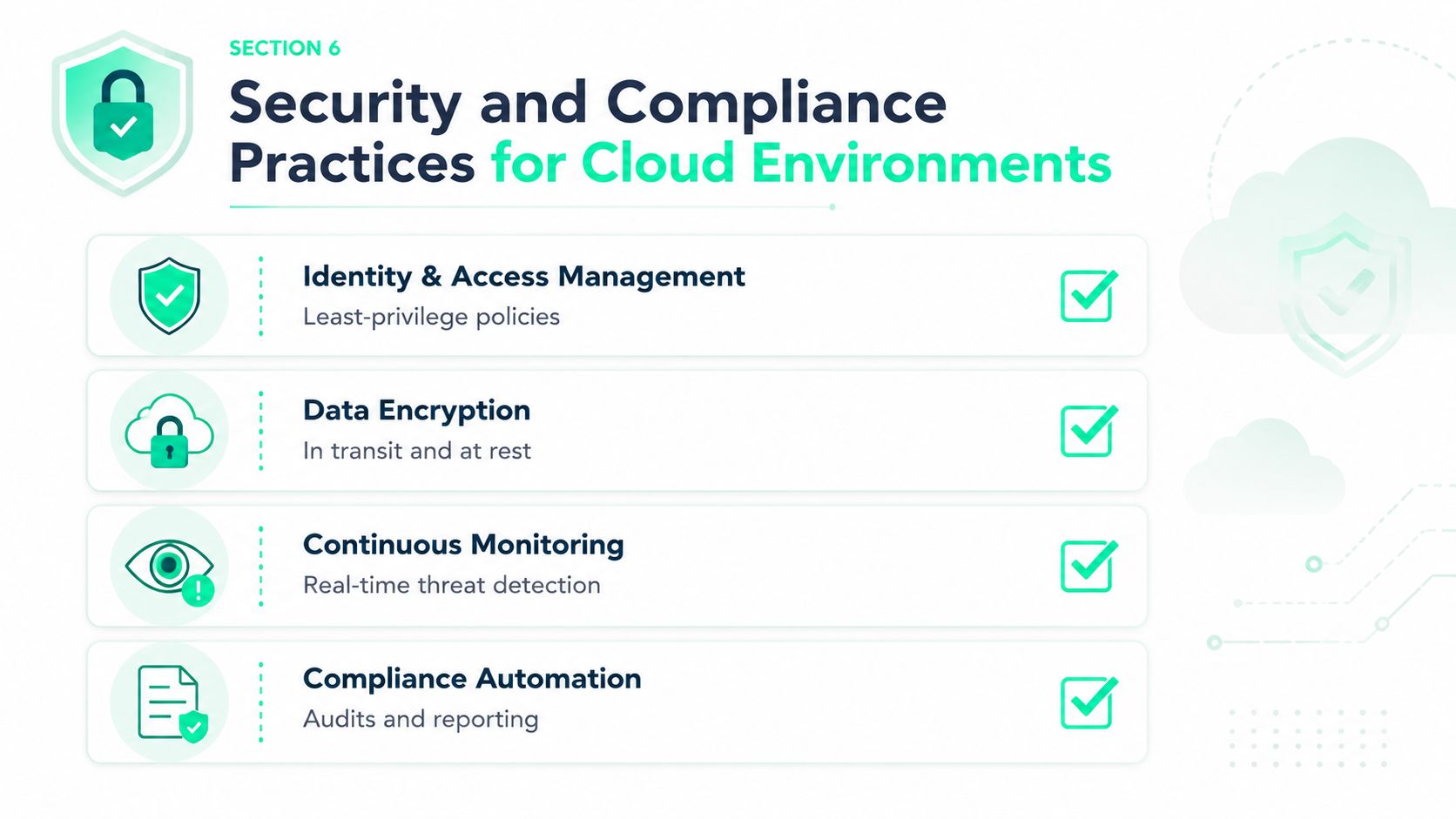
Begin with identity. Centralize workforce authentication, use short-lived credentials for workloads, and grant permissions according to the smallest practical scope. Review machine identities as aggressively as human accounts. A forgotten service role can retain access long after the application that created it has changed.
Build controls into delivery
Network segmentation should reflect trust boundaries and data flows, not just organizational diagrams. Separate administrative access, production services, data stores, and public endpoints. Use private connectivity where it reduces exposure, but monitor the resulting routes so security controls don't become invisible dependencies.
Encrypt data in transit and at rest, then protect the keys with controlled access and rotation procedures. Secrets belong in managed secret stores, not deployment files, images, or shared chat messages. Make secret retrieval observable so incident responders can determine what was accessed.
Security checks should run inside the delivery pipeline. Validate infrastructure configuration, container images, dependencies, and policy requirements before deployment. A blocked build is cheaper than a production incident, but excessive false positives train engineers to bypass controls.
Operate for evidence
Continuous monitoring needs actionable signals. Collect audit logs, identity events, network flows, administrative changes, and application security events in a way that supports correlation across providers. Define who investigates each alert and what evidence an incident requires.
Compliance frameworks and certifications can simplify vendor evaluation, but they don't prove that your workload is correctly configured. Map each control to an owner, an automated check, and an audit record. For a multi-cloud estate, standardize evidence collection so auditors and engineers don't reconstruct the same facts manually.
Security should support velocity by making the safe path the easiest path. Approved modules, managed identity patterns, policy-as-code, and reusable evidence pipelines reduce friction while improving consistency.
Building Cloud Maturity Through FinOps and Cost Visibility
Cloud maturity begins when an organization can connect a resource to an owner, a workload to a business capability, and a cost to an operational decision. Without that chain, optimization becomes a sequence of guesses. Engineers may reduce a bill without understanding the effect on latency, reliability, or customer experience, while finance may identify a spike without knowing which deployment caused it.
The first control is attribution. Tag resources consistently, carry ownership metadata through deployment systems, and classify costs by product, environment, team, provider, model, and workload. The second is cadence. Review spend during delivery, not only after the monthly invoice arrives.
Use evidence to prioritize changes
A useful optimization backlog ranks opportunities by estimated impact, confidence, and migration risk. That prevents teams from spending a sprint on a small storage adjustment while a large, low-risk idle resource remains untouched.
For application teams, cost visibility should sit beside operational telemetry. A cloud application monitoring approach becomes more useful when it helps correlate a release with changes in latency, errors, traffic, and consumption. The same principle applies to AI features. Track usage by workflow, endpoint, feature, model, and provider so teams can distinguish valuable inference from prompt waste or accidental repetition.
SpendLens AI provides developer-first analytics for LLM costs across OpenAI and Anthropic workloads. Its Python instrumentation can attribute calls to workflows, tasks, features, experiments, or endpoints, while its dashboard breaks spend down by project, provider, model, and workload. It also surfaces cache efficiency, prompt waste signals, model-switch opportunities, and recommendations with estimated savings, confidence, and migration-risk ratings.
Those details support practical decisions. A team might discover that a simple classification workflow uses an unnecessarily expensive model, that a large repeated template inflates token consumption, or that a deployment changed usage without a corresponding product benefit. The platform sends provider calls directly to OpenAI or Anthropic rather than acting as a proxy, and its defaults use metadata-oriented tracking rather than storing user prompts and model responses.
Make savings accountable
Assign every optimization to a person or team, define the expected change, and verify the result after deployment. Record whether the change affected cost, performance, reliability, or user behavior. A verified saving is more valuable than an untested recommendation because it improves the next planning decision.
Executive reporting should answer four questions: what did we spend, who drove the change, what value did the workload produce, and what action has the highest confidence next? That format turns cloud spend from an invoice dispute into an engineering feedback loop.
SpendLens AI helps teams attribute and optimize LLM spending across OpenAI and Anthropic workloads without changing provider clients, with visibility into workload drivers, cache efficiency, prompt waste, and model alternatives. If your cloud and AI costs are growing faster than your ability to explain them, visit SpendLens AI to instrument the workloads and prioritize measurable savings opportunities.