Few Shot Prompting: A Complete Guide for 2026
Learn how few shot prompting improves AI outputs with real examples, cost tips, and evaluation methods in this 2026 guide.
You shipped the prompt in a notebook because it looked straightforward. The first few demos passed, the dashboard lit up, and the team moved on. Then production traffic arrived, the examples got copied into every call, and the monthly bill no longer matched the speed of the feature.
That's the shape of few shot prompting in production. It isn't just a clever way to steer an LLM, it's a recurring cost decision, because every example you keep in the prompt gets paid for on every request. If you've ever watched a prompt get “a little better” while finance starts asking why spend climbed, you're already dealing with the economic side of prompting.
Table of Contents
- Why Shot Count Is an Economic Decision
- Zero-Shot, One-Shot, Few-Shot, and Fine-Tuning Compared
- A Few-Shot Prompt With Three Labeled Examples
- How Each Example Inflates Your Token Bill
- Five Patterns That Make Few-Shot Prompts Work
- Common Pitfalls That Quietly Destroy Few-Shot Performance
- Instrumenting and Monitoring Few-Shot Prompts in Production
- Testing, Evaluation, and When to Stop Adding Examples
Why Shot Count Is an Economic Decision
A team usually notices the mistake after the feature is live. The prompt that felt “safe” in testing had four polished examples, so every classification request now carries those tokens forever. That choice can be more expensive than the modeling work itself, because you're paying the same prompt tax on every single call.
The hidden bill in every example
A shot is just one demonstration, but in production it becomes a permanent line item. If you add an example to make format errors less likely, you're also adding input tokens, model latency, and more bytes to move through the system. The prompt may feel static to the engineer who wrote it, but it behaves like a usage multiplier once traffic starts.
This is why “just add another example” is a weak default. It solves the immediate prompt quality issue, then pushes up the cost of every future request. That tradeoff matters even more when the model is called by a user-facing feature, because a small prompt change can ripple across thousands of calls without any visible product change.
Practical rule: treat every added example like a recurring subscription, not a one-time edit.
The useful mental shift is simple. Shot count is a budget lever. If the example doesn't measurably improve the task, it's probably not earning its keep. A prompt that works in a notebook can still be the wrong design once traffic, retries, and long-lived workflows enter the picture.
Why the finance lens beats intuition
The first mistake is assuming prompt quality and prompt economics are separate. They're not. The same example that improves output can also increase spend, and the only way to know whether it's worth it is to compare the gain against the recurring token cost. That's why the rest of this guide keeps tying prompt design back to measurement, not just taste.
For a broader cost mindset around API usage, see this overview of LLM API spend. The point isn't to memorize pricing. It's to recognize that few shot prompting becomes a FinOps problem the moment the prompt leaves your editor.
Zero-Shot, One-Shot, Few-Shot, and Fine-Tuning Compared
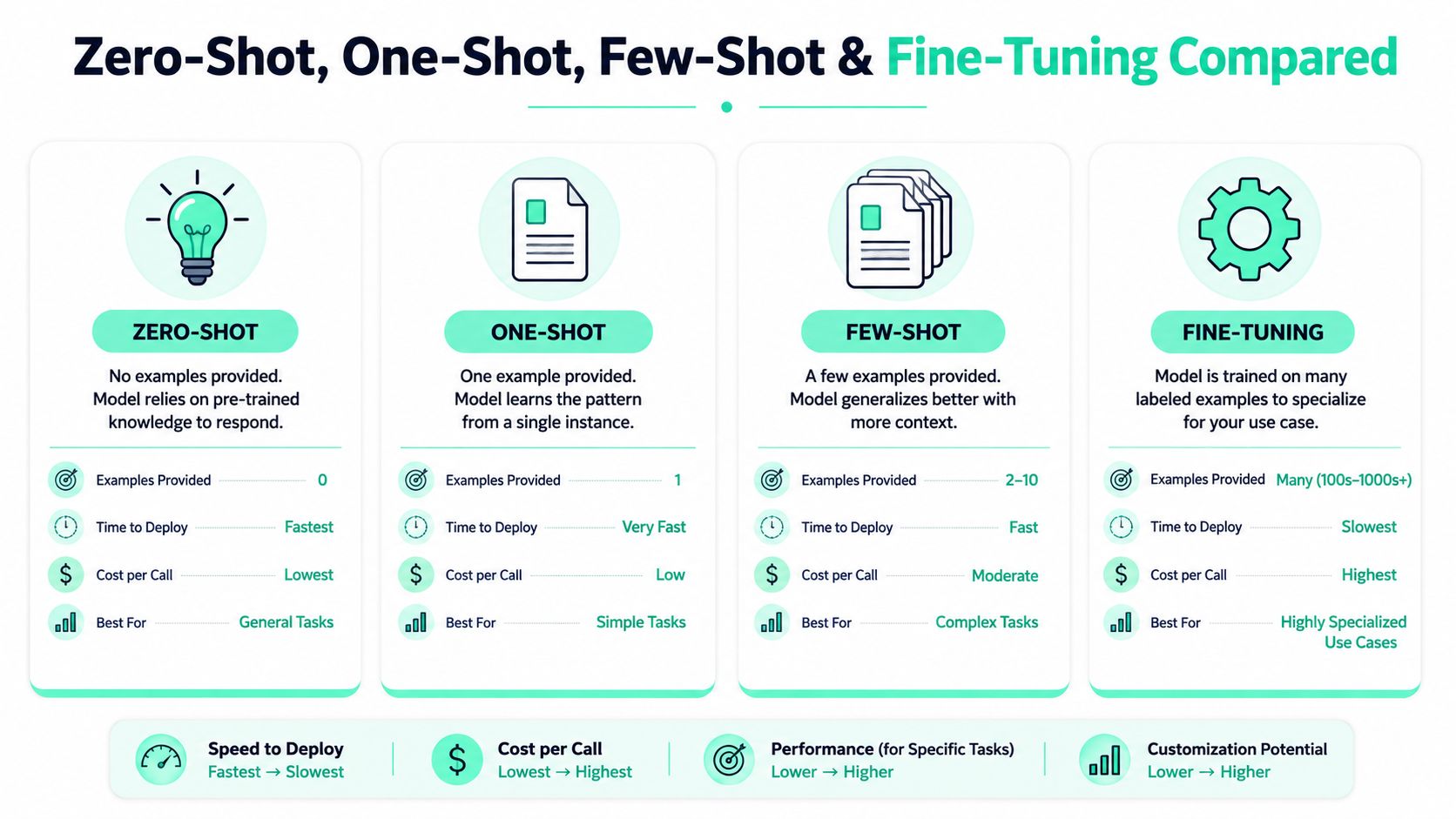
The choice isn't really between “good prompting” and “bad prompting.” It's between four ways to adapt a model, each with different tradeoffs in data, speed, cost, and flexibility. If you frame the decision that way, the right option becomes easier to defend to both engineering and finance.
The adaptation spectrum
Zero-shot is the lightest option. You give the model instructions and no examples, so it's fast to write and cheap to run, but it can be fragile on exact format. One-shot adds a single example, which often helps the model imitate structure without making the prompt heavy. Few-shot usually means a small handful of examples, and practitioner guidance commonly lands around 2–5 examples as the sweet spot for clarity versus token cost, while some guidance considers two or more examples enough to qualify as few-shot prompting [IBM guide on few-shot prompting].
Fine-tuning moves in a different direction. Instead of paying for examples on every call, you pay upfront to adapt a model to a task, then serve a lighter prompt later. That can make sense when the task is stable and well-defined, but it also makes change slower when product requirements shift.
Here's the plain-language version. Zero-shot is easiest to start with, one-shot is the first useful correction, few-shot is the practical middle ground, and fine-tuning is the heavier commitment when you know the task will stay put.
How to choose under real constraints
The best choice depends on four questions. Do you have labeled data already. Do you need to ship this week. Is the call cost acceptable at scale. How often will the task change next quarter. If you answer those questions, few shot prompting often wins when the task needs structure but not a full training pipeline.
Fine-tuning also changes the maintenance burden. You need data curation, training time, evaluation, and release discipline. Few-shot prompting avoids that setup cost, which is why it stays popular for teams that need a working system quickly, especially when the output format matters more than deep domain adaptation.
A Few-Shot Prompt With Three Labeled Examples
Support ticket classification is a clean place to learn the pattern because the output needs to be structured, and mistakes are easy to spot. If your prompt can handle this, it can usually handle sentiment, routing, extraction, or simple taxonomy work with only small edits.
Start with the zero-shot baseline
A zero-shot prompt for ticket categorization might read like this.
Customer ticket: “I can't log in after the password reset email arrived.”
Return one label from: billing, access, bug, feature_request.
That often works on obvious examples, but it can wobble on format. The model may answer in a sentence, include extra explanation, or invent a second label. When the downstream system expects one clean value, that's enough to break automation.
A one-shot version improves the shape by showing one labeled pair.
Customer ticket: “My invoice shows the wrong amount.”
Label: billing
Customer ticket: “I can't log in after the password reset email arrived.”
Label:
That already teaches the model the output style. The problem is that one example rarely teaches the edge conditions that show up in production, such as missing context or a ticket that belongs to two categories but must still be forced into one.
Add examples that teach boundaries, not just labels
A useful few-shot version uses two clear examples and one edge case. Keep the labels short, keep the formatting identical, and use the last example to teach how to fail gracefully when the input is thin.
Customer ticket: “My invoice shows the wrong amount.”
Label: billing
Customer ticket: “I can't log in after the password reset email arrived.”
Label: access
Customer ticket: “It doesn't work.”
Label: bug
Customer ticket: “The app crashes when I upload a photo.”
Label:
Why these examples earn their token cost is straightforward. The first two teach the model the taxonomy boundaries. The third shows that a vague complaint should still map to the most likely operational label instead of producing a rambling answer. Short labels matter because they reduce clutter and keep the model focused on the pattern, not the prose.
Keep the examples boring. Boring examples are easier for the model to imitate and easier for your team to maintain.
If you're adapting this to extraction, swap the labels for fields. If you're adapting it to routing, keep the same structure and replace the label set. The important part isn't the topic, it's the consistency.
How Each Example Inflates Your Token Bill
A single shot is not free once the prompt is live. Each example you add sits in the input context for every request, so you keep paying for it over and over for as long as that prompt runs. A prompt that looks tidy in a test notebook can become a recurring expense once real traffic starts hitting it.
The basic math
If an example takes noticeable room in the prompt, it has a direct cost. More examples mean more input tokens, longer processing time, and more spend per call. The prompt also leaves less room for the user's actual message, which matters when the task depends on preserving the full input without truncation.
The 2026 empirical study makes the tradeoff concrete. It found that GPT-4o-mini improved by +0.0524 F1 at 8-shot vs. 0-shot, and Gemini Flash improved by +0.0362 F1 at 2-shot vs. 0-shot, but those gains were not statistically significant under the study's conditions [2026 empirical study]. In the same paper, Llama 3.1 8B recovered sharply from zero-shot failure with a single example, with Cohen's d = 10.98 and p < 0.0001.
That is the practical lesson. Extra examples can help a lot for some models and tasks, but a small or unstable gain does not pay for a permanent increase in prompt length. If the lift is modest and inconsistent, you are spending tokens without getting a dependable return.
A simple comparison lens
| Model | Shot count | Approx. F1 gain vs zero-shot | Token cost per call |
|---|---|---|---|
| GPT-4o-mini | 8-shot | +0.0524 F1 | Higher because every example stays in context |
| Gemini Flash | 2-shot | +0.0362 F1 | Higher than zero-shot, lower than larger shot counts |
| Llama 3.1 8B | 1-shot optimal in the study | Large recovery from catastrophic zero-shot failure | Higher than zero-shot, but justified in that case |
The table is not a pricing sheet. It is a decision aid. One model may justify the extra spend because more examples stabilize its behavior, while another may need only one or two shots to stay on format. To connect that prompt choice to runtime spend, use this guide to LLM inference costs as the operating model. The main point is simple, every extra shot adds overhead, and the quality gain has to clear that cost before it makes sense to keep it.
Five Patterns That Make Few-Shot Prompts Work
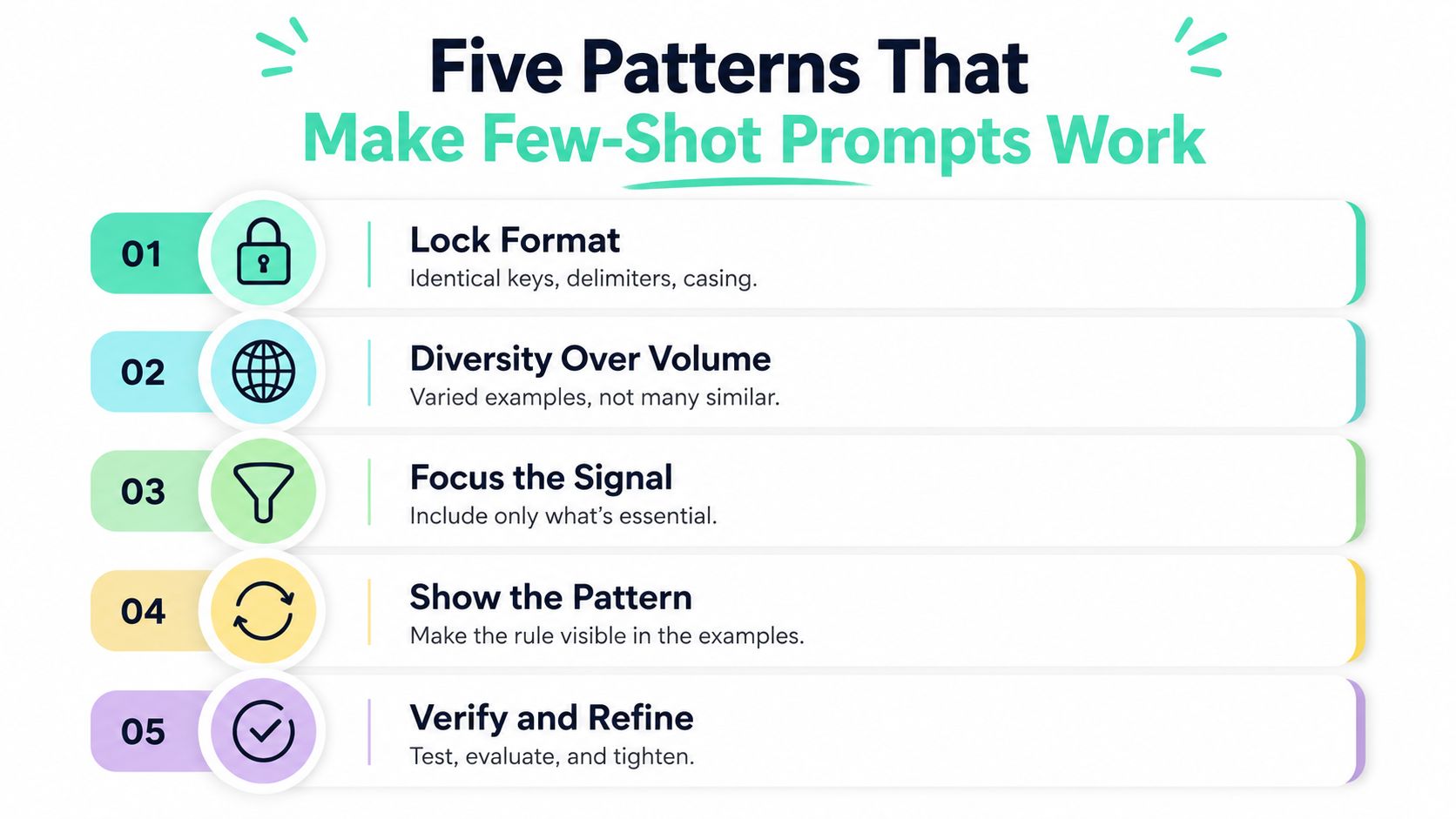
The prompts that survive production usually look boring on the page. They work because the structure is disciplined, not because the examples are clever. Most failures come from inconsistency, redundancy, or examples that teach the wrong habit.
Lock the format first
Every example should use the same keys, separators, casing, and field order. If one example says Label: billing and another says billing ->, the model starts learning multiple output styles at once. That's how you end up with a prompt that feels close in testing but drifts in production.
Prefer diversity over volume
Two examples that cover different edge cases are usually better than six near-duplicates. Diversity helps the model learn the boundary of the task, while redundancy mostly burns tokens. A prompt for support routing, for example, should show at least one straightforward case and one ambiguous or low-information case.
Include one edge case
The edge case is where the model learns restraint. A ticket with missing details, a malformed input, or a borderline label teaches the model how to behave when the answer isn't obvious. That one example often earns more value than another polished, average case.
Use reasoning only when the task needs it
If the task is simple extraction or classification, don't add long reasoning traces just because they look good. Longer reasoning increases prompt size and can make the model over-elaborate. Save it for tasks where stepwise thinking improves the answer.
Keep examples short and label-clean
Short examples are easier for the model to pattern-match and easier for humans to maintain. Strip out fluff, keep the labels consistent, and remove any wording that could distract from the main signal. The model learns what you show it, so don't make the examples do double duty as documentation.
Common Pitfalls That Quietly Destroy Few-Shot Performance
The worst prompt bugs are the ones that still look reasonable. The examples are there, the labels are there, and the model still behaves badly because the prompt teaches mixed signals. Teams only notice after a release, when bad outputs start showing up in logs.
The failure modes to watch for
Duplicate or near-duplicate examples make the prompt look richer than it is. Diagnostic, the model keeps repeating one pattern and misses broader cases. Fix, replace repeats with examples that cover different boundaries.
Noisy labels teach the wrong lesson. Diagnostic, the model performs well on obvious cases but collapses on borderline inputs. Fix, audit each label as if it were training data, because in practice it is.
Examples that fight the system prompt create instruction conflict. Diagnostic, the model ignores either the system rule or the example set depending on which one it weights more heavily. Fix, align the examples with the highest-priority instruction and remove contradictions.
Overlong examples crowd out the live user input. Diagnostic, the model starts truncating useful context or answering less precisely near the context limit. Fix, shorten the examples until the core pattern is still obvious.
Mismatched tone or domain confuses the task. Diagnostic, support-ticket examples leak into legal, medical, or technical prompts and the output style feels off. Fix, keep the example domain close to the production domain, even if the label space is the same.
The broader warning is that prompt quality isn't just about having examples, it's about having the right examples in the right shape. A prompt can look polished and still be miscalibrated if it was built from hand-picked demos that don't resemble actual traffic.
For a deeper look at why token counts alone miss the full cost picture, see this breakdown of prompt spend signals.
Instrumenting and Monitoring Few-Shot Prompts in Production
The teams that manage few-shot prompting well treat it like software plus measurement. They tag calls, compare prompt versions, and watch for cost drift the same way they'd monitor latency or error rates. Without that loop, you only discover prompt waste after the invoice lands.
What to log on every call
Start by tagging the call with the workflow, feature, experiment, and endpoint. That lets you answer basic questions fast, like which prompt variant is expensive, which customer path is creating the most volume, and which release coincided with a bill spike. If you don't tag calls, spend attribution becomes guesswork.
You also want to log which examples were used. That matters because few-shot prompts often evolve from hand-picked demos into living prompt banks, and the examples that worked during staging may stop matching production traffic later. When that drift happens, the prompt can keep paying for the same context while accuracy slips.
How instrumentation changes the workflow
SpendLens AI's Python SDK is designed for lightweight instrumentation without changing the provider client, and it surfaces prompt waste signals such as oversized templates, repeated instructions, and cache-hit opportunities. That's useful because the most expensive prompt is often the one nobody noticed had duplicated context. The goal is to make the waste visible before it becomes standard operating cost.
A strong operational loop looks like this. Tag the call, record the prompt version, compare accuracy and cost across versions, then retire the prompt when the examples no longer match real traffic. That also helps when finance asks why spend changed after a deployment, because you can point to the exact workflow and prompt revision instead of hunting through logs.
If you can't trace spend back to a feature, you can't improve it with confidence.
For the mechanics of endpoint-level visibility, this monitoring guide is the right companion read. The main point is simple. Few-shot prompting gets much easier to manage when cost, accuracy, and prompt shape are measured together.
Testing, Evaluation, and When to Stop Adding Examples
A prompt is not ready because it reads cleanly. It is ready when the team can show that the extra examples are doing real work. That means testing the same prompts on the same held-out set, while tracking accuracy, cost per call, and latency together.
Build an evaluation set that can actually detect small gains
Small improvements are easy to miss when the sample set is too thin. As noted earlier, detecting a small F1 lift with useful confidence can require far more examples than a quick internal check usually includes. That is why a tiny eval set can make a weak prompt look better than it is, or hide a useful change entirely.
Run a sweep over 0, 1, 2, 4, and 8 shots on the same held-out set. Keep the data fixed, keep the metric fixed, and compare prompt versions against the same slice of traffic. If the evaluation changes from run to run, the result stops being useful for a shipping decision.
Decide with economics, not optimism
A good prompt version is not the one with the highest accuracy at any cost. It is the one where the marginal gain still beats the marginal token cost and latency hit. Shot count stops being a craft choice and becomes a budget choice at that point.
Refresh examples from real failure cases, not from polished demos someone wrote months ago. Production traffic drifts, user language shifts, and model behavior changes too. When the examples stop matching current inputs, the prompt turns into a museum piece that still bills like a living system.
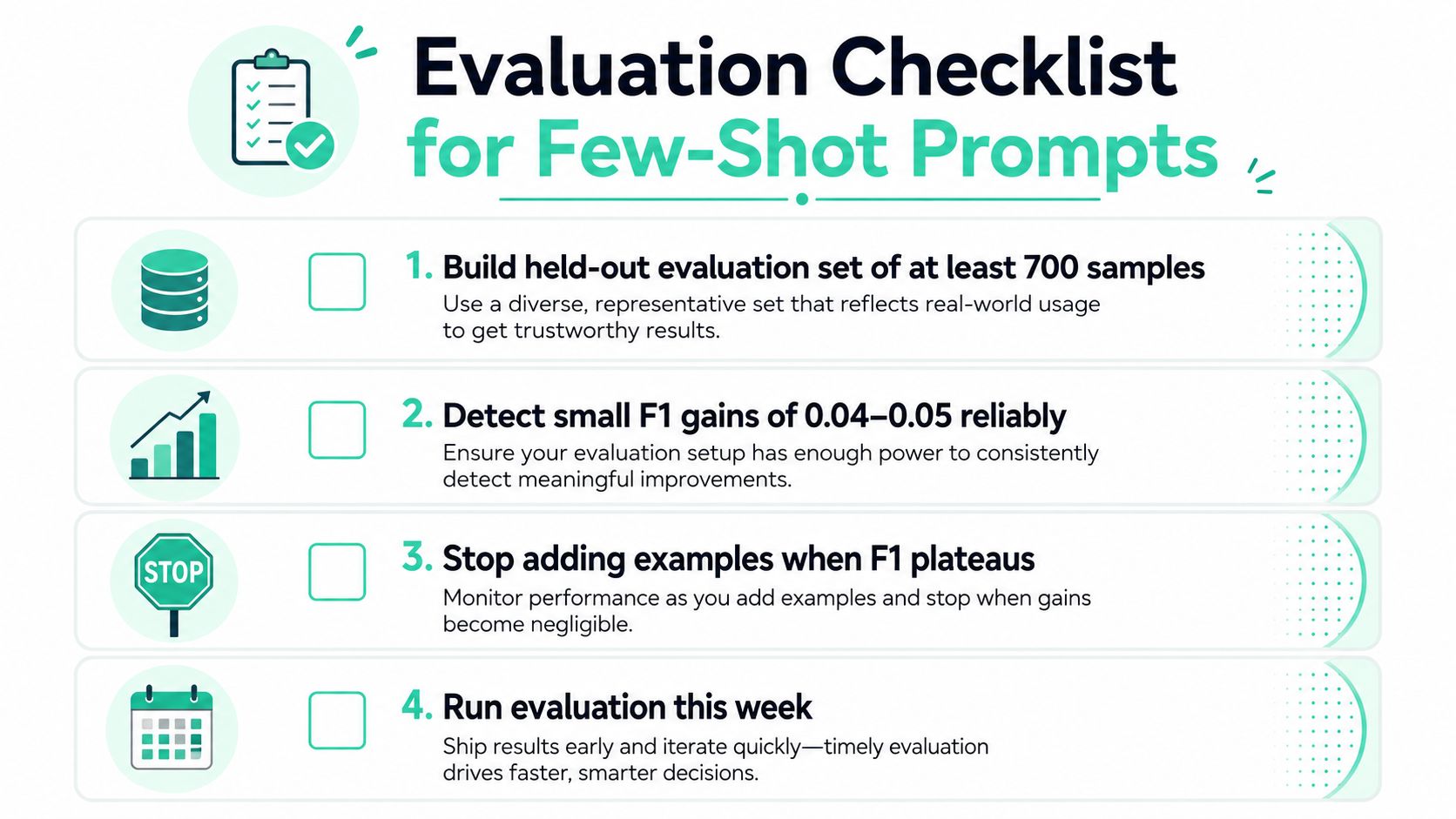
Stop adding examples when the accuracy gain no longer pays for the extra tokens, and when the prompt is no longer a top cost driver in the savings view. That rule keeps the team from chasing small improvements that do not survive contact with the bill.
SpendLens AI helps teams see which prompt versions are costing real money, where repeated context is bloating requests, and where cache opportunities are being missed. If you are shipping few shot prompting in production, visit SpendLens AI to connect prompt design with cost attribution before the next invoice forces the conversation.