
Cost of Redshift: Pricing Models and Savings Playbook
Understand the real cost of Redshift in 2026. Covers provisioned, serverless, RA3, Spectrum, and transfer pricing with worked examples and optimization tactics.
The cost of Redshift ranges from roughly $186 per month for a single always-on dc2.large node to over $2,380 per month for a continuous ra3.4xlarge, with serverless starting near $1.50 per hour and Spectrum billed at $5 per TB scanned. That spread is why a quiet warehouse can still produce a loud invoice, especially when the workload shape changes more than the team expects.
You're probably looking at a bill that felt reasonable in planning and irrational in production. A common mistake is treating Redshift as a node-buying decision, then getting surprised when scan volume, idle time, region, and off-cluster queries dominate the outcome. The cost of Redshift is compute plus storage plus spillover charges, and workload shape decides which part wins.
Table of Contents
- Why a Redshift Bill Surprises the Teams Who Modeled It
- The Five Pricing Pillars That Make Up Every Redshift Bill
- Provisioned, Serverless, and Reserved Compared
- Two Worked Monthly Cost Examples
- Off-Cluster Cost Drivers Most Teams Miss
- A Prioritized Cost Optimization Checklist
- Forecasting the Next Redshift Bill Before It Lands
- When Redshift Is Worth It and Common Questions
Why a Redshift Bill Surprises the Teams Who Modeled It
An engineering lead opens the invoice on Monday and sees a bigger number than the one finance approved last quarter. The warehouse was quiet, nobody launched a new product line, and yet the bill climbed because the workload changed shape, not because the team “used Redshift wrong.” That's the part people miss.
List prices are only the entrance fee. Redshift now spans provisioned and serverless pricing, with public entry prices starting at $0.543 per hour for provisioned and $1.50 per hour for serverless on AWS's pricing page (AWS Redshift pricing). But the bill doesn't stop at compute. Managed storage is billed separately in managed-storage deployments, and feature usage can create a second layer of spend that the original budget never modeled.
Workload shape beats headline pricing
A warehouse that runs predictably overnight behaves differently from one that gets hammered by ad hoc product analytics all day. That's why the same platform can look efficient in one team and wasteful in another. The cost of Redshift is not a static rate card, it's a function of whether the workload is steady, bursty, scan-heavy, or idle-heavy.
Practical rule: If your Redshift bill is a surprise, start by asking which workload got more variable. That question usually finds the money faster than debating node families.
The practical definition I use in FinOps reviews is simple. Redshift cost equals compute, storage, off-cluster charges, and data transfer. Compute can be node-hours or RPU-hours, storage is separate in managed-storage setups, Spectrum adds scan-based cost on provisioned clusters, and transfer or replication can show up when data crosses boundaries. The workload shape decides the weighting, so the same architecture can be cheap for one feature and expensive for another.
A team can still make a good architectural choice and get a bad invoice. That's why the rest of this guide stays focused on what moves spend, not the folklore around “just pick a smaller node.” The size matters, but the shape matters more.
The Five Pricing Pillars That Make Up Every Redshift Bill
A Redshift bill stops being mysterious once you stop treating it as one line item. Every invoice breaks into five pillars, and each pillar tracks a different workload pattern, billing unit, and control point. If you keep blaming “cluster size” for everything, you will miss the primary driver and keep paying for the wrong shape of work.
Compute
Compute is the engine that runs queries. On provisioned clusters, the bill is node-hours. On serverless, the bill is RPU-hours, with a 60-second minimum and a capacity range of 4 to 512 RPUs. Independent pricing summaries also place serverless around $0.375 per RPU-hour, with active time starting near $1.50 per hour for 4 RPUs (AWS Redshift pricing). A bursty BI team usually fits this model well because it pays for active capacity instead of carrying an always-on cluster through idle periods.
Managed storage
Managed storage is the data footprint that sits outside compute. AWS lists managed storage at about $0.024 per GB-month on its pricing page. A warehouse with steady tables and moderate query volume can spend less on compute than on keeping retained data online (AWS Redshift pricing). This is the pillar that catches teams that size for query speed but ignore how much historical data they keep warm.
Redshift Spectrum
Spectrum is the pay-per-scan path into S3 data. On provisioned clusters, AWS documents $5 per TB scanned, rounded up to the next megabyte with a 10 MB minimum per query (AWS Redshift pricing). A one-off exploration over wide external files can produce a meaningful bill line even if the data itself stays cheap in S3. If analysts keep reaching into external data for broad scans, Spectrum cost grows with that behavior, not with cluster size.
Concurrency scaling
Concurrency scaling adds temporary query capacity when the queue fills up. It is a pressure valve for provisioned clusters, not free capacity. AWS and independent guides describe free credit behavior, then per-second billing once those credits run out, so repeated burst traffic can turn “nice safety feature” into real spend (AWS Redshift pricing). Month-end dashboard spikes are the classic example. One spike is fine. Repeated spikes burn through the free allowance and move the bill.
Data transfer and snapshots
Transfer and snapshots are the quiet extras. Cross-region traffic, non-S3 transfer paths, and long-lived snapshot retention can all add cost even when compute looks clean. A multi-region analytics setup can stay disciplined on node spend and still drift upward because data keeps moving or because retention policies are too loose. This pillar rarely dominates on its own, but it is often the reason a forecast misses the mark.
The right way to read a Redshift invoice is simple. Map each charge to the workload pattern that created it, then decide whether that pattern should exist at all. That is how you get control over spend instead of just arguing about instance families.
Provisioned, Serverless, and Reserved Compared
Choosing between provisioned and serverless is really choosing how you want the bill to behave under load. Provisioned suits steady pipelines, serverless suits spiky analytics, and reserved pricing suits predictable usage when finance wants a lower baseline.
| Redshift Deployment Options at a Glance | Option | Billing Unit | Typical Fit | Reference Rate |
|---|---|---|---|
| Provisioned, RA3 | Node-hours plus managed storage | Always-on ETL, production warehouses, mixed workloads | ra3.large at about $0.543/hour, ra3.4xlarge at about $3.26/hour in us-east-1 (checkthat.ai pricing summary) |
| Provisioned, DC2 | Node-hours | Small fixed workloads, simple dev or staging environments | dc2.large at about $0.25/hour in US East (RudderStack pricing guide) |
| Serverless | RPU-hours | Ad hoc analytics, bursty BI, unpredictable development usage | About $0.375 per RPU-hour, with a 60-second minimum and 4 to 512 RPUs (AWS Redshift pricing) |
| Reserved provisioned | Committed node-hours | Steady long-running clusters where utilization is forecastable | Reserved pricing can materially reduce on-demand spend (AWS Redshift pricing) |
What each option does well
RA3 provisioned is the safest default when the warehouse runs most of the day and you want managed storage decoupled from compute. DC2 is a niche fit for smaller, fixed workloads, not a blanket recommendation. Serverless is the cleanest answer when usage is bursty, but it punishes sloppy concurrency and long-running ad hoc habits because every active second counts.
Don't choose serverless because it sounds modern. Choose it because the workload is genuinely uneven and the savings from avoiding idle time outweigh the risk of active-time growth.
Reserved pricing is a finance move, not an architecture move. Use it when you already know the warehouse will stay hot and the team can live with commitment discipline. If utilization is uncertain, the reservation becomes a forecasting tax instead of a savings lever.
Two Worked Monthly Cost Examples
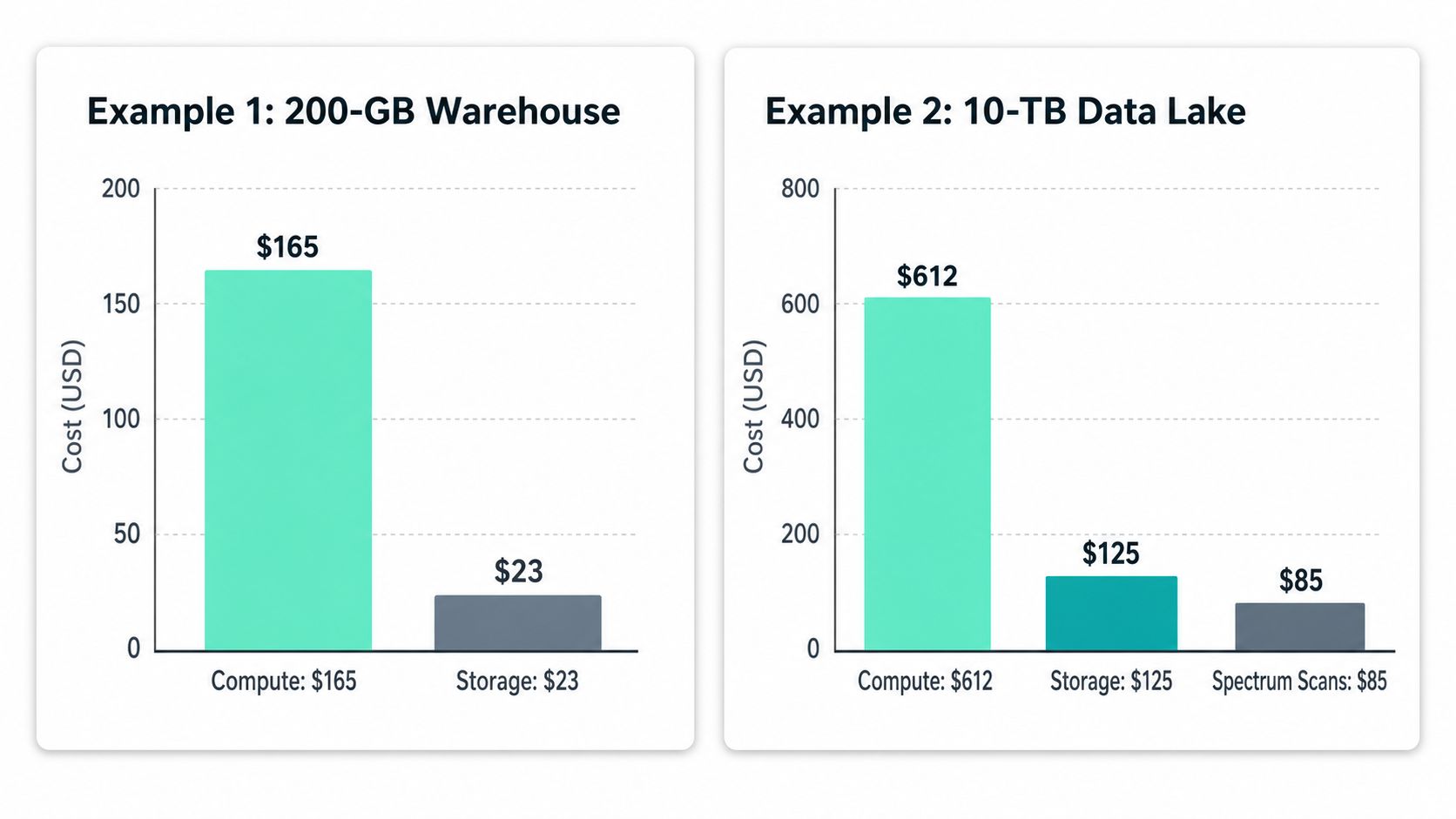
These examples stay simple on purpose. The point is to show how the bill changes when the workload shape changes, because Redshift spend follows usage pattern first and node choice second.
Example 1 A 200 GB analytics warehouse on dc2.large
Start with a single dc2.large node at roughly $0.25 per hour in US East, which puts an always-on node in the neighborhood of a modest monthly compute bill, as discussed in the earlier pricing guide (RudderStack pricing guide). Add managed storage for 200 GB, and the storage line stays small compared with compute. A light Spectrum allowance for occasional external scans sits on top of that.
That bill shape is what you expect from a small warehouse that stays online. The storage line does not move the total much. The primary cost driver is the node sitting there all month, even if the team only uses it in bursts. Small constant compute can still outrun storage by a wide margin.
If this is your workload, cut idle uptime first and reduce external scans second. If the cluster stays on because nobody shut it down, you are paying for process failure, not analytics value.
Example 2 A medium SaaS reporting feature on ra3.4xlarge
Now take a ra3.4xlarge that runs as the engine behind a product reporting feature. The node rate is much higher than the small warehouse above, so the monthly bill climbs fast if it stays hot all day. If the feature runs only during active business hours, the compute cost falls because you are buying fewer active hours. Managed storage and concurrency scaling then become the next lines to watch.
The lesson is simple. A reporting feature that looks like a normal warehouse on a slide can spend very differently once customer dashboards, product analytics, and ad hoc slicing all hit the same cluster. The expensive part is usually not the label on the node. It is the workload shape behind it, especially when bursts and scan-heavy queries show up together. For teams doing their own scenario math, a SpendLens AI calculator helps sanity-check the bill before it arrives.
Money-saving pattern: The faster the query mix changes during the day, the less useful a single monthly node estimate becomes. Active-hour exposure matters more than the sticker price of the node.
The right move is to isolate the dominant driver first. If constant compute is the problem, reduce uptime. If burst traffic is the problem, cut concurrency pressure. If external scans are the problem, stop routing exploratory queries through the warehouse like it is a data lake.
Off-Cluster Cost Drivers Most Teams Miss
The biggest Redshift bill surprises usually do not come from the core node rate. They show up when the warehouse starts acting like a query router, a data lake front end, or a multi-region distribution layer.
| Off-Cluster Cost Drivers Ranked by Surprise Frequency | Driver | Billing Unit | Common Cause of Surprise |
|---|---|---|---|
| 1 | Redshift Spectrum | TB scanned | Analysts query wide external files or unpartitioned data, and scans climb quickly |
| 2 | Concurrency scaling | Per-second cluster rate after free credits | Dashboard bursts and parallel ETL queues trigger extra capacity that teams do not track closely |
| 3 | Managed storage growth | GB-month | Retention grows quietly as tables, backups, and reclaimed data lag behind usage |
| 4 | Data transfer | Variable network charge | Cross-region movement or non-S3 traffic shows up after architecture changes |
| 5 | Snapshot retention | Stored backup data | Default retention stays in place long after the business no longer needs it |
Spectrum is the first place I look when a “warehouse bill” behaves like a lake bill. If analysts query S3 directly instead of loading only the useful slice, scan volume becomes the hidden tax on every exploration. The fix is usually about data shape and file discipline, not about buying more compute.
Concurrency scaling is a concurrency problem disguised as an availability feature. Dashboard bursts and parallel ETL can keep the warehouse responsive, but they also create extra spend that disappears if nobody watches the pattern behind it. The core of cloud cost management practices matters, because the bill follows behavior, not intent.
Managed storage and snapshots are easier to overlook because they feel passive. They do not look dramatic on a daily graph, but they keep accumulating if nobody trims the data lifecycle. Tie retention to business need, not to default settings.
A Prioritized Cost Optimization Checklist
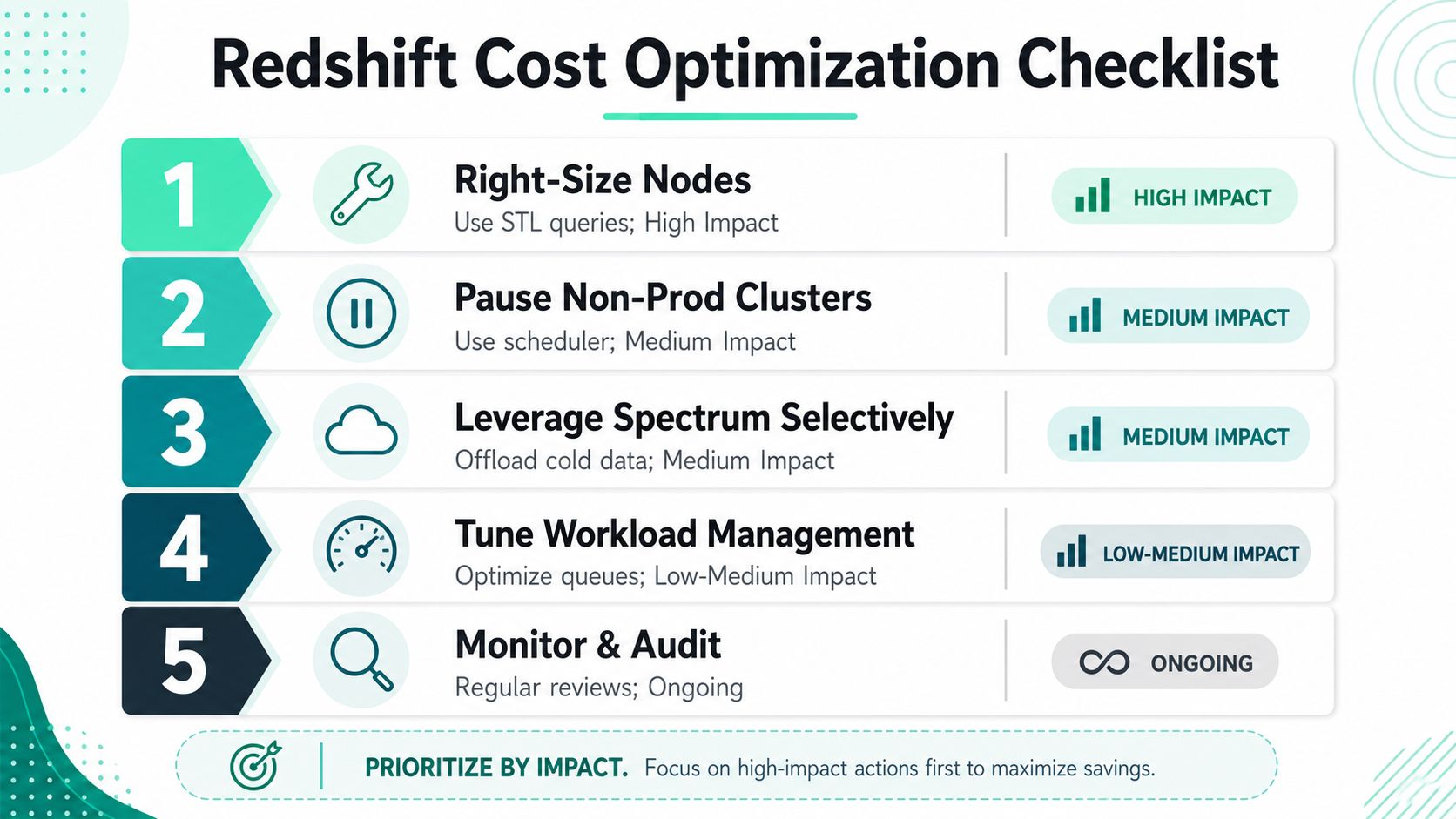
This is the order I'd use in a real FinOps review. Start with the changes that usually move the invoice the most, then work down to the hygiene items that stop cost from creeping back.
1. Right-size nodes first
Query the system tables and look for low utilization, long idle periods, and oversized concurrency. If the cluster is carrying dead weight, a smaller instance or a move to serverless can materially change spend. This usually delivers the biggest savings because you're cutting the base line, not nibbling around the edges.
2. Pause what doesn't need to stay on
Non-prod clusters are the easiest win in the room. If dev and staging sit idle overnight, they're still burning money unless someone pauses them. The savings show up quickly because the waste is obvious once you stop paying for unused hours.
3. Use Spectrum selectively
Spectrum is excellent for cold or rarely queried data, but it's a bad place to leave wide, poorly shaped files. Keep it for the parts of the lake that deserve to stay external, and load the rest into Redshift where repeated queries are cheaper to execute.
4. Tune workload management and scans
Sort keys, table design, and queue settings matter because they change how much data each query touches and how much contention you create. Smaller scans and cleaner concurrency keep both compute and Spectrum pressure lower. That's where many teams save time as well as money, because fewer slow queries mean fewer reruns and fewer manual fixes.
5. Clean up snapshots and retention
Old backups and unnecessary retention are pure drag. If no one can justify the data being kept, it shouldn't stay by default. This is the kind of work that saves less than rightsizing on paper, but it keeps the bill from climbing back after the big win.
Use this sequence so the team doesn't spend a week on a low-impact tweak while the cluster keeps running hot. Then verify the change against the next invoice and the system tables, not against gut feel. The companion guide on reducing monthly cloud bills fits well if you're building an internal playbook.
Watch the next section through the lens of proof. If you can't see the lower scan count, the lower active hours, or the smaller storage footprint on the next billing cycle, the optimization didn't really happen.
Forecasting the Next Redshift Bill Before It Lands
Forecasting is its own discipline. Optimization tells you what to fix after the fact, but forecasting tells finance and engineering which workload pattern will hit the bill next. That's the difference between a controlled change and a postmortem.
Build the forecast from usage, not hope
Start with AWS Cost Explorer and the Cost and Usage Report, then layer in Redshift system table telemetry so the forecast reflects query shape, active time, and storage growth. From there, tag workload owners and set alerts by team or feature so the person who caused the cost can see it before the invoice closes. If you need a structured cost allocation approach, the cost allocation methods guide is a good companion.
The monthly review should be short and blunt. Finance asks which workload changed, engineering answers with the leading indicator, and both sides agree on the next action before the bill arrives. That keeps the conversation on behavior, not blame.
Forecasting rule: The forecast should track the pattern that moves spend, not just the total. If the workload got burstier, the next bill will tell you even if the average stayed flat.
When Redshift Is Worth It and Common Questions
Redshift is not automatically expensive. It becomes expensive when the workload shape and pricing model fight each other. The right fit can still be a very sensible analytics choice, especially when you want managed storage, strong SQL performance, and AWS-native integration without building a warehouse stack from scratch.
Is Redshift always the cheapest choice
No. It's the right fit when the data size, query patterns, and operational model line up with provisioned, reserved, or serverless economics. A small fixed workload and a bursty ad hoc workload should not be priced the same way, and Redshift gives you different paths for each.
What's the biggest cost mistake
Over-provisioning and forgetting to pause non-prod. Those two habits keep showing up in the bills because they're easy to overlook and hard to justify once you see the math. The second mistake is treating Spectrum like a default landing zone instead of a selective tool for cold data.
How should I size a migration
Start from the workload, not the old warehouse's marketing tier. Match the active query pattern, scan behavior, and concurrency profile to the new Redshift model, then watch the first billing cycle closely. If the team migrates without that check, the same shape problem just moves to a different invoice.
Two identical clusters can cost very different amounts across regions, so geography is part of the bill, not a footnote. A DC2 node in London has a higher hourly rate than the same class in US East, which means dev and staging placements can change your budget even when the workload stays the same (Cloudzero regional pricing example). That's why region choice belongs in the cost review alongside sizing and retention.
If you want a cleaner way to spot the drivers behind Redshift spend, use SpendLens AI to track cost signals, workload patterns, and savings opportunities before the invoice lands. Visit SpendLens AI to see how it helps teams connect usage to spend and turn Redshift cost surprises into planned operating decisions.