Azure Open AI Pricing Guide for Engineering Teams
Get a clear breakdown of Azure open ai pricing with model comparisons and cost-saving tips for your LLM deployments.
You open the Azure bill and the number makes no sense. The pilot looked controlled, the team kept saying the prompts were “pretty short,” and yet the invoice landed 2x or 3x above forecast. That's usually the moment engineering leaders realize Azure OpenAI pricing isn't hurting them because it's hidden, it's hurting them because they've been measuring the wrong thing.
The trap is simple. Teams count requests, maybe token totals, and still miss bill drivers, especially output length, cache hit rates, and model tier selection. Azure OpenAI is token-based, but token-based doesn't mean workload-agnostic. A chat feature, a classifier, and a summarizer can all use the same model and still produce wildly different effective costs depending on how much they ask the model to generate.
Table of Contents
- Why Your Azure OpenAI Bill Surprises You
- How Azure OpenAI Token Pricing Actually Works
- Choosing the Right Model Tier for Your Workload
- Hidden Cost Multipliers Beyond Base Token Rates
- Real-World Cost Reduction Case Study
- Instrumenting Your Code for Cost Visibility
- Building Sustainable AI FinOps Practices
Why Your Azure OpenAI Bill Surprises You
A platform team I'd trust at 2 AM usually finds the problem the same way. The dashboard looks calm, the usage graph stays flat, and then the month-end Azure invoice lands far above the forecast. The issue is rarely that Azure OpenAI pricing is hard to read. It is that the team watched request count while the bill tracked what the model produced.
Token totals are not the same as cost
Microsoft bills input tokens and output tokens separately, and that split is what catches teams off guard. On the Azure pricing page, GPT-5 is listed at $1.25 per 1 million input tokens and $10.00 per 1 million output tokens, while GPT-5-nano is $0.05 and $0.40 respectively, per 1 million tokens (Azure OpenAI pricing). The same request volume can produce a very different bill if the model starts generating longer answers, verbose tool output, or more reasoning text.
Practical rule: if output grows, cost grows faster than many teams expect. The bill follows the generation pattern, not just the prompt volume.
A support draft feature that returns long, polished responses can burn through output tokens even when the prompts are small. A routing endpoint that classifies text may barely generate anything, so it stays cheap even at high volume.
The blind spot shows up clearly in why token counts alone don't tell the full story. That matches what I see in practice. The “cheap” feature is often the one with disciplined outputs and a tight prompt shape, not the one with the lowest headline model tier.
The same model can produce two very different bills
Two teams can use the same Azure model and still see wildly different spend. One team sends compact prompts and asks for a short classification label. Another sends a long system prompt, repeats instructions, and asks for a multi-paragraph answer with tool traces. The model name is identical, but the cost surface is not.
The difference is usually in the workload shape. One service may reuse context efficiently and keep responses short. Another may keep re-sending the same instructions, generate long completions, and pay for that repetition every time. A model switch can help, but only if the workload matches the cheaper tier. If the output pattern stays verbose, the bill stays high even after the switch.
Two teams can use the same model and still end up with a 25x spread in spend when one keeps prompts tight and output short while the other sends bulky context and asks for long-form generation. That gap is why volume metrics alone mislead. If you only watch calls per day, you miss output inflation, repeated prompt overhead, cache hit rates, and the fact that one workflow may be paying to make the model re-read the same material over and over again. The better question is direct: what are the requests asking the model to generate, how much of the prompt is repeated context, and where can a smaller model handle the job without hurting quality?
How Azure OpenAI Token Pricing Actually Works
Azure OpenAI billing is simple only after you separate the parts that move the invoice. Microsoft charges input tokens and output tokens separately, and the rate card makes one thing obvious right away: output usually costs far more than input. That gap matters more than the headline model name, because the same model can behave very differently depending on how much text you send and how much it returns.
The rate card is asymmetric by design
The published examples show the pattern clearly. GPT-5 is $1.25 input and $10.00 output per 1 million tokens, GPT-4.1 is $2.00 and $8.00, GPT-4o is $2.50 and $10.00, and GPT-5-nano is $0.05 and $0.40 per 1 million tokens. That puts the output side at 4x to 8x the input side for the mainstream models listed on the pricing page.
| Azure OpenAI Model Pricing Comparison | |||
|---|---|---|---|
| Model | Input Cost (per 1M tokens) | Output Cost (per 1M tokens) | Output/Input Ratio |
| GPT-5 | $1.25 | $10.00 | 8x |
| GPT-4.1 | $2.00 | $8.00 | 4x |
| GPT-4o | $2.50 | $10.00 | 4x |
| GPT-5-nano | $0.05 | $0.40 | 8x |
That asymmetry is why long responses get expensive fast. A short classification label barely touches the output side. A verbose answer, tool trace, or over-documented response burns through output tokens every time the model keeps talking. If your application asks for long completions by default, the bill follows that choice whether the prompt was tidy or not.
The same model can still produce very different bills
Two teams can send traffic to the same Azure model and end up in very different places on the invoice. One team keeps prompts tight, reuses context efficiently, and asks for a concise answer. Another team repeats instructions in every request, sends bulky context, and asks for multi-paragraph output. The model name stays the same. The spend does not.
That gap usually comes from workload shape, not just model selection. Repeated context gets paid for again and again. Long completions turn every request into a larger output event. Cache hit rates change the picture further, because a workflow that reuses stable context can cost much less than a workflow that rebuilds the same prompt over and over. A practical breakdown of those hidden multipliers is in why token counts alone don't tell the full story.
Deployment shape changes the effective price
The rate card is only the starting point. Azure's pricing surface includes different deployment types and model families, including global, regional, and data-zone offerings, plus provisioned throughput options. The effective price depends on how you deploy, not just which model you pick.
The operational trade-off is straightforward. A latency-sensitive production service may need one deployment shape, while a batch workflow can tolerate slower handling if the cost is lower. Guidance on cost control also points to cached-input discounts and batch-style savings, so the same model can land very differently on the invoice depending on how often the prompt repeats and how the workload arrives. Microsoft's public pricing page and Finout's Azure OpenAI pricing guide both point to this same reality, token rates are only one part of the bill (Azure OpenAI pricing, Finout's Azure OpenAI pricing guide).
What looks cheap on the rate card can still be expensive if the workload repeats large prompts, generates long completions, or runs on a deployment shape that does not fit the job.
Azure OpenAI model pricing comparison in practice
The table above is where the first real cost conversation starts. If the workload does not need premium reasoning, the spread between flagship and smaller tiers is large enough to justify testing a switch. If the workload is output-heavy, the output/input ratio deserves attention before anyone starts tuning infrastructure.
Two services can use the same model and still end up with very different bills because one sends short, cache-friendly requests and the other keeps paying to regenerate long answers. Token pricing is only the visible part. Workload shape, context reuse, and output length are what move the invoice.
Choosing the Right Model Tier for Your Workload
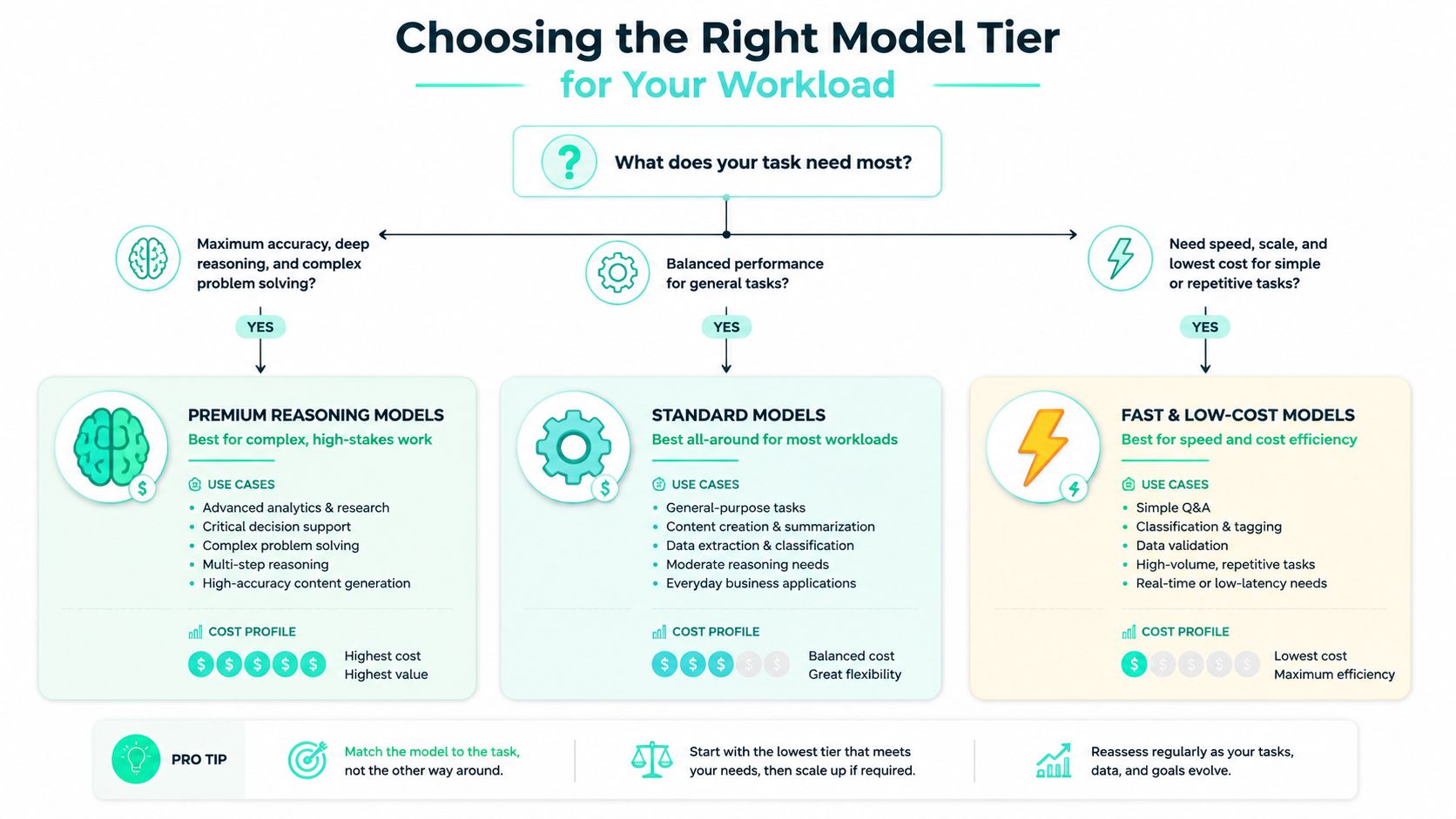
A lot of Azure OpenAI bills are inflated before the first prompt ever runs. The expensive model sits in the default path, so every request pays for capability the workload may never use. The right tier depends on quality threshold, latency tolerance, and business criticality, not on the assumption that the largest model is automatically the safest choice.
Match the model to the task, not the team's habit
For classification and routing, a small model is usually enough. Azure's published rates make the trade-off hard to ignore, GPT-5-nano is $0.05 input and $0.40 output per 1 million tokens, while GPT-5 is $1.25 and $10.00 (CloudZero's Azure OpenAI pricing overview). If a workflow only needs to sort, label, or route text, that spread is large enough to justify testing a lower tier before the default becomes permanent.
For summarization, the decision is less obvious. The task still benefits from lower cost, but it also needs readable output and faithful compression of the source text. A mid-tier model like GPT-4o, at $2.50 input and $10.00 output per 1 million tokens, can be a practical middle ground when the result has to read well but does not need heavy reasoning (Azure OpenAI pricing).
For complex reasoning chains, flagship models earn their place. That is especially true when a bad answer creates rework, the output needs to stand up to scrutiny, or the workflow is exposed directly to users. I would rather pay for a model that reduces retries and manual review than save a little on the rate card and ship a brittle experience.
Use A/B tests before you switch
Model switching should be based on evidence. Put the candidates on the same labeled workload, then compare accuracy, failure modes, latency, and the quality users see. If the smaller model clears the bar, the savings can be real without changing provider clients or rebuilding the feature.
Good migration test: run the same workload through two models, then review only the outputs that matter to the business. If the smaller model is good enough on your real examples, the cheaper tier is usually the right choice.
A practical selection aid like SpendLens AI's model comparison guide helps teams make that call with less guesswork. The goal is not to chase the most powerful model. The goal is to stop paying premium prices for tasks that do not need premium reasoning.
A simple decision framework
- Use a nano-tier model for routing, classification, extraction, and other narrow tasks where the response format is fixed.
- Use a mid-tier model for user-facing summaries, drafts, and tasks where readability matters more than deep reasoning.
- Use a flagship model when correctness, multi-step reasoning, or high business risk justifies the extra cost.
That split usually saves time too. Teams spend less effort debugging overbuilt prompts, and more time shipping features that actually need the expensive model.
Hidden Cost Multipliers Beyond Base Token Rates
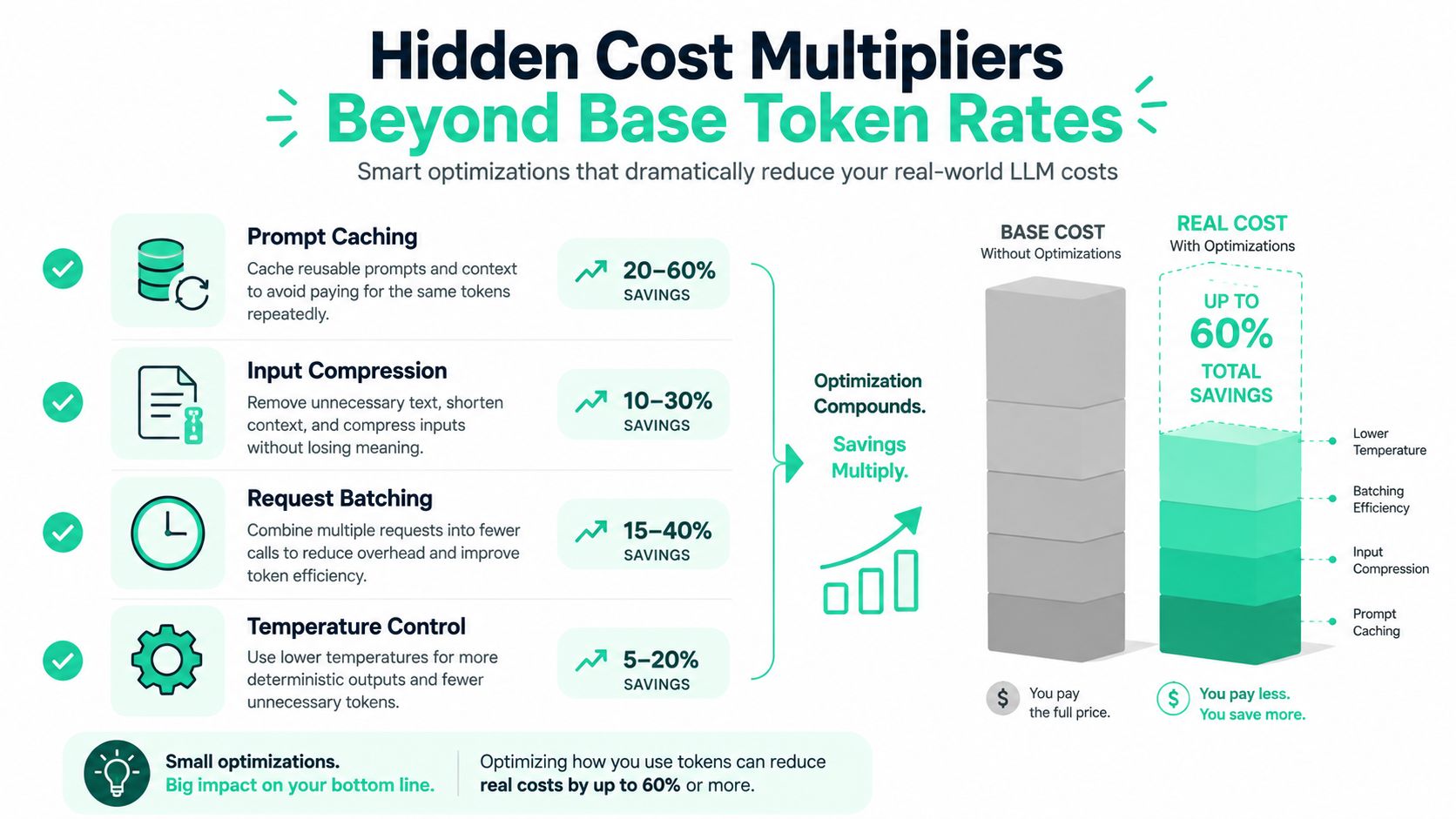
Base token pricing is only the first layer of Azure OpenAI economics. The bill usually moves when workloads keep resending the same context, when output runs much longer than input, or when teams send every job through the live path instead of separating urgent work from background work. Those factors do not change the model label on the invoice, but they change how fast spend climbs.
Caching changes the shape of the bill
Azure pricing guidance and optimization writeups point to cached-input discounts on GPT-5-class models and to batch-style savings for async work. That matters because many production apps resend the same instructions, policy text, and context blocks on every call. If the cache hit rate is low, you pay to process the same material again and again, even when the answer changes very little.
Two teams can use the same model and see very different bills. Team A sends a short prompt, gets a short answer, and rarely repeats context. Team B sends a long template, attaches the same policy block to every request, and generates a verbose answer each time. Same model, different effective cost, because the token mix is different and the repeated context keeps getting charged.
Batch the work that does not need a live answer
Async workloads are strong candidates for batch processing. FinOps guidance notes that batch processing can cut per-token cost for async workloads, and that is often where teams leave money on the table because the job was built on the same path as interactive traffic. That choice keeps the system simpler on paper, then turns into a steady source of unnecessary spend.
Use batch-style handling for document enrichment, backlog summarization, nightly cleanup, and other jobs where the user does not need an answer right this second. The value is not only direct savings, it also makes capacity planning cleaner because the traffic stops competing with interactive endpoints. If you want a practical way to think about API spend beyond the model rate, the cost of API usage breakdown is a useful reference point.
Prompt design is a cost control tool
Prompt bloat is one of the easiest ways to waste money. Repeated instructions, unnecessary examples, and oversized context windows all increase the number of tokens the model must process. If the prompt is doing the same work three times, you are paying three times for the privilege.
A practical rule is blunt. If a prompt block exists because someone once found it useful, test it before you keep paying for it. The same applies to policy text, formatting instructions, and examples that survived multiple iterations but no longer change the result.
Output length can dwarf input cost
Teams focus on the prompt because it feels visible, then miss the output side. A short input with a long generated response can cost far more than a longer prompt with a tight answer. That is where output-to-input ratios become a real budget problem, especially in chat assistants, report drafting, and copilots that are rewarded for being wordy.
One team can run a compact extraction workflow and keep answers to a few fields. Another team can use the same model for a customer-facing assistant that writes paragraphs, restates the question, and adds caveats that nobody asked for. The second team can burn through tokens far faster even though both teams say they are “using the same model.”
Model switching only helps when the workload fits
The biggest savings usually come from matching model strength to the shape of the task. A routing step, classification pass, or extraction job does not need the same reasoning budget as a multi-step support workflow. If the smaller model clears the business bar, use it there and reserve the larger model for the cases where the extra reasoning changes the outcome.
The mistake is assuming cost per token is the whole story. It is not. Cache hit rates, prompt reuse, output verbosity, and whether a workload is interactive or batch all multiply the base rate in different directions. That is why two teams on the same model can end up with bills that feel unrelated to each other.
A practical optimization checklist
- Trim repeated instructions so the model does not re-read policy text on every call.
- Separate live and async paths so batchable work can use cheaper processing.
- Watch output verbosity and cap answers when the business need is short-form.
- Measure cache hit rate on repeated context instead of assuming the savings will appear automatically.
That combination often saves more than a model swap. It also gives you a cleaner baseline before you decide whether a cheaper tier is enough for the task.
Real-World Cost Reduction Case Study
A cautious SaaS company, not a reckless one, had a document classification workflow running on GPT-5 and spending about $8,000/month. The workload was high volume, but it did not need deep reasoning, it needed consistent labels. Once the team validated that the task was really structured classification, they moved the workflow to GPT-5-nano and cut spend to $320/month, a 25x reduction based on the published rates, as noted earlier.
How they proved the downgrade was safe
The team did not make the change on instinct. They built a labeled test set from real documents, ran both models on the same inputs, and compared the outputs against the business rules the product already used. They also tracked latency, because a cheaper model still fails the test if it slows the product path enough to frustrate users.
The migration rule was simple: if the smaller model matched the operational quality bar on real examples, the team treated the cheaper tier as the default.
They focused on the signals that matched the workflow. Accuracy on the label, error rate on edge cases, and whether borderline documents still routed correctly. Raw language quality did not matter here, because the business cared about the right bucket, not polished prose.
What changed after the migration
The biggest surprise was not just the bill reduction. The team also ended up with a cleaner operating model because the prompt no longer pretended to solve a problem it never had. Their engineers could simplify the request path, and product stopped paying flagship prices for work that was basically structured classification.
That is the broader lesson. The safest workloads to downgrade are the ones with narrow outputs, stable rules, and easy ways to verify correctness. The risky ones are the workflows where reasoning quality, edge-case handling, or user trust really matter. If the product breaks when the model gets weaker, keep the premium tier for those calls.
Where this pattern works best
- Routing and classification when the answer space is small and measurable.
- Extraction tasks when the output format is fixed and easy to validate.
- Internal automation where human review already catches rare misses.
Teams looking for similar savings should not force a cheaper model everywhere. The point is to stop paying premium rates for jobs that do not need premium behavior. A classification job with a tight rubric, low output variance, and high input repetition can often move down a tier without hurting the product. A support workflow with long answers, uncertain intent, or sensitive edge cases usually cannot.
The cost lesson is simple. Two teams can point to the same model and still see wildly different bills, because workload shape drives spend just as much as base token rate does. Output length, cache reuse, and the model tier you choose all push the total in different directions.
Instrumenting Your Code for Cost Visibility
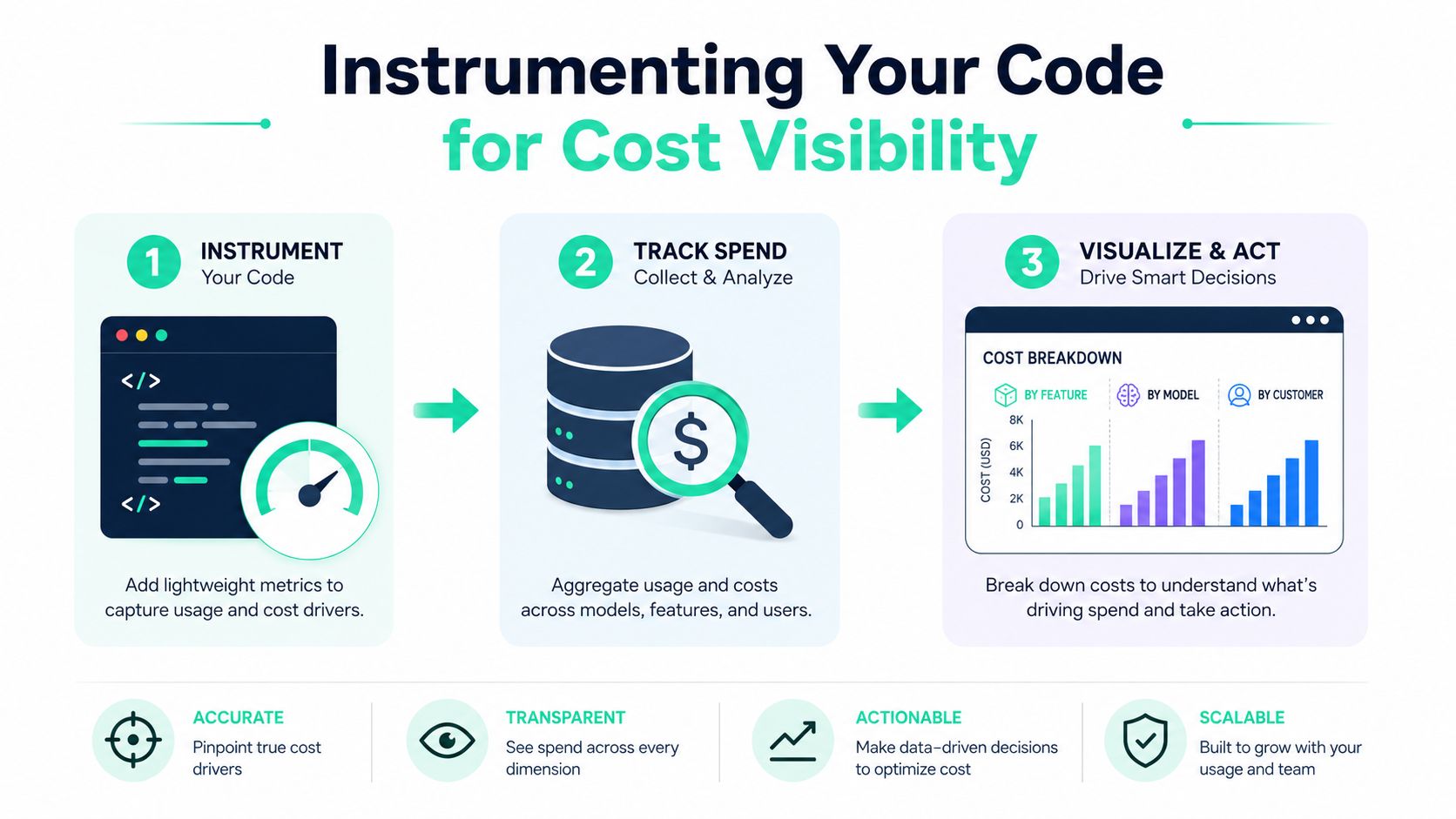
A bill can look random until you break the calls apart. If every Azure OpenAI request lands in the same log bucket, finance sees a total and engineering sees noise. The practical fix is lightweight instrumentation that tags each call by workflow, feature, model, and customer segment, so the spend is tied to the work that created it.
Tag calls at the point of use
Attach metadata where the call happens. If you already use a provider SDK, there is no reason to rebuild the client path. A decorator, wrapper, or tagging helper can record the business context around each request while keeping the existing integration intact.
SpendLens AI takes that approach with lightweight attribution across workflows and models, while preserving the existing client path instead of inserting a proxy. Use the same pattern in your own stack if you want the logs to answer the question that matters most after the invoice arrives, which feature, which job type, and which customer journey drove the cost.
Track the signals that expose waste
The signals that matter are the ones that explain why cost changed. Token usage is only the starting point. Cache efficiency shows whether repeated context is being reused or paid for again. Per-call metrics, where available, show which requests are unusually expensive. Prompt waste also shows up in large templates, repeated instructions, and unnecessary context that keep inflating the bill.
A useful observability hierarchy usually looks like this:
- By feature, so product can see which user flows consume the most spend.
- By model, so platform can spot expensive defaults that no longer fit.
- By customer or tenant, so chargeback and margin analysis stay grounded in actual usage.
That view is where the hidden multipliers become obvious. Two teams can run the same model and still see very different bills because one sends short prompts with high cache reuse while the other sends long, repetitive context and gets large outputs back. Output-to-input ratio, cache hit rate, workload shape, and the point where a cheaper model can take over all change the final number. The base token rate never tells the whole story.
Use the data to make decisions, not just dashboards
A dashboard that nobody acts on does not change the bill. The better output is a short list of actions, ranked by spend driver and expected savings, with migration risk attached so teams know what to test first.
That makes the trade-offs visible. A workflow with narrow outputs and high repetition can often move to a cheaper model, while a support path with long answers, uncertain intent, or sensitive edge cases may need the premium tier. Once the data is in place, engineering stops debating vague “AI usage” and starts discussing one workflow with one cost profile. Finance gets numbers it can forecast. Product gets evidence for whether a feature should stay on a higher tier or move down the ladder.
Building Sustainable AI FinOps Practices
A one-time optimization helps, but it rarely holds for long. Prompts change, traffic grows, and new features alter usage patterns, then the bill drifts again. Sustainable control over Azure OpenAI pricing depends on ongoing FinOps practices that keep engineering and finance aligned on the same numbers.
Make spend review a habit, not an incident
Daily spend summaries, budget alerts, and workload-level attribution give leaders a way to catch drift before month-end. Azure's budgeting automation pattern shows why hard guardrails matter, including threshold alerts and automated enforcement through budgets, action groups, and runbooks (Microsoft Tech Community on Azure OpenAI cost control). That kind of control keeps surprise spend from turning into a recurring fire drill.
Good governance pairs visibility with action. If the alert does not lead to a review, or the review does not lead to a change, the alert is just noise.
Compare workloads on equal footing
Classification comes next. Similar workloads need to be grouped so they can be compared on the same basis. A summarization endpoint and a routing endpoint should never be judged against the same cost expectation, and a batch job should not be compared with a live chat path without context.
Savings recommendations matter here too. The useful ones are ranked by impact, confidence, and migration risk, because not every lower-cost option deserves engineering time. A cheaper model that saves money but introduces brittle behavior is not optimization, it is deferred trouble.
Real workload shape changes the bill more than the base token rate suggests. A short, repetitive workflow with high cache reuse can stay inexpensive even under the same model that produces a much larger invoice for a team sending long prompts and long outputs. Two teams can share the same model and still end up with wildly different spend because output-to-input ratio, cache hit rate, and the point where a cheaper model can take over all change the final number.
Tie the bill to business value
The strongest AI cost programs do more than report spend, they connect it to the feature or customer journey that caused it. Once that link exists, forecasting gets easier, chargeback becomes possible, and product teams can see which experiences are worth the cost. That clarity turns AI economics from a surprise expense into a managed operating discipline.
For teams that want a single place to add instrumentation, track spend drivers, and surface model-switch opportunities, SpendLens AI fits that role. It is built to monitor LLM costs across OpenAI and Anthropic workloads, and the same attribution style applies to Azure OpenAI usage when you need cost visibility without rebuilding your provider clients.
If your Azure OpenAI bill has already drifted past the forecast, do not wait for the next invoice to confirm the pattern. Visit SpendLens AI to instrument your workloads, find the features driving spend, and surface lower-cost model opportunities before the next surprise reaches finance.