
AI Model Routing Explained for Cost and Quality
Learn what AI model routing is, how routing policies work, and how to balance cost, latency and quality with real examples and testing tips.
Your support assistant, document summarizer, and code helper may all be sending requests to the same expensive model right now. That keeps integration simple, but it also makes routine work pay frontier prices, pushes latency higher than necessary, and gives your finance team little explanation when the bill rises after a prompt or feature change.
AI model routing addresses that mismatch by choosing a model for each request, or for each stage of a task. The difficult part isn't adding a switch statement. A production router must balance quality, cost, latency, safety, compliance, provider availability, caching, and the maintenance burden created by changing models and prompts.
This guide builds the idea progressively. You'll start with the basic request path, compare routing architectures, examine real-time policies, and then connect routing decisions to observability and controlled testing. Along the way, examples will show where routing can save money or time, including documented results such as $2,316 in monthly savings from one routing example and 41% to 80% lower LLM costs from prompt caching in long-horizon agentic workloads, as reported by ProjectDiscovery's prompt-caching analysis.
The approach suits engineering leaders, platform engineers, FinOps practitioners, and product teams that need to scale AI features without treating quality and governance as afterthoughts. If you're managing a growing model fleet or an unpredictable LLM bill, routing is a practical systems discipline rather than a cosmetic optimization.
Table of Contents
- Why One Model Rarely Fits Every Request
- What AI Model Routing Really Means
- Routing Architectures and Their Trade Offs
- How Routing Policies Decide in Real Time
- Observability Testing and Keeping Routing Honest
- Real World Examples Where Routing Pays Off
- Putting Routing Into Practice With Confidence
Why One Model Rarely Fits Every Request
A customer support assistant may need to classify a short request, retrieve an account policy, and draft a careful reply. A summarizer may process a long document with repeated instructions. A code helper may need deep reasoning only when it encounters a difficult failure. Sending every one of those requests to the same model gives you one operational default, not one optimal decision.
The first request might be routine and inexpensive to answer. The second may benefit more from prompt caching than from a larger model. The third may justify a capable model only after a smaller model fails or signals uncertainty. A single-model setup hides these differences, so your application pays for capability it doesn't always need and accepts latency that some users don't need to experience.
Practical rule: Route by the requirements of the task, not by the reputation of the model.
Consider a SaaS team that has selected a powerful model because it performs well in evaluation. The support team likes the answer quality, so product engineers reuse that model for ticket tagging, FAQ retrieval, meeting summaries, and code suggestions. The bill then reflects the most expensive path even when most requests are simple. Before choosing a router, the team should inspect its workload by feature, endpoint, model, token usage, latency, and failure mode. A guide to AI model cost comparison can help establish that baseline.
Routing also changes the product conversation. Instead of asking, “Which model should we use?” you ask, “Which requests need which capability, under which policy?” That question exposes trade-offs the single-model choice conceals:
- Support triage: A lightweight model may assign categories, while sensitive escalations go to a stricter path.
- Document work: A cache-friendly path may reduce repeated-prefix expense before you consider model substitution.
- Code assistance: A fast model may handle edits, while a more capable model receives unresolved test failures.
- Internal research: A router can reserve deeper reasoning for questions with ambiguous evidence or higher business risk.
The rest of the design follows from this separation. You need a request taxonomy, candidate models, policy constraints, fallback behavior, and measurements that show whether the route preserved quality. You also need a way to discover when the original rule has stopped working.
By the end, you'll be able to explain routing to a teammate, select an architecture that matches your risk tolerance, and run a low-risk comparison that reports both money saved and time saved. The people who benefit most are teams moving beyond a single model while still needing direct control over reliability, compliance, and spend.
What AI Model Routing Really Means
Think of a router as an air-traffic controller for model calls. The controller doesn't ask which aircraft is universally best. It considers the destination, runway, weather, priority, and safety constraints, then assigns an available aircraft that can complete the journey. An AI router makes a similar decision for a request.
A user query enters with signals such as task type, estimated difficulty, context size, policy classification, latency target, and expected cost. The router compares those signals with the capabilities and operating conditions of candidate models. It then sends the request to a selected model, a sequence of models, or a human escalation path.
The decision can be represented as constrained optimization:
- Define the minimum acceptable outcome. A support answer may need policy compliance and factual grounding. A code edit may need tests to pass.
- List the available paths. These might include a fast model, a reasoning model, a provider in another region, or a fallback.
- Apply hard constraints. Compliance, data residency, safety, and availability can eliminate otherwise attractive choices.
- Optimize the remaining trade-off. The router weighs quality, latency, and cost rather than maximizing one metric in isolation.
- Record the decision. Without the selected model and reason, you can't tell whether the policy worked.
This is different from a proxy. A proxy primarily forwards traffic, handles authentication, retries, or provider normalization. A router adds a decision about where the request should go. The two can coexist, but putting routing logic in a proxy can create latency and governance concerns if the component becomes too heavy.
Two meanings of model routing
The term also describes routing inside a model. In a mixture-of-experts system, a learned gate directs tokens or examples to selected expert components instead of activating the entire network for every input. Google Research described expert-choice routing as a way to activate only parts of a model per example, increasing capacity without proportional compute, a milestone that made MoE routing especially prominent in 2022. Later path-constrained MoE research reported 85.6% consecutive-layer routing correlation versus 62% for independent routing, showing that routing design can affect specialization and stability. Those figures come from the Google Research explanation of expert-choice routing.
Application-level routing happens outside the model. Your service chooses among separate models, providers, or versions. The mechanism differs, but the central question is related: how can the system assign the right computational path to the input?
A useful team explanation is simple: a model router is a policy-driven switchboard that selects a model path for each request while respecting quality, cost, speed, and risk constraints. That definition keeps the focus on the request path and the operating system around it.
For a visual walkthrough of the basic routing idea, this AI model routing video can complement the architecture diagram above.
Routing Architectures and Their Trade Offs
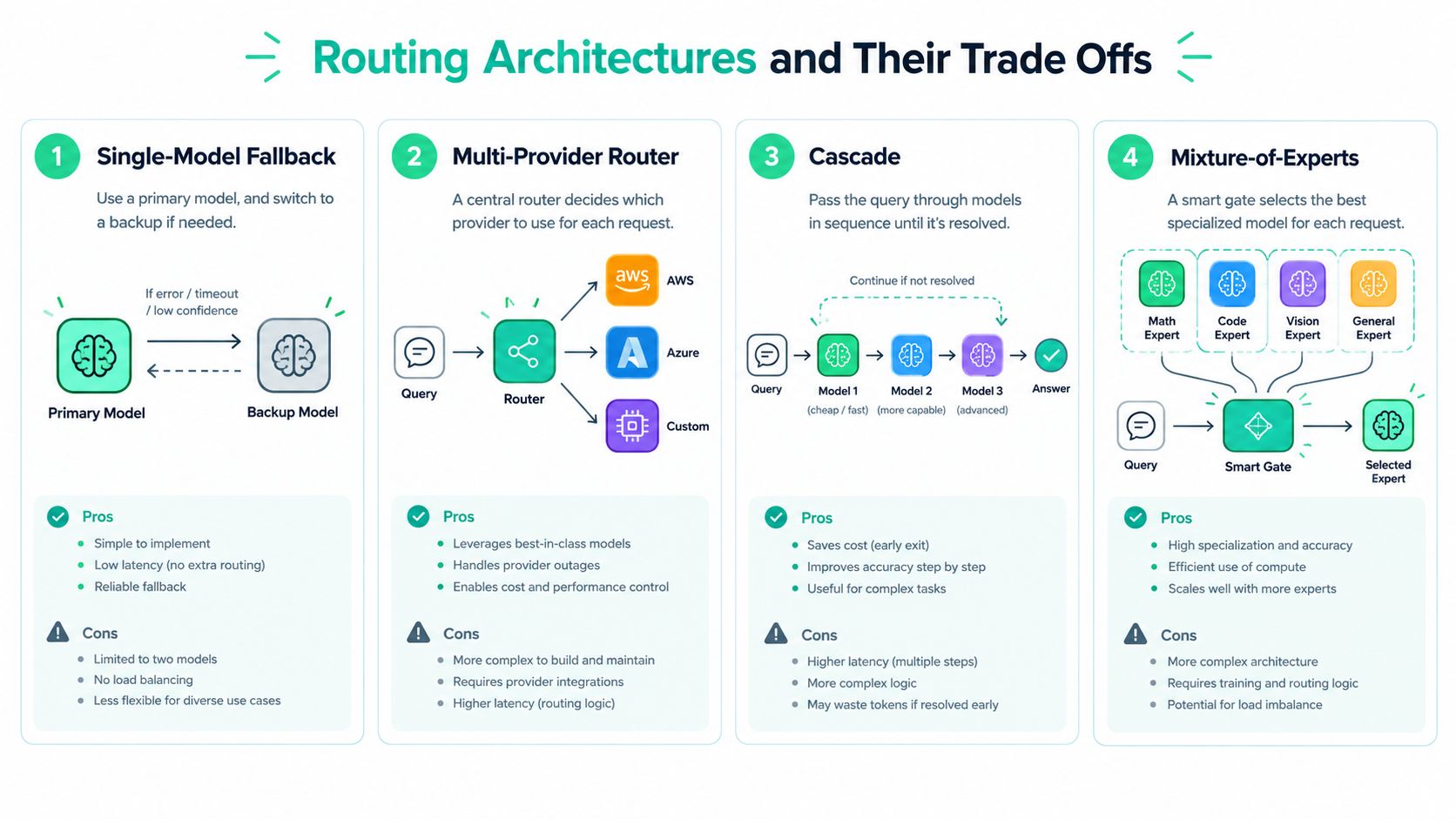
Architecture determines where complexity lives. A fallback is easy to understand but reacts after a problem. A multi-provider router makes choice explicit but must normalize provider behavior. A cascade can save work on easy requests, while mixture-of-experts routing operates inside a model rather than your application.
Four common patterns
Single-model fallback sends traffic to a primary model and switches to a backup after an error, timeout, or availability failure. It improves resilience and can prevent an outage from becoming a product outage, but it usually doesn't reduce routine spend because the primary still handles normal traffic. Latency can increase when the system waits for a failed call before trying again.
Multi-provider routing distributes requests among providers or model families. It can support regional compliance, provider redundancy, and workload-specific capability selection. The trade-off is integration work. Token accounting, safety settings, streaming behavior, error types, and output formats may differ, so a provider-neutral interface needs careful testing.
Cascade routing starts with a cheaper or faster model and escalates when the answer fails a validator, exceeds a difficulty threshold, or shows signs of uncertainty. The easy path can reduce both cost and response time, but an escalation adds a second call for hard requests. A cascade therefore needs a stopping rule and a quality evaluator that won't approve a weak response.
Mixture-of-experts routing selects internal experts within one model. It can increase effective capacity without proportional compute, as described by Google Research's expert-choice routing overview, but application teams don't usually control its expert policy. Treat it as a model-design choice unless your infrastructure exposes those controls.
Decision matrix
| Architecture | Best For | Latency Impact | Cost Control | Operational Risk |
|---|---|---|---|---|
| Single-Model Fallback | Availability and provider outage protection | Adds delay after failure | Limited during normal traffic | Low policy complexity, weaker optimization |
| Multi-Provider Router | Provider diversity, regional rules, varied capabilities | Depends on router and selected provider | Strong when workloads differ | Higher integration and normalization burden |
| Cascade | Routine requests with occasional difficult cases | Fast on easy work, slower after escalation | Strong if escalation is selective | Validator errors and repeated calls need control |
| Mixture-of-Experts | Model architectures that need capacity and specialization | Managed inside model execution | Depends on model serving economics | Mostly hidden from application operators |
The right choice depends on more than cost. A healthcare workflow may reject a cheaper model if its data-handling policy is unsuitable. A live support interface may prefer a slightly less capable model if it returns quickly and escalates only when needed. An internal batch summarizer may tolerate extra processing if caching and lower-cost execution reduce the bill.
Public evaluations reinforce this broader view. RouterBench research describes routing as a constrained optimization problem and reports more than 405,000 inference outcomes across 11 representative LLMs and seven tasks. LLMRouterBench extends evaluation to 400K+ instances across 21 datasets and 33 models with 10 routing baselines. The practical lesson is that a router needs accuracy and cost curves, not a single quality score.
Design principle: Choose the simplest architecture that can enforce your safety and compliance requirements, then add adaptive behavior only when measurements justify the complexity.
How Routing Policies Decide in Real Time
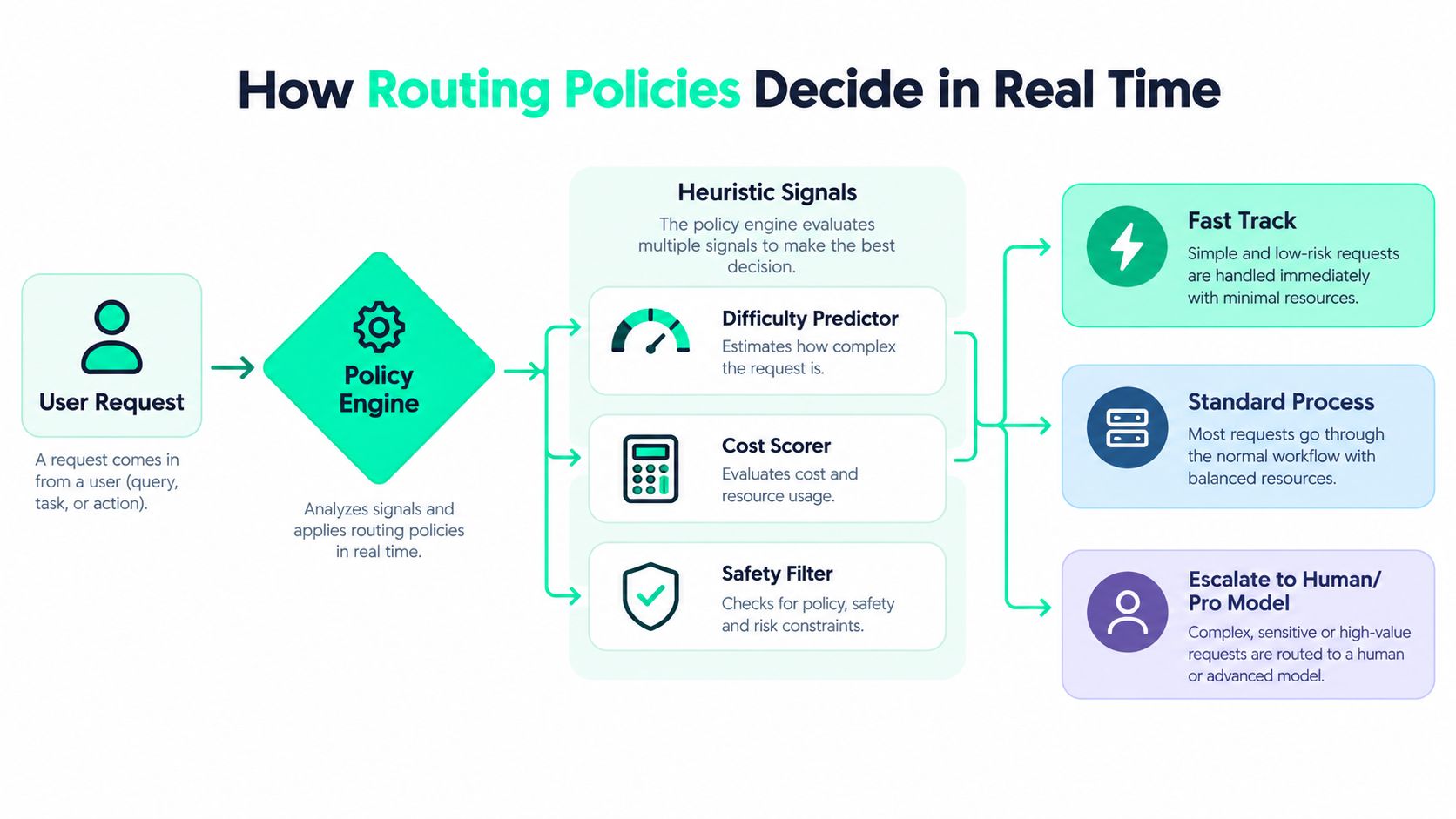
A routing architecture gives you the shape of the system. A routing policy determines what happens on each request. The policy might be a set of explicit rules, a learned classifier, a cost-aware score, or a combination of these approaches.
Start with signals that are observable and explainable. Prompt length can indicate context cost, task type can separate classification from code generation, and a cache key can reveal whether repeated context is likely to receive a cached treatment. Historical quality can show that a particular model performs well on a specific workload, while latency data can identify a provider that fails the product's response target.
From simple rules to learned decisions
A rule-based policy is often the right first implementation:
- Task rule: Send ticket labels and language detection to a lightweight model.
- Difficulty rule: Escalate requests containing unresolved errors, multiple constraints, or complex tool plans.
- Policy rule: Keep restricted data within an approved provider or deployment boundary.
- Latency rule: Use a fast path for interactive requests and a deeper path for asynchronous jobs.
- Cache rule: Preserve repeated prefixes when cache reuse is likely, rather than switching models and losing that opportunity.
Rules are easy to audit, but they become brittle as prompts, models, traffic, and provider behavior change. Recent routing coverage identifies this maintenance burden as an under-answered operational risk. Each new prompt type or model change can trigger rule reviews, while learned routers, fallbacks, and cascades can reduce manual upkeep when they have reliable training and evaluation data. The analysis of AI agent model routing frames that upkeep as part of the cost of routing.
A learned router predicts which candidate is likely to meet the request's quality threshold. It can combine difficulty, model capability, historical outcomes, cost, and latency into a score. That doesn't eliminate policy. It moves part of the decision from manually maintained thresholds into a system that must be monitored for drift.
Quantifying the decision
Every policy should have a value equation. For a routine classifier, compare the cost of the current model with the selected alternative, then multiply the difference by eligible request volume. For an interactive request, compare end-to-end latency, including router overhead, model time, retries, and possible escalation. For a sensitive task, assign a hard rejection or escalation outcome rather than treating compliance as another soft preference.
The available evidence shows why these calculations matter. One intelligent routing example reported that tuned routing can cut bills by 40% to 85%, and quantified one result as 33.6% lower cost, equal to $2,316 saved per month, according to Digital Applied's routing guide. Use such figures as reference points, not promises. Your savings depend on workload mix, model prices, escalation frequency, and the quality threshold you enforce.
Prompt caching belongs in the same calculation. ProjectDiscovery reports 41% to 80% lower LLM costs and 13% to 31% better time-to-first-token in long-horizon agentic workloads when repeated prefixes are cached. If cached input is billed at about 10% of the normal input-token price, Redis explains why cached portions can produce savings of up to 90%. A router that ignores cache state can choose a cheaper model and still lose more value than it gains.
For implementation teams, AI observability for LLM systems provides the surrounding measurement context. Instrument first, then tune the policy against measured cost, latency, cache behavior, and quality.
Observability Testing and Keeping Routing Honest
A router can look successful while sending more requests to expensive models, adding latency through repeated attempts, or allowing quality to drift. Trust comes from a feedback loop that connects the request, the decision, the outcome, and the economic result.
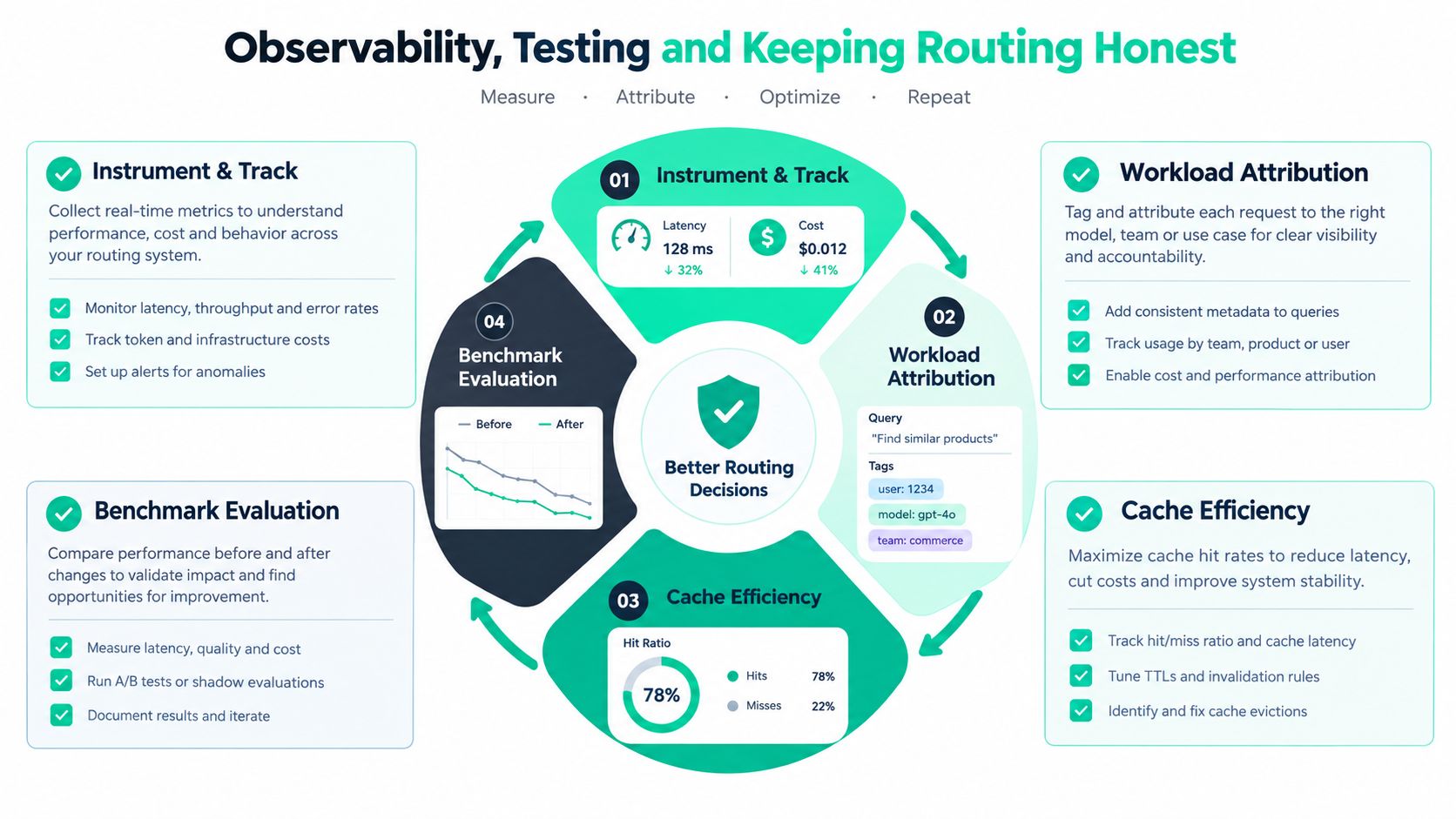
Record the route alongside the normal LLM telemetry. At minimum, capture the workload name, selected provider and model, input and output token usage, latency, cache status where available, fallback or escalation events, policy version, and an outcome signal. For a support assistant, the outcome might include a human correction or escalation. For code generation, it might include test results or whether the suggested change was retained.
Attribute before comparing
Aggregated spend hides routing opportunities. “The code service costs more” isn't actionable until you can separate code explanation, autocomplete, test repair, repository search, and tool planning. Workload attribution lets you compare equivalent operations across models without mixing simple and difficult requests.
A useful review sequence looks like this:
- Tag the workload. Identify the feature, task, endpoint, experiment, and release.
- Capture the decision. Store the route, candidate set, reason, and policy version.
- Compare like with like. Replay or sample equivalent requests against alternative models.
- Measure quality and cost together. Include latency, escalation frequency, failures, and cache effects.
- Review drift. Watch for new prompt shapes, model updates, provider changes, and rising manual overrides.
An apples-to-apples comparison should keep the request set, context, tool availability, evaluator, and success definition stable. If a routing change reduces average cost but creates more retries, the apparent saving may disappear. If it lowers latency by returning incomplete answers, the product has traded user time for hidden rework.
Test online and offline
Offline evaluation helps isolate model behavior, but production routing sees follow-up questions, changing context, tool calls, cache misses, provider load, and user corrections. RouterBench and LLMRouterBench illustrate the scale needed to compare routing methods fairly across many tasks and inference outcomes. Your own test can start smaller, but it should still represent the workload mix rather than a handpicked set of easy prompts.
A route isn't healthy because it is cheap. It's healthy when the cost, latency, policy, and quality signals move together in the intended direction.
Track daily spend by workload and model, then inspect prompt waste signals such as repeated instructions, unnecessary context, oversized templates, and long outputs. Cache efficiency deserves its own view because a model switch can change cache behavior. For practical tooling, LLM observability tools can help teams organize these measurements without inserting a heavy component into every request path.
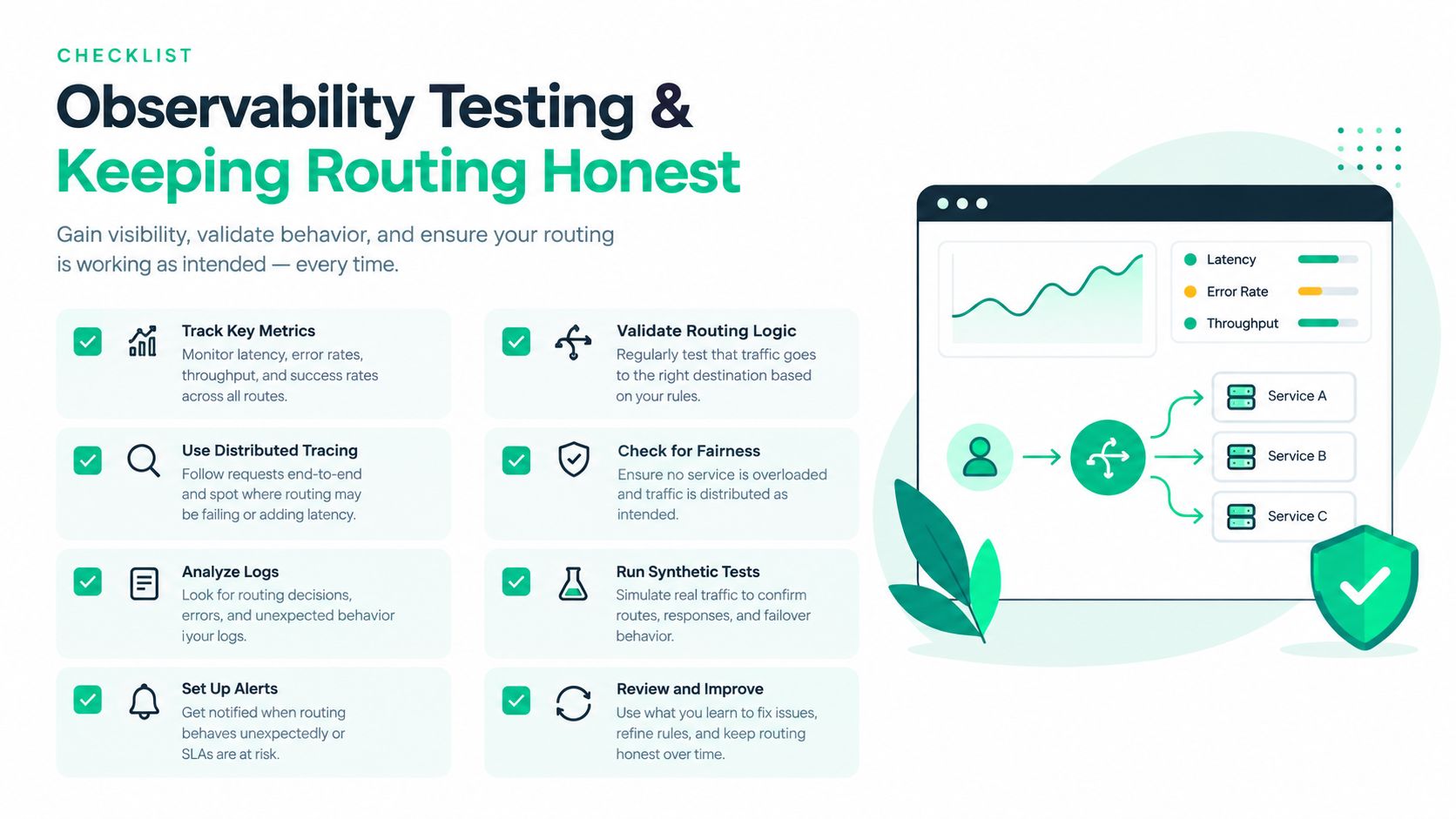
Keep a rollback path. Version policies, shadow-test candidates where possible, set escalation limits, and require review when a new model changes the expected quality or compliance profile. This turns routing from an opaque optimization into a controlled production system.
Real World Examples Where Routing Pays Off
A support product often has two very different paths. Ticket classification and language detection are repetitive, while policy-sensitive replies and unusual account disputes need stronger safeguards. A cascade can send routine classification to a lower-cost model, validate the result, and escalate only when confidence or policy rules require it. The measurable value is the avoided spend on routine calls and the time saved when simple tickets receive a faster response, while a human or more capable model remains available for exceptions.
Document summarization creates a different opportunity. Long prompts frequently contain repeated instructions, schemas, or shared reference material. Before changing the model, preserve the repeated prefix and measure cache hits. ProjectDiscovery's workload analysis reports 41% to 80% cost reduction and 13% to 31% lower time-to-first-token for long-horizon agentic workloads using prompt caching. The saving comes from reuse, so a router that changes the prefix or model unnecessarily can reduce the benefit.
Code generation needs escalation
A coding assistant can route mechanical edits, formatting, and straightforward explanations to a fast model. A failed test, repeated tool error, or multi-file architectural change can trigger escalation to a more capable model. The product should measure time to a usable change, not only model latency. If a faster first response causes several correction cycles, the team may save milliseconds and lose developer time.
A routing policy can also keep a session on one model when continuity matters, then escalate only after a defined failure signal. That avoids reclassifying every turn while still protecting difficult work. The guardrail is concrete: run tests, inspect tool outcomes, cap repeated attempts, and preserve a manual override for the developer.
Internal research benefits from policy separation
An internal research assistant may handle low-risk retrieval with a smaller model, but confidential or high-impact questions need a compliant provider and stronger review. Here, cost isn't the only objective. The router should classify data sensitivity before it scores price, then choose only from approved models and regions.
One published routing example reported 40% to 85% lower bills from tuned routing, with a specific result of 33.6% reduction and $2,316 saved per month, as documented by Digital Applied. Apply that outcome as a calculation pattern: identify eligible traffic, estimate the per-request difference, subtract router and escalation costs, and validate quality on your own workload. Don't copy the percentage as a forecast.
For each product, record four values: baseline cost, routed cost, response time, and quality outcome. That makes “routing pays off” testable. A successful route either reduces money spent, reduces user or operator time, improves resilience, or achieves a better combination without violating policy.
Putting Routing Into Practice With Confidence
Start with one workload that has a clear success signal and visible spend. Support triage, document summarization, or code assistance usually works better than a broad “route everything” launch because you can define quality, latency, and escalation behavior precisely.
Use this sequence:
- Instrument the baseline. Capture model, workload, tokens, latency, cache status, errors, and outcome.
- Separate request classes. Identify routine, difficult, sensitive, and asynchronous work.
- Select the smallest viable architecture. A fallback may be enough for availability. A cascade fits selective escalation. Multi-provider routing fits capability or compliance diversity.
- Run a controlled comparison. Keep the workload sample and quality evaluator consistent.
- Review the economics. Report money saved, time saved, extra calls, cache changes, and quality movement together.
- Version and monitor the policy. Recheck decisions after prompt, provider, or model changes.
A model fleet will keep changing, so static choices won't remain optimal forever. The durable advantage comes from making decisions observable, reversible, and tied to workload outcomes. That gives your team a low-risk way to capture savings without turning quality or compliance into an afterthought.
SpendLens AI helps teams attribute OpenAI and Anthropic usage by workload, model, provider, endpoint, and callsite, while surfacing cache efficiency, prompt waste, and model-switch opportunities. Visit SpendLens AI to instrument one workload, compare routing candidates, and estimate monthly savings before changing production traffic.