
OpenAI Completions API Guide 2026: Master Your AI
Learn how to use the OpenAI Completions API. Get detailed explanations, examples, cost analysis, migration tips, and AI optimization with SpendLens.
You've got the same problem a lot of platform teams run into. The feature shipped, the model calls are working, and then the monthly bill shows up with no clean explanation of which workflow, prompt, or project caused the spike. The OpenAI Completions API still matters in that environment because it's the simplest text-in, text-out path for single-prompt generation, and it's often the fastest place to build reliable logging, cost controls, and migration guardrails before you move anything more complex.
If you're trying to keep production integrations stable while getting real cost visibility, this guide is built around the details that matter in practice, request shape, sampling controls, token accounting, usage exports, and the trade-offs that show up when teams scale. It also includes a concrete instrumentation path for SpendLens AI so you can attach spend attribution to existing calls without rewiring your OpenAI client code. For setup details, the SpendLens AI quickstart is the shortest path from “we need visibility” to “we can answer who spent what.”
Table of Contents
- Introduction to OpenAI Completions API
- Completions API Endpoint Overview
- Understanding API Parameters
- Example Requests with Python and Curl
- Token Usage and Cost Analysis
- Troubleshooting Common Integration Issues
- Migration Guidance for Responses API
- Instrumenting and Optimizing with SpendLens AI
- Quick Reference and Cheat Sheet
Introduction to OpenAI Completions API
Production usage of the OpenAI Completions API often exposes a gap between engineering success and financial visibility. The request returns the right text, the feature ships, and spend still looks opaque when the only artifact is a monthly invoice. That becomes harder to manage when product, engineering, and finance each need different cuts of the same usage data.
The path out of that fog is to instrument usage at the request level, not after the bill arrives. OpenAI's usage tools let teams inspect Completions usage in the Usage Dashboard, export data for up to 60 days, and break it down by API key, project, and top users, with enterprise views for top organizations and top API keys in UTC time. API keys created after December 20, 2023 have tracking enabled by default, which helps when teams separate keys by feature, team, or project. OpenAI usage dashboard and API usage docs
That visibility matters before optimization, not after it.
A simple rollout pattern is to pair the API with request logging, per-key attribution, and cost labels that line up with your internal ownership model. If you are using a workflow that already depends on prompt-in, completion-out behavior, the integration stays manageable, and the hard part becomes measurement rather than prompt plumbing. A practical starting point is to wire the app to a cost observability layer such as the SpendLens AI quickstart, then tag requests by feature, environment, and customer segment so the usage data can be reviewed alongside release activity and budget reviews.
Why this endpoint still shows up in production
The main reason is control. The Completions API fits summarization, templated generation, controlled text transforms, and other one-shot workflows where you do not need a conversation object just to get a result. That makes request shape, retry behavior, and output review easier to standardize across services.
It also gives platform teams a clean baseline for cost analysis. One request maps to one completion, so it is easier to compare token behavior across features, detect where a prompt is drifting, and decide whether a higher-output model is justified for a specific path. In practice, that kind of visibility helps when you need to keep release timing intact while still proving where spend is coming from.
Practical rule: if a workflow does not need conversation history, start with the simplest request shape you can support, then add observability before you add abstraction.
The Completions API is also a useful reference point for migration planning. Once you understand how a single text-generation request behaves, you can compare it with newer surfaces like the Responses API, test whether output quality stays within tolerance, and check whether logging and cost tracking still answer the questions your team asks. That comparison is where time gets saved, because it replaces guesswork with real request data.
Completions API Endpoint Overview
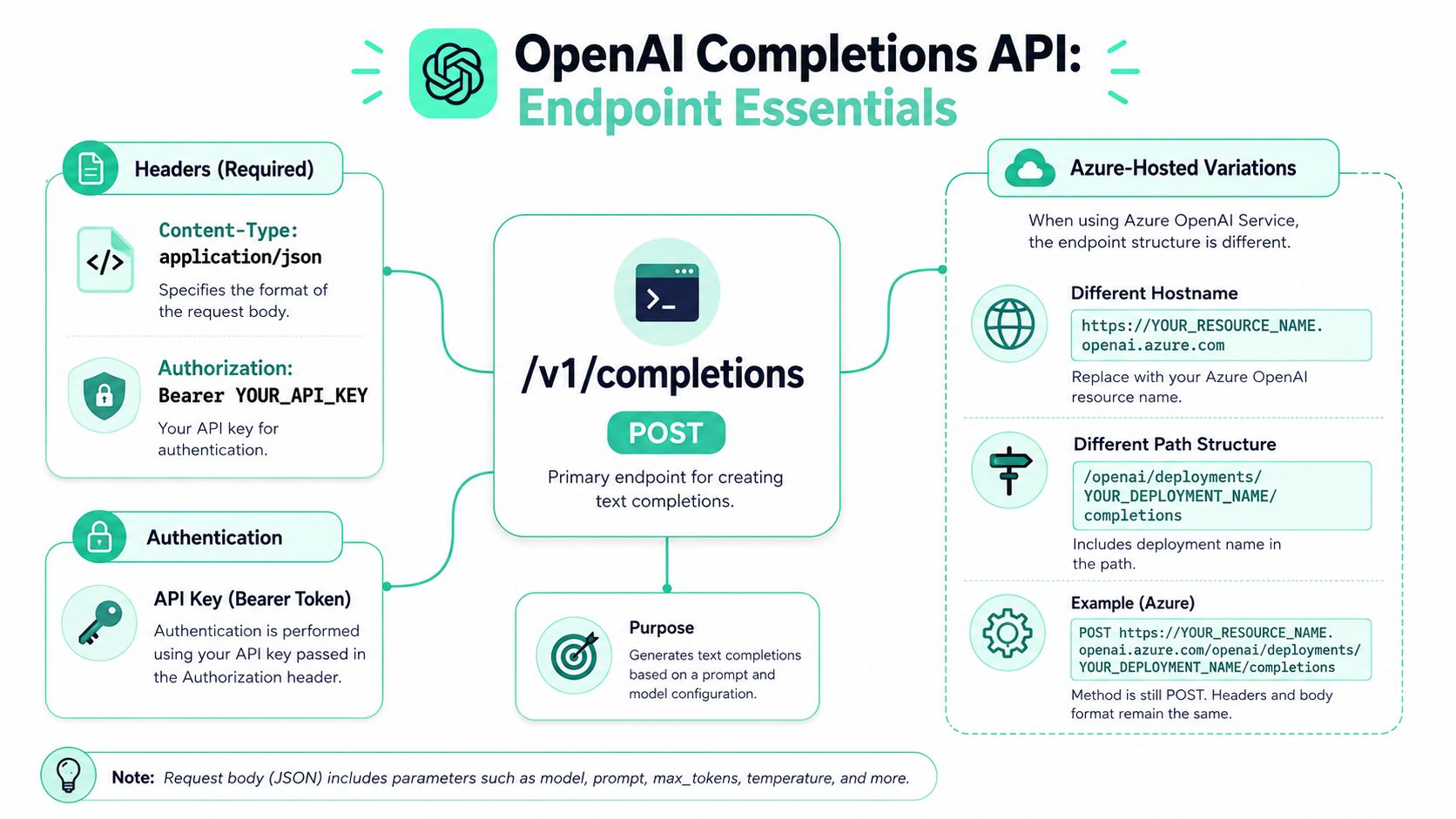
A production integration with /v1/completions starts with a plain POST request that sends JSON, uses Bearer-token authorization, and requires Content-Type: application/json OpenAI Completions endpoint guide. The contract looks simple, which is useful, but it still needs to be enforced consistently in your HTTP client, retry logic, and request validation before traffic reaches the model.
What the request path tells you
For OpenAI-hosted calls, the main details are the HTTP method, the authorization header, and the JSON body. SDKs usually hide those pieces, but they still matter when you debug a malformed payload, a missing token, or a 401 response. The endpoint behaves like a standard text-generation service, so your observability stack can track it alongside other outbound API calls without special handling.
Azure-hosted deployments often use a different host name and path structure, with URLs such as /openai/deployments/YOUR_DEPLOYMENT_NAME/completions. Teams often assume “OpenAI-compatible” means identical routing, then waste time on a 404 that comes from a path mismatch rather than a model issue. The same endpoint family can behave differently depending on the hosting platform, so keep the client abstraction thin until the route is verified in your environment.
Where usage and costs come from
Usage and cost reporting live outside the request path. OpenAI's Usage Dashboard provides Cost and Activity views, exports up to 60 days of data, uses UTC timestamps, and can break usage down by API key, project, top users, and, on enterprise plans, top organizations and top API keys. OpenAI also exposes the Usage API, including the completions endpoint at /v1/organization/usage/{completions,...} and a separate costs endpoint at /v1/organization/costs, which is what makes automated reporting and alerting possible.
If billing only shows up at invoice time, the next spike is already underway.
That separation is the part teams miss. Request handling tells you what the model returned. Usage reporting tells you what it cost. In production, the gap between those two views is where most cost surprises live, and it is also where tools like SpendLens AI should attach instrumentation, so each completion can be tied back to the request shape, the service owner, and the budget context without waiting for manual review.
Understanding API Parameters
The Completions API looks simple until you start tuning it for production. That's where the request parameters become the primary interface, because they control output shape, determinism, and token consumption at the same time. The strongest pattern is to treat parameter choices as business decisions, not just model settings, since every extra candidate or overlong output can turn into unnecessary spend.
The parameters that change behavior
A few inputs do most of the work:
modeltells OpenAI which engine to use, so the output quality, latency, and cost profile all start here.promptcarries the text task itself, and prompt clarity is what keeps output stable enough for automation.max_tokenscaps the length of the generated answer, which is one of the fastest ways to control spend when responses tend to run long.temperatureandtop_psteer sampling, which is why they matter so much in list generation, classification-adjacent transforms, and other output-sensitive tasks.nasks for multiple completions, which is useful for candidate generation but easy to misuse when teams forget each extra choice increases token usage.stop,echo,logprobs,suffix, andstreamhelp with formatting, debugging, and response handling in edge cases.
How to tune for quality without wasting tokens
For controlled generation, lower temperature makes outputs more deterministic and focused, while higher temperature increases diversity. Microsoft's guidance explicitly recommends lowering temperature to reduce drift, especially for list-like or evaluative tasks, and running multiple tests to calibrate probability settings sampling guidance. That's the right default for production systems that need predictable text, because variation is usually a bug when the result feeds another workflow.
Practical rule: keep
temperaturelow when the downstream system needs consistency, and raise it only when diversity is the goal.
top_p is the other sampling knob, and it's best treated as a diversity control rather than a creative shortcut. In practice, teams get better results when they change one knob at a time and compare outputs on the same prompt set. That makes it easier to tell whether the model improved or whether the decoding settings just got looser.
How n and output length affect spend
n is where quality experiments can inadvertently become expensive. Generating multiple candidates can be valuable for ranking, reranking, or human review, but if you never compare the extra outputs against the business value they created, you're just paying for unused tokens. The same logic applies to max_tokens, because long outputs can be useful in drafting workflows but wasteful in classification, tagging, or short-answer use cases.
A practical production pattern looks like this:
- Set a clear ceiling on output length with
max_tokens. - Use low temperature first to establish a stable baseline.
- Increase
nonly if you are selecting among candidates. - Measure the output-to-value ratio before keeping the new setting.
That approach keeps tuning disciplined. It also makes later cost analysis much easier, because you can tie token growth to a specific parameter change instead of guessing after the fact.
Example Requests with Python and Curl
A production-safe implementation starts with the smallest request that proves the path works, then adds controls only where they solve a real problem. That keeps the first pass focused on auth, payload shape, and response parsing before you bring in streaming, retries, or branching logic. It also shortens debugging when you need to confirm the request reaches OpenAI and returns the text you expect.
Python example
from openai import OpenAI

client = OpenAI(api_key="YOUR_API_KEY")

response = client.completions.create(
    model="gpt-3.5-turbo-instruct",
    prompt="Write a concise product update for internal stakeholders.",
    max_tokens=120,
    temperature=0.2,
)

print(response.choices[0].text)
The main pieces are the API key, the prompt, and the output cap. Low temperature keeps the output steady, which fits internal updates, support drafting, and deterministic transforms. If the model returns more text than you need, reduce max_tokens first, then recheck whether the prompt or decoding settings need adjustment.
For more advanced SDK usage, including asynchronous clients and error handling, see the SpendLens AI Python SDK documentation.
Curl example
curl https://api.openai.com/v1/completions \
  -H "Authorization: Bearer YOUR_API_KEY" \
  -H "Content-Type: application/json" \
  -d '{
    "model": "gpt-3.5-turbo-instruct",
    "prompt": "Turn this note into a customer-friendly email.",
    "max_tokens": 160,
    "temperature": 0.3
  }'
Raw curl shows the request exactly as it leaves the host. That helps isolate whether a failure comes from the client library, the payload, or the upstream API. Platform teams also use it to compare production traffic with what their SDK wrapper is sending, which is useful when a small serialization difference changes the model response.
When streaming helps
Streaming makes sense when the user is waiting on text and you want to render it as it arrives. It also gives you a cleaner place to attach cost instrumentation, because OpenAI's token usage docs note that token counts appear in API responses under the usage field, and streaming Completions can request a final usage chunk by setting stream_options: {"include_usage": true}. OpenAI token usage docs
The trade-off is added control flow. Streaming improves perceived latency, but your parser, logging, and error handling need to handle partial responses without losing the final usage record. In SpendLens AI, that usually means instrumenting the request at the SDK boundary, tagging the model, prompt family, and completion length, then correlating those fields with the returned token counts so finance and platform teams can see which flows are driving spend before the invoice closes.
Token Usage and Cost Analysis
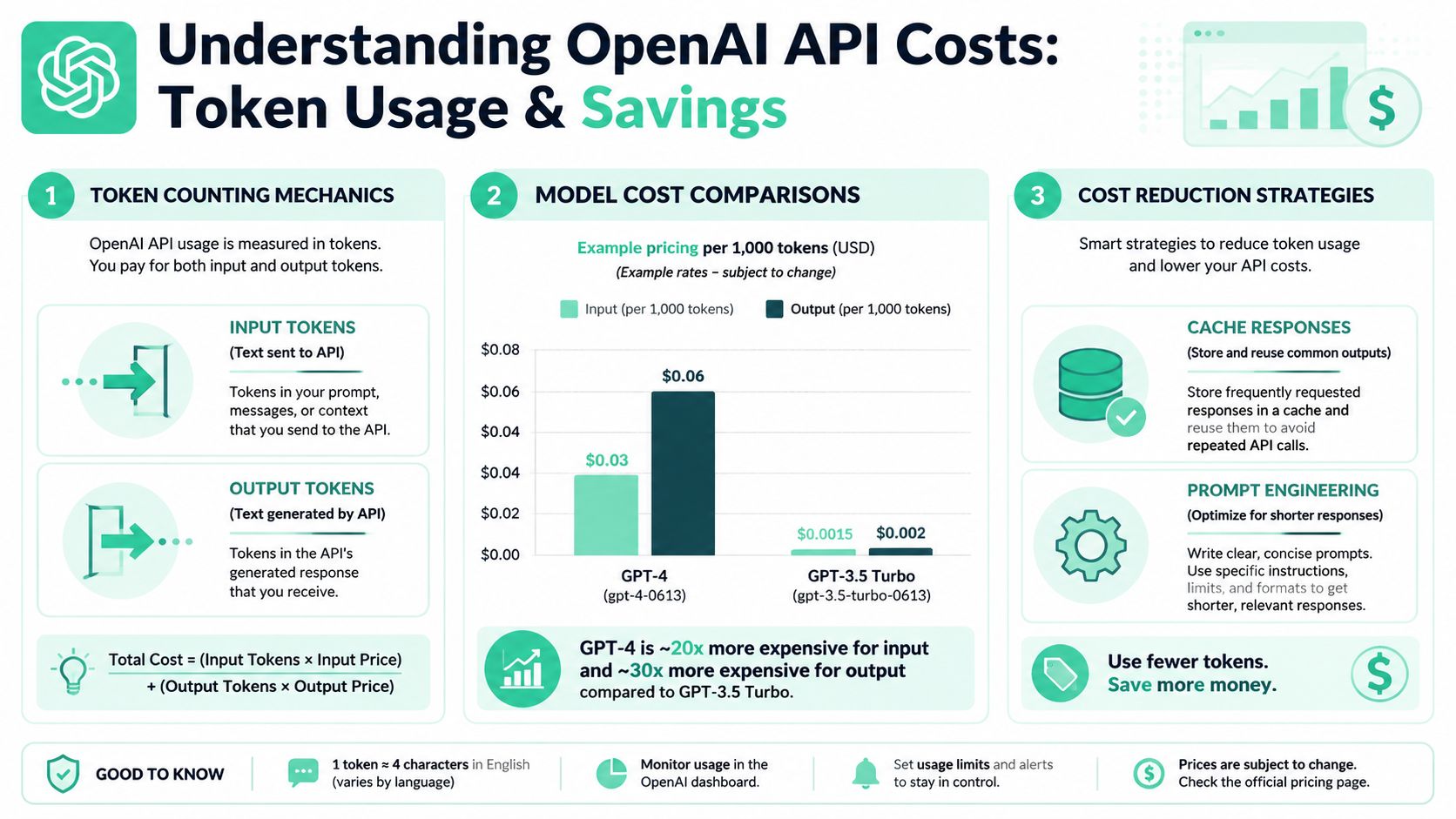
A request can look healthy at the application layer and still be expensive. Input tokens cover the text you send, output tokens cover the text the model returns, and both contribute to total usage. Long prompts, long completions, and multiple candidates all raise cost even when the call succeeds.
What the dashboard actually gives you
OpenAI's Usage Dashboard gives platform teams a practical operational view. It separates Cost and Activity, exports up to 60 days of data, timestamps records in UTC, and breaks usage down by API key, project, and top users, with deeper enterprise splits where available OpenAI usage dashboard and API usage docs. That makes it easier to answer who owns the spend, which service is growing fastest, and whether a new workflow is driving the change.
The API side matters just as much. OpenAI exposes usage programmatically through the completions endpoint at /v1/organization/usage/{completions,...} and cost exports through /v1/organization/costs, which supports automated reconciliation instead of manual invoice checks. Teams that wire this into their reporting loop can compare service-level usage with finance data before a billing cycle closes.
How to think about savings
Most savings come from straightforward changes. Cache repeated outputs when the task is stable, remove redundant instructions from prompts, and trim completions that are longer than the downstream consumer needs. As noted in why token counts alone don't tell the full story of AI spend, request-time token data matters because it lets you reconcile usage with billing-cycle reporting before invoices become the only source of truth.
A practical budgeting workflow looks like this:
- Measure per-request tokens before scaling a feature to all users.
- Separate input-heavy from output-heavy workflows so you know which side to optimize.
- Compare usage by project and API key to find the service owning the spend.
- Reconcile exports with invoice totals after the billing cycle closes.
SpendLens AI makes that workflow easier to run in production. Instrument the SDK boundary, tag each request with the model, prompt family, environment, and completion length, then compare those fields against the returned token counts. That gives finance and platform teams the same view of spend, instead of forcing them to rebuild attribution from logs after the fact.
Troubleshooting Common Integration Issues
Most production failures with the Completions API are boring in the best possible way. They come from a small set of mistakes that are easy to prevent once you've seen them once, and they usually show up as an auth error, a malformed payload, or an unexpected response shape. The fastest fix is to classify the error by layer, not by symptom.
Common failure patterns
- Authentication failure. The request returns an authorization error because the Bearer token is missing, stale, or attached to the wrong client.
- JSON parsing issue. The server rejects the request because the body isn't valid JSON or the
Content-Typeheader is missing. - Streaming mismatch. The client expects a full response but the code is reading a stream incorrectly.
- Model mismatch. The code points at a model name that isn't available in the target environment.
- Unexpected status code. The response isn't what the parser expects, so the application crashes on a null or empty field.
What to check first
Start with the request itself. Validate the payload before sending it, print the final URL and headers in non-production environments, and confirm that retries aren't replaying a bad body over and over. If you've enabled detailed logging, make sure you're logging the payload shape and response status, not the secret key itself.
Practical rule: if the first request is wrong, retries just turn one bug into several identical failures.
For rate-sensitive services, backoff logic matters more than people think. A clean exponential retry policy protects the app from short upstream blips without flooding the API with duplicate calls. That's especially important when a single workflow fans out across several completions, because the retry layer can multiply spend if you don't keep it tight.
A quick debugging sequence
- Check auth headers and confirm the key is valid for the target environment.
- Inspect the JSON body and make sure all required fields are present.
- Reduce the request to a minimal prompt and short output cap.
- Turn off streaming temporarily if the parser is failing on partial responses.
- Re-test with one known-good model before blaming the broader app.
That sequence avoids a common trap, which is blaming the model for a client-side issue. Most integration incidents get resolved faster when the team narrows the request until only one variable is left.
Migration Guidance for Responses API
Migration from legacy completion-style requests to the Responses API is a real engineering project, not a search-and-replace exercise. OpenAI's newer API surface is where the platform is moving, but current public coverage still tends to explain older request patterns and parameters, which leaves practitioners without enough guidance on compatibility, feature parity, and cost tracking adjustments OpenAI chat API reference. That gap matters because the migration touches both application code and observability.
What changes in practice
The first change is request shape. Legacy Completions calls are prompt-centric, while newer APIs are more structured and often more explicit about inputs and outputs. The second change is logging, because your existing parsers may be built around a response structure that no longer matches the new endpoint. The third change is operational, since cost attribution and evaluation pipelines need to keep working while the client evolves.
A safe migration plan usually includes three layers:
- Parallel testing. Run the old and new endpoints against the same prompt set and compare outputs before cutting over.
- Feature parity checks. Validate the behaviors your downstream system depends on, not just whether the request succeeds.
- Cost tracking alignment. Make sure the new route still lands in your reporting and alerting pipeline cleanly.
How to avoid breaking production
Keep the old path alive until you've verified logging and billing views. If your team uses request tags or per-feature keys, preserve that scheme during the transition so your attribution doesn't collapse into one generic bucket. It's also worth treating migration as a observability change, not just a model change, because that's where most hidden regressions show up.
Don't migrate the endpoint first and think about reporting later. If you can't tell which feature used tokens, the migration isn't done.
The goal is continuity. You want the newer API's benefits without losing the ability to compare spend, debug failures, or reproduce evaluation runs.
Instrumenting and Optimizing with SpendLens AI
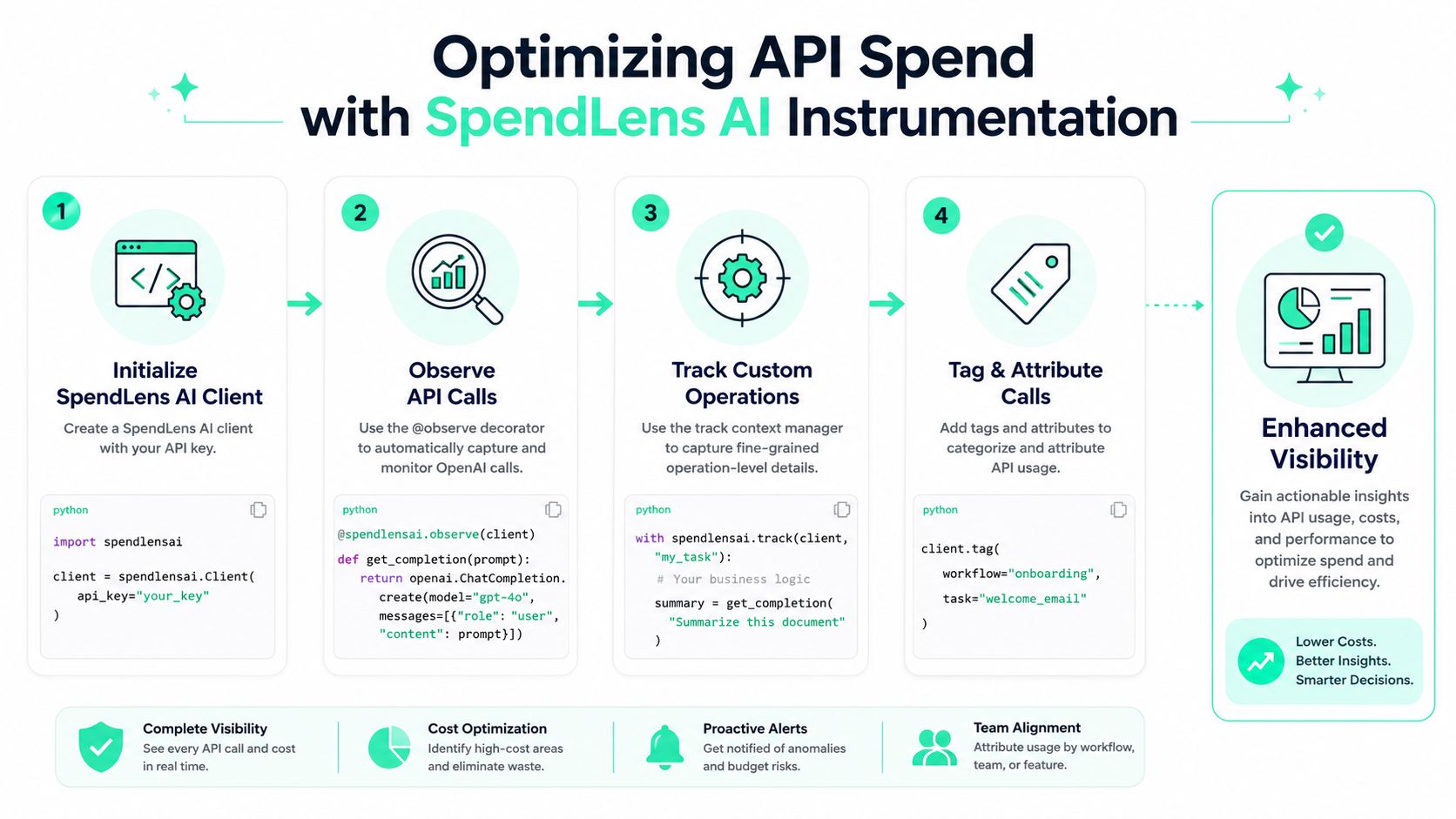
Teams usually already have OpenAI calls running before they start asking where the spend is going. That is the right time to add instrumentation, because you can attach metadata to live workflows without rewriting the client or moving traffic through a proxy. SpendLens AI is built for that kind of rollout, with a Python SDK that adds lightweight decorators, tracking scopes, and tags around existing calls. The setup is straightforward, and the value comes from tying API usage to the work the model is doing.
Add attribution without rewiring the client
A minimal pattern is to initialize the client, then decorate the function that makes the OpenAI call.
from spendlensai import Client, observe, track

client = Client(api_key="YOUR_SPENDLENS_KEY")

@observe(client)
def generate_copy(prompt: str):
    response = openai_client.completions.create(
        model="gpt-3.5-turbo-instruct",
        prompt=prompt,
        max_tokens=120,
    )
    return response.choices[0].text
That gives you call-level attribution with very little code. Use track() when one function contains several steps and you want to isolate the cost of a specific operation, such as summarization, rewriting, or classification.
with track(client, "welcome_email_generation"):
    text = generate_copy("Draft a welcome email for a new customer.")
client.tag() is the other piece that matters. It attaches workflow and task metadata so you can roll usage up by business context instead of only by model or endpoint.
client.tag(workflow="onboarding", task="welcome_email")
Why tags matter more than raw token totals
OpenAI provides request-level token counts, which gives you the raw usage data for each call. That is useful for billing checks, but it does not tell you which workflow is producing waste. Tags, task names, and cache signals turn those counts into something you can act on.
The practical win is comparison. If one prompt template emits long outputs and another produces shorter, equally useful results, the dashboard can show that difference at the workflow level instead of forcing you through generic logs. That is usually where teams find the easy savings, because the issue is often a specific task that is over-generating text, not the model itself.
Use the dashboard to find spend drivers
The SpendLens dashboard works best when you use it to look for patterns, not one-off spikes. You can review spend by project, provider, model, and workload, then compare similar operations across releases. That helps with decisions like whether a lower-cost model is good enough for a given task, or whether the current prompt is carrying too much repeated context.
A practical workflow is:
- Tag every important entry point.
- Track each meaningful business operation.
- Review the top spend drivers weekly.
- Run Savings Tests against lower-cost alternatives.
That sequence saves teams time because attribution does not need to be rebuilt by hand. It also keeps cost optimization inside the engineering workflow, where request shape, prompt changes, and business context can be reviewed together instead of in separate tools.
Quick Reference and Cheat Sheet
The fastest way to keep an OpenAI integration healthy is to standardize the pieces people forget under pressure: endpoint shape, auth headers, output caps, and tagging habits. A small reference like this helps new engineers avoid re-learning the same request structure and makes incident response much faster when something breaks in production.
Completions API Quick Reference
| Parameter | Description | Default | SpendLens Tagging |
|---|---|---|---|
model |
Selects the target model | None | client.tag(model="...") |
prompt |
Text sent to the model | None | client.tag(workflow="...", task="...") |
max_tokens |
Caps generated output length | Model-dependent | Track in track(client, "short_answer") |
temperature |
Controls determinism vs. diversity | Model-dependent | Tag experiments by prompt variant |
top_p |
Alternative sampling control | Model-dependent | Tag sampling tests by release |
n |
Generates multiple candidates | 1 | Tag candidate-generation workflows |
stop |
Stops generation on specified tokens | None | Tag format-constrained tasks |
stream |
Streams partial output | False | Tag streaming endpoints separately |
Core request reminders
The request is a JSON POST to the completions endpoint, with Authorization: Bearer YOUR_API_KEY and Content-Type: application/json. Keep the body minimal until the request works, then add sampling controls or streaming only where the use case justifies them. For attribution, apply a workflow tag first, then add a task tag when you want to separate similar features inside the same service.
A simple payload pattern looks like this:
{
  "model": "gpt-3.5-turbo-instruct",
  "prompt": "Summarize this support ticket.",
  "max_tokens": 100,
  "temperature": 0.2
}
Practical rule: if you can't explain why a field is in the payload, remove it and re-test.
That keeps both debugging and cost control simpler. The fewer moving parts you have in the request, the easier it is to see whether a response change came from the prompt, the model, or the decoding settings.